What “Assessment Quality Control” Means in AI-Assisted Workflows
Assessment quality control is the set of checks you run after an AI generates (or helps you edit) an assessment, to ensure the final instrument measures what you intend, at the intended difficulty, without accidentally revealing answers or drifting away from the learning target. In practice, quality control focuses on two high-risk failure modes: answer leakage (students can infer the correct response from clues in the item or surrounding materials) and misalignment (the item measures a different skill than the objective, or measures it at the wrong cognitive level). When educators use AI to draft questions, these risks can increase because the model may optimize for fluency and helpfulness, sometimes adding hints, over-explaining, or simplifying in ways that undermine the assessment.
Quality control is not “distrusting AI”; it is treating AI output like any draft created under time pressure. The goal is to build a repeatable review process that catches predictable issues before students see the assessment. This chapter gives you a practical checklist, a step-by-step workflow, and ready-to-use prompts that help you audit items for leakage and alignment without rewriting everything from scratch.

Answer Leakage: What It Looks Like and Why It Happens
Answer leakage occurs when the correct answer becomes easier to guess for reasons unrelated to the targeted knowledge or skill. Leakage can be obvious (the answer appears in the stem) or subtle (the correct option is longer, more specific, or matches the teacher’s phrasing from a study guide). AI can unintentionally introduce leakage because it tends to be consistent, explanatory, and pattern-based. If you ask for “helpful” questions, the model may embed mini-tutorials inside the stem, include definitional cues, or create distractors that are clearly wrong.
Common leakage patterns in selected-response items
- Stem contains a definition that points to one option: “A polygon with three sides is called…” makes the correct answer trivial if “triangle” is present.
- Option length imbalance: The correct option is noticeably longer, more nuanced, or includes qualifiers like “most likely” while distractors are short.
- Grammatical cues: Only one option fits the grammar of the stem (singular/plural, tense, article “an” vs “a”).
- Absolute language in distractors: Distractors use “always/never” while the correct answer uses moderate language, making it stand out.
- Parallelism mismatch: Three options are nouns; one is a full sentence (often the correct one).
- Repeated keywords: A key term from the stem appears only in the correct option.
- “All of the above/none of the above” misuse: These can allow test-taking strategies rather than content knowledge.
- Unintentional clueing via numbers: Options like 3, 6, 9, 12 where the correct one is the only even number, etc.
Leakage patterns in constructed-response and performance prompts
- Over-scaffolded prompts: The prompt tells students exactly what to say, turning the task into copying rather than demonstrating understanding.
- Embedded exemplars that are too close to the expected answer: A “sample sentence starter” that essentially contains the claim and reasoning.
- Teacher-facing notes accidentally left in: AI sometimes outputs “Expected answer:” or “Key points:” in the student version.
- Context that narrows to one obvious response: A scenario includes a unique detail that only matches one solution path.
Misalignment: When the Item Measures the Wrong Thing
Misalignment happens when an assessment item does not match the intended learning objective, the level of thinking required, or the evidence you actually want. With AI-generated items, misalignment often appears as “near-miss” questions: they are on-topic, but they measure recall instead of application, or they assess reading complexity rather than the target skill. Misalignment can also occur when the item introduces extra prerequisites (vocabulary, background knowledge, multi-step math) that are not part of the objective, making the assessment unfair or noisy.
Common misalignment patterns
- Wrong cognitive demand: Objective requires analysis, but the item asks for a definition.
- Wrong construct: You want to assess scientific reasoning, but the item mainly tests reading comprehension of a dense passage.
- Scope creep: The item requires additional skills not taught or not intended (e.g., advanced algebra in a physics concept check).
- Ambiguous evidence: Multiple answers could be justified because the prompt does not specify criteria.
- Trickiness unrelated to learning: The item relies on a gotcha detail rather than the target concept.
- Mismatch with instruction language: Students were taught one method, but the item requires a different method without signaling that flexibility is expected.
A Practical Quality Control Workflow (Step-by-Step)
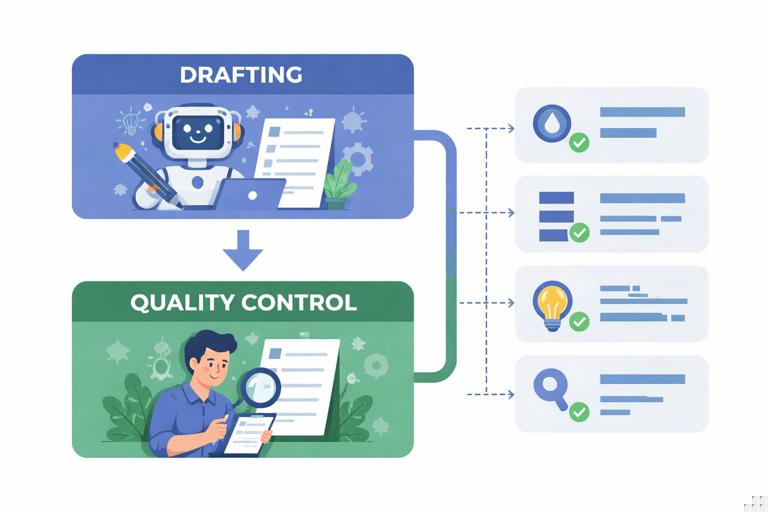
Use this workflow after you have a draft assessment. The steps are designed to be fast and repeatable. You can do them yourself, or you can use AI as a “QC assistant” by giving it the draft and asking it to audit for specific failure modes. The key is to separate drafting from auditing: draft first, then run QC with a different prompt that instructs the model to be critical.
- Listen to the audio with the screen off.
- Earn a certificate upon completion.
- Over 5000 courses for you to explore!

Download the app
Step 1: Create an “Item Intent Card” for each question
Before you edit the item, write a short intent card: what the item is supposed to measure, what counts as evidence, and what should not influence the score. This prevents you from improving wording in a way that changes the construct.
Item Intent Card (template) - Target skill/knowledge: - Evidence required: - Non-target skills to minimize (reading load, computation, background knowledge): - Intended difficulty: (easy/medium/hard) and why - Common misconceptions to include as distractors (if applicable):Step 2: Run a leakage scan on the student-facing version
Copy only what students will see (no answer key, no teacher notes) and scan for direct and indirect clues. Look for definitional phrasing, repeated keywords, and “helpful” explanations that belong in instruction, not assessment. If you use AI for this scan, instruct it to behave like a test security reviewer and to flag any text that reduces the need for the target skill.
Prompt: Leakage Scan You are an assessment security reviewer. Analyze the following student-facing item(s) for answer leakage. Flag: (1) direct clues, (2) indirect clues (grammar, length, keyword repetition), (3) over-scaffolding, (4) any teacher-only text. For each flag, quote the exact phrase and propose a minimal edit that removes the clue without changing the target skill. Items: [paste student-facing items]Step 3: Run an alignment check against the intent card
Now compare the item to the intent card. Ask: does a correct response require the target skill, or can students succeed using test-taking strategies, reading cues, or elimination? Also check whether the item accidentally requires extra skills. If the item is misaligned, decide whether to revise the item or revise the intent card (sometimes the objective you thought you were assessing is not what the item actually measures).
Prompt: Alignment Check You are an assessment alignment auditor. For each item, compare it to the provided Item Intent Card. Output a table with: Item #, Alignment (Yes/Partial/No), What it actually measures, Evidence mismatch, Cognitive demand mismatch, Non-target barriers, and a recommended fix. Item Intent Cards: [paste] Items: [paste]Step 4: Check distractor quality (selected-response)
Distractors should be plausible to a student who has a specific misconception or incomplete understanding. Weak distractors create leakage because they make the correct option stand out. Audit distractors for plausibility, parallel structure, and uniqueness. Replace distractors that are obviously wrong, silly, or unrelated. Also check that only one option is defensibly correct under the wording given.
Prompt: Distractor Audit Review each multiple-choice item. Identify which distractors are implausible or give away the answer. For each weak distractor, propose a replacement tied to a realistic misconception. Ensure all options are parallel in length and structure, and confirm only one is correct. Items: [paste]Step 5: Check for “construct-irrelevant variance”
Construct-irrelevant variance is score variation caused by factors unrelated to the target skill (unnecessary reading complexity, cultural references, tricky formatting, or multi-step calculations when the objective is conceptual). This is a misalignment issue because it changes what the score means. Reduce reading load, define necessary terms, and remove irrelevant complexity unless it is part of the intended challenge.
Prompt: Construct-Irrelevant Variance Check Identify any parts of the item that could unfairly affect performance without measuring the target skill (reading level, vocabulary, background knowledge, formatting, extraneous steps). Suggest edits that preserve rigor while reducing non-target barriers. Items: [paste]Step 6: Verify the key and rationale (teacher-facing)
Quality control includes checking that the answer key is correct, complete, and consistent with the item wording. AI-generated keys can be wrong, especially in multi-step reasoning. Require a short rationale that references the stem and explains why distractors are wrong. If you cannot write a clean rationale, the item may be ambiguous or miskeyed.
Prompt: Key Verification For each item, provide: correct answer, a 2–4 sentence rationale tied to the stem, and a 1-sentence explanation for why each distractor is incorrect. If the item is ambiguous or could have multiple correct answers, flag it and propose a fix. Items: [paste]Step 7: Do a “student strategy” simulation
Try to answer the item without using the target knowledge: use only elimination, grammar cues, or pattern recognition. If you can get the right answer that way, you likely have leakage. You can also ask AI to simulate a student who is weak in the target skill but good at test-taking strategies, and see whether it can still guess correctly.
Prompt: Test-Taking Strategy Attack Act as a student who does NOT know the content but is good at guessing. Try to select the correct answer using only clues in wording, grammar, option patterns, and general test strategies. Explain the clue used. If you can guess reliably, propose edits to remove the clue. Items: [paste]Editing Tactics That Remove Leakage Without Lowering Rigor
When you find leakage, the fix should be minimal and targeted. Avoid rewriting the entire item unless necessary, because large rewrites can introduce new misalignment. Use these tactics to remove clues while keeping the same evidence requirement.
Tactic 1: Remove definitional stems and replace with application
If the stem is essentially a definition, students can match terms rather than demonstrate understanding. Convert the stem into a short scenario or example that requires applying the concept. Keep it brief so you do not add reading load.
Before (leaky): A triangle is a polygon with how many sides? A) 3 B) 4 C) 5 D) 6 After (less leaky, still basic): A shape has three straight sides and three angles. Which name best fits? A) Triangle B) Rectangle C) Pentagon D) HexagonTactic 2: Normalize option structure and length
Make options parallel: same grammatical form, similar length, similar specificity. If the correct answer needs qualifiers, ensure distractors also include qualifiers. This reduces “the longest option is correct” leakage.
Before (leaky): A) It is fast. B) It is very fast and depends on multiple interacting factors in the environment. C) It is slow. D) It is not real. After (normalized): A) It depends on one factor. B) It depends on multiple interacting factors. C) It depends only on speed. D) It does not depend on any factors.Tactic 3: Remove keyword echoing
If the stem uses a key phrase and only one option repeats it, students can match words. Paraphrase the stem or distribute similar language across options.
Tactic 4: Replace “obviously wrong” distractors with misconception-based distractors
Distractors should represent common errors: confusing similar terms, reversing cause and effect, misapplying a rule, or overgeneralizing. This increases validity and reduces leakage because students must actually think.
Tactic 5: Separate instruction from assessment
AI often adds helpful hints like “Remember that…” or “Think about…” Remove these. If you want to support students, provide supports outside the item (e.g., a reference sheet) and state that it is allowed, rather than embedding hints in the question.
Misalignment Fixes: Keeping the Target and the Evidence in Sync
When an item is misaligned, the best fix depends on what drifted: the content, the cognitive demand, or the evidence type. Use the intent card to decide what must remain constant. Then choose the smallest change that restores alignment.
Fix 1: Adjust the verb and the evidence
If you intended students to analyze, but the item asks them to identify, change the task so the response requires analysis. For example, ask students to justify a choice, compare two cases, or explain why an alternative fails. Keep the prompt focused so you do not accidentally assess writing stamina instead of reasoning.
Fix 2: Reduce non-target barriers
If the item is measuring reading level more than the target skill, shorten the passage, simplify sentence structure, or provide a glossary for non-target vocabulary. If computation is not the target, provide numbers that keep arithmetic simple or allow a calculator if appropriate to your intent.
Fix 3: Tighten the success criteria in the prompt
Ambiguity creates misalignment because students can respond in multiple ways and still appear correct. Add a constraint that clarifies what counts as evidence: number of examples, required components, or the perspective to use. Avoid adding hints about the answer; focus on clarifying the required output.
Prompt tightening example: Before: Explain your reasoning. After: Explain your reasoning by (1) stating the rule you used, (2) applying it to the given case, and (3) checking your result against the condition in the prompt.Quality Control for AI-Specific Risks
AI introduces a few risks that are less common in teacher-written items. Build explicit checks for these so they do not slip through.
Risk 1: Hidden key exposure in metadata or formatting
If you copy from an AI chat into a document, teacher-only notes can remain in comments, speaker labels, or collapsed sections. Always generate two versions: a student version and a teacher version, and never “hide” the key in the same file students receive. As a QC step, export the student version to a clean format and re-open it to confirm no key text remains.
Risk 2: Hallucinated facts or inconsistent premises
An item can be internally inconsistent (a graph label that contradicts the stem, a scenario with impossible values, or a claim that is not true). This causes misalignment because students are penalized for noticing errors. QC requires checking factual accuracy and internal consistency, especially in word problems, data tables, and scenario-based items.
Prompt: Consistency and Fact Check Check each item for internal consistency and factual accuracy. Flag any contradictions, impossible values, or claims that would confuse a knowledgeable student. Propose a corrected version that preserves the target skill. Items: [paste]Risk 3: Style drift across items
AI-generated sets can vary in tone and complexity: some items are conversational, others formal; some are short, others long. This can create unintended difficulty differences unrelated to the target. QC includes normalizing style: consistent directions, consistent use of units, and consistent expectations for explanation length.
Building a Repeatable QC Checklist You Can Reuse
To make quality control sustainable, convert the workflow into a one-page checklist you run every time. The checklist should be short enough to use, but specific enough to catch predictable failures. Below is a compact version you can paste into your planning document and check off per item.
- Alignment: Item requires the target skill; cognitive demand matches intent; no extra prerequisites.
- Clarity: Only one defensible correct answer (or clear criteria for open response); directions specify required evidence.
- Leakage: No definitional giveaways; no keyword echoing; no grammar/length cues; no teacher notes in student view.
- Distractors: Plausible misconceptions; parallel structure; no “silly” options; no pattern-based clues.
- Fairness: Reading load and vocabulary are appropriate; cultural/context assumptions minimized; formatting is clean.
- Key integrity: Key is correct; rationale is coherent; distractor rationales make sense.
- Security: Student file contains no answers, rationales, or embedded metadata that reveals the key.
Using AI as a “Second Pair of Eyes” Without Letting It Rewrite the Assessment
AI is most useful in QC when you constrain it to identify issues and propose minimal edits, not to generate a brand-new assessment. The prompts in this chapter are designed to keep the model in an auditing role. When you paste items for review, include the intent card and explicitly ask for “minimal edits” so the model does not change the construct. If you accept an edit, re-run the leakage scan and alignment check on the revised item, because even small wording changes can introduce new cues or shift difficulty.
Prompt: Minimal-Edit QC Pass You are a quality-control editor for assessments. Do NOT rewrite items from scratch. For each item: (1) list QC issues (leakage, misalignment, ambiguity), (2) propose the smallest possible edit, (3) explain how the edit preserves the target skill and difficulty. Item Intent Cards: [paste] Items (student-facing): [paste]