What “Feedback at Scale” Means (and What It Doesn’t)
Feedback at scale means you can respond to many student submissions quickly while still giving feedback that is specific, actionable, and aligned to the learning target. It does not mean copying the same generic comment to everyone, nor does it mean outsourcing judgment to AI. In practice, scaling feedback combines three elements: a reusable comment bank, a consistent tagging system (so comments are easy to select and personalize), and a formative feedback loop that turns comments into next-step actions students actually complete.
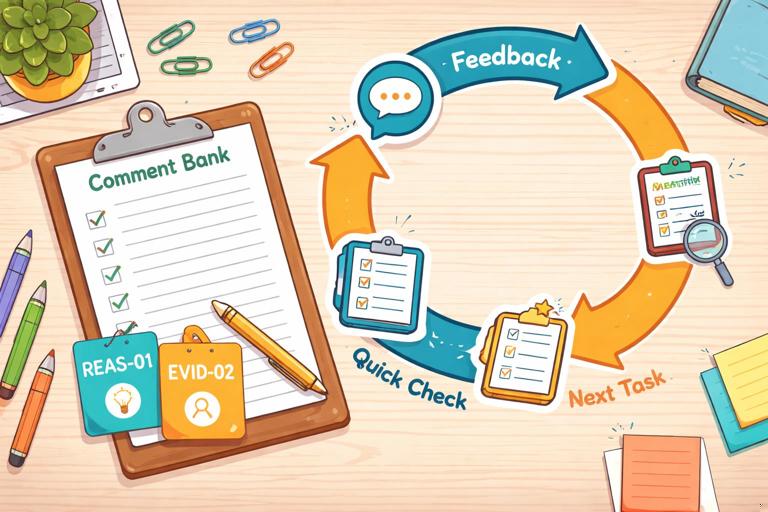
When feedback is scaled well, students receive: (1) a clear statement of what is working, (2) one or two high-leverage improvements, (3) a concrete next step they can do in minutes, and (4) a chance to resubmit or apply the feedback immediately. Teachers gain: faster turnaround, more consistent messaging across classes, and better data about common misconceptions.
Comment Banks: The Engine of Scalable, High-Quality Feedback
A comment bank is a curated set of feedback statements you can reuse across assignments. The goal is not to sound robotic; the goal is to standardize the “core coaching moves” you make repeatedly, then personalize the last 10–20% for each student. A strong comment bank is organized by skill, common error patterns, and next-step actions. It includes both “praise with precision” and “improvement with direction.”
What a High-Utility Comment Looks Like
High-utility comments have three parts: (1) evidence from the student work, (2) the impact on the reader or task, and (3) a next step. Compare the difference:
- Low-utility: “Be more specific.”
- High-utility: “Your claim is clear, but your evidence stays general (e.g., ‘many people’). Add one concrete example or data point and explain how it supports your claim in one sentence.”
Notice that the high-utility version tells the student exactly what to do and how much to do. This makes it easier for students to act and easier for you to assess improvement quickly.
- Listen to the audio with the screen off.
- Earn a certificate upon completion.
- Over 5000 courses for you to explore!

Download the app
Types of Comments to Include
Build your bank with categories that match how you actually read work. Common categories include: clarity and accuracy, reasoning and evidence, organization and coherence, language and conventions, and task completion. For each category, include at least four types of comments:
- Glow (specific strength): names what is working and why it matters.
- Grow (priority improvement): focuses on the single change that will most improve the work.
- Next-step task: a short revision or practice action (2–10 minutes).
- Metacognitive prompt: a question that helps the student self-correct (e.g., “What would a skeptical reader ask here?”).
Designing a Comment Bank: A Step-by-Step Build
Step 1: Choose One Assignment Type to Start
Start with a recurring task: short responses, lab conclusions, problem explanations, discussion posts, or paragraph writing. Scaling works best when the task repeats, because patterns repeat. Pick one task you will see at least three times in a unit.
Step 2: Identify the 8–12 Most Common Patterns
Skim 10–15 submissions (or last year’s samples) and list the most frequent strengths and issues. Aim for patterns, not one-off quirks. Examples of patterns: “answers the question but doesn’t justify,” “uses evidence but doesn’t explain it,” “calculation correct but units missing,” “good ideas but unclear structure,” “overly long introduction,” “confuses two related terms.”
Step 3: Write Comments as Modular Blocks
Write each comment so it can stand alone and be combined with others. Use placeholders for personalization, such as [quote], [term], [step], or [example]. Keep each block short enough to scan quickly.
GROW-REASONING-01: Your answer states [claim], but the reasoning step between [fact] and [claim] is missing. Add one sentence that explains why [fact] leads to [claim].NEXTSTEP-REASONING-01: Add a “because” sentence after your claim: “[claim] because [reason].” Keep it to 12–20 words.Step 4: Add “If/Then” Variations for Common Misconceptions
Many issues have predictable variants. Create branching comments so you can select the right one quickly. For example, if students cite evidence but misinterpret it, you need a different comment than when they provide no evidence at all.
IF evidence missing: Add one piece of evidence (quote/data/example) and cite where it comes from. THEN explain how it supports your claim in 1–2 sentences.IF evidence present but misused: Your evidence is relevant, but your explanation changes what it shows. Re-read the evidence and restate it in your own words before connecting it to your claim.Step 5: Attach Micro-Tasks That Produce Visible Revision
To make feedback actionable, pair each “grow” comment with a micro-task that results in a concrete change you can verify quickly. Examples: “underline your claim,” “add one sentence that starts with ‘This shows…’,” “label each step in your solution,” “replace two vague words with precise terms,” “add units to every numerical answer,” “move sentence 3 to the end of the paragraph.”
Step 6: Create a Tagging System You Can Use in Seconds
Tags let you apply comments fast and track patterns. Use a simple code: CATEGORY-SKILL-NUMBER. Keep it consistent across assignments.
- REAS-01 Missing reasoning link
- EVID-02 Evidence present, explanation weak
- ORG-03 Topic sentence unclear
- CONV-01 Run-on sentences
- ACCUR-02 Term confusion
Even if you never show tags to students, tags help you sort, count, and plan reteaching.
Using AI to Draft and Maintain a Comment Bank (Without Losing Your Voice)
AI can help you generate first drafts of comments, variations, and micro-tasks. Your job is to edit for accuracy, tone, and alignment to your expectations. Treat AI as a “comment bank assistant” that proposes options; you choose what matches your classroom language and your students’ needs.

Prompt: Generate Comment Bank Entries from Common Patterns
Use a prompt that forces specificity, modularity, and next steps. Provide the assignment type, the learning target, and the patterns you see.
Role: You are an instructional coach helping me write a reusable feedback comment bank in my tone: direct, kind, and specific. Context: Students are writing short constructed responses (5–7 sentences) explaining a concept. Learning target: explain a claim using accurate terminology and evidence. Task: Create 12 reusable feedback comments organized into categories: Glow, Grow, Next-step task, Metacognitive question. Constraints: Each comment must (a) reference observable features of student work, (b) include a concrete action, (c) be 1–3 sentences, (d) avoid vague phrases like “be clearer.” Include placeholders like [quote] or [term]. Patterns to address: missing evidence, evidence without explanation, inaccurate term use, unclear claim, weak organization, overlong summary, correct answer but missing reasoning.Prompt: Convert Teacher Notes into Polished, Student-Friendly Comments
If you already have quick notes like “needs units” or “define term,” ask AI to rewrite them into high-utility comments with micro-tasks.
Rewrite these shorthand feedback notes into student-friendly comments with a next-step micro-task. Keep my tone: concise and supportive. Notes: (1) missing units, (2) claim unclear, (3) evidence quoted but not explained, (4) mixed up [term A] and [term B], (5) steps jump from 2 to 4.Prompt: Create Levelled Variations for Different Student Needs
To support students who need more scaffolding and those ready for challenge, generate two versions of the same comment: “standard” and “stretch.”
Create two versions (Standard, Stretch) of each feedback comment below. Standard: one clear next step. Stretch: adds a second step that deepens thinking. Keep each version under 45 words. Comments: [paste 6 comments].After generating, you can keep the “standard” version for most students and use “stretch” selectively.
Formative Feedback Loops: Turning Comments into Learning
A formative feedback loop is a repeatable cycle where students receive feedback, act on it quickly, and you check the result to decide the next instructional move. The loop is the difference between “feedback delivered” and “feedback used.” A scalable loop has a predictable structure, short time windows, and clear student responsibilities.
The Core Loop (Teacher and Student Actions)
- Teacher: Identify 1–2 priority tags per student (not everything). Apply comment bank items and one micro-task.
- Student: Complete the micro-task and highlight the change (or annotate where they revised).
- Teacher: Verify the change quickly (spot-check) and record tag counts to see class trends.
- Teacher: Use trend data to plan a 5–10 minute mini-lesson or targeted practice.
- Student: Apply the same focus skill on the next task (transfer).
Scaling depends on limiting scope. If you give five improvement points, students often do none. If you give one high-leverage improvement and a short task, students are more likely to complete it, and you can verify it fast.

Two Practical Loop Formats
Format A: “Fix-Then-Submit” (Same Day or Next Day) works well for short tasks. Students revise immediately after receiving feedback. You check only the targeted change.
Format B: “Carry-Forward Focus” (Next Assignment) works well when revision is not feasible. Students keep a personal focus tag (e.g., REAS-01) and must demonstrate improvement on the next submission. You grade the new work while checking for the focus skill.
Step-by-Step: Running a 15-Minute Feedback Cycle in Class
Step 1: Pre-Select 6–10 Comments You Expect to Use
Before you start marking, choose the most likely tags and comments for the task. Put them in a quick-access list. This reduces decision fatigue and speeds up feedback.
Step 2: Mark with “One Glow + One Grow + One Task”
For each student, select one glow comment that reinforces a transferable strength, one grow comment that targets the highest-leverage improvement, and one micro-task. If you need to address a serious misconception, use the grow slot for that and keep everything else minimal.
Step 3: Require Students to Show Evidence of Revision
Students should not just “fix it”; they should show what changed. Options: highlight revised sentences, add margin notes like “REAS-01 fixed,” or include a short “Before/After” snippet. This makes your verification step fast and keeps students accountable.
Step 4: Do a 3-Minute Trend Scan
After you’ve tagged a set of submissions, count the top 2–3 tags. If many students share the same issue, plan a micro-lesson. If issues are scattered, plan small-group support or a practice menu.
Step 5: Close the Loop with a Quick Check
Use a fast verification method: spot-check the revised sentence, ask students to submit only the revised portion, or have them answer a one-question “proof of fix” prompt. The goal is not re-grading everything; it is confirming that the feedback produced learning.
Practical Comment Bank Examples (Ready to Adapt)
Reasoning and Explanation
- Glow: “Your explanation connects the idea to the outcome clearly, especially when you wrote [quote]. That link helps the reader follow your thinking.”
- Grow: “You give the answer, but the ‘why’ is missing. Add one sentence that explains the cause or rule that makes your answer true.”
- Next-step task: “Add a ‘because’ sentence after your claim. Start with: ‘This is true because…’”
- Metacognitive: “If a classmate disagreed, what single reason would you use to convince them?”
Evidence Use
- Glow: “You chose evidence that directly matches your claim (see [quote/data]). That makes your argument stronger.”
- Grow: “You included evidence, but you didn’t explain what it shows. Add 1–2 sentences interpreting the evidence in your own words.”
- Next-step task: “After the evidence, add: ‘This shows…’ and finish the sentence with the meaning of the evidence.”
- Metacognitive: “What would the evidence mean to someone seeing it for the first time?”
Accuracy and Terminology
- Glow: “You used [term] accurately and in the right context. That precision makes your explanation trustworthy.”
- Grow: “You used [term] in a way that changes its meaning. Replace it with [correct term] and rewrite the sentence so it matches the definition.”
- Next-step task: “Add a 6–12 word definition of [term] in parentheses the first time you use it.”
- Metacognitive: “Which part of the definition of [term] is most important for this question?”
Organization and Clarity
- Glow: “Your first sentence sets up the main idea, and the rest of the paragraph stays on that point.”
- Grow: “Your ideas are strong, but the order makes it hard to follow. Move your main claim to the first sentence, then support it with evidence and explanation.”
- Next-step task: “Label your sentences 1–5. Write ‘C’ next to the claim, ‘E’ next to evidence, and ‘X’ next to explanation. If any label is missing, add one sentence.”
- Metacognitive: “If you could keep only one sentence to preserve your main point, which would it be?”
Managing Tone, Motivation, and Student Trust at Scale
When feedback becomes faster, the risk is that it feels impersonal. You can keep trust high by standardizing the structure while personalizing the evidence. A simple rule: every student should see at least one quote, number, or specific reference to their work. Even a short insertion like “In your second sentence…” signals that you actually read it.
Also, keep the ratio of “what to fix” to “how to fix” in balance. Students can handle direct critique when the path forward is clear. If you notice students ignoring feedback, the issue is often not attitude; it is that the next step is too big, too vague, or too far away from the next chance to use it.
Quality Control: Keeping Scaled Feedback Accurate and Fair
Scaled feedback should be consistent across students, but it must still be accurate for each individual. Use these safeguards: (1) never apply a tag without verifying the pattern in the student work, (2) avoid comments that assume intent (“You didn’t try”), (3) keep comments aligned to what the task actually asked for, and (4) periodically audit your own bank by checking whether students can complete the micro-task without extra clarification.
When using AI-generated drafts, do a quick “teacher edit pass”: remove any jargon you don’t use, ensure the next step is feasible in your time constraints, and confirm that the comment does not introduce new content beyond what students were expected to know. Your comment bank should sound like you, not like a template library.
Data from Tags: Planning Instruction Without Extra Grading
One advantage of tags is that they create lightweight data. If you track tag frequency, you can decide whether to reteach, practice, or move on. For example, if 60% of students receive REAS-01 (missing reasoning link), you can plan a short whole-class routine: show two anonymous examples, identify the missing link, and have students write one “because” sentence. If only a few students receive ACCUR-02 (term confusion), you can address it in a small group or with a targeted practice prompt.

You can also use tag data to improve the comment bank itself. If a tag appears often but students don’t improve, the comment may be too vague or the micro-task may not produce the intended change. Revise the comment, not the students. Over time, your bank becomes a tested set of interventions that reliably move student work forward.