Why assessment creation needs a system
Assessment creation becomes much easier when you treat it as a system: a reusable question bank, a repeatable method for writing distractors, and a consistent way to control cognitive demand using Depth of Knowledge (DOK). Instead of writing a new quiz from scratch each time, you build a library of items tagged by skill, topic, difficulty, and DOK level. Then you can assemble quizzes, exit tickets, unit tests, and retakes quickly while keeping quality high and coverage balanced.
In this chapter, you will learn how to use AI to generate, review, and refine question banks without coding. The focus is not on general prompt basics, but on practical workflows: how to specify item targets, how to produce plausible distractors, how to avoid common item-writing flaws, and how to tag and mix items across DOK levels so your assessments measure what you intend.
Question banks: what to store and how to organize
A question bank is more than a folder of questions. It is a structured collection of items with metadata that lets you retrieve the right question at the right time. The minimum useful metadata includes: learning target or skill, topic, item type, correct answer, rationale, common misconception addressed by each distractor, DOK level, and estimated time. Optional but valuable metadata includes: prerequisite skills, language demand, calculator policy, and whether the item is suitable for formative or summative use.
Question bank fields (a practical template)
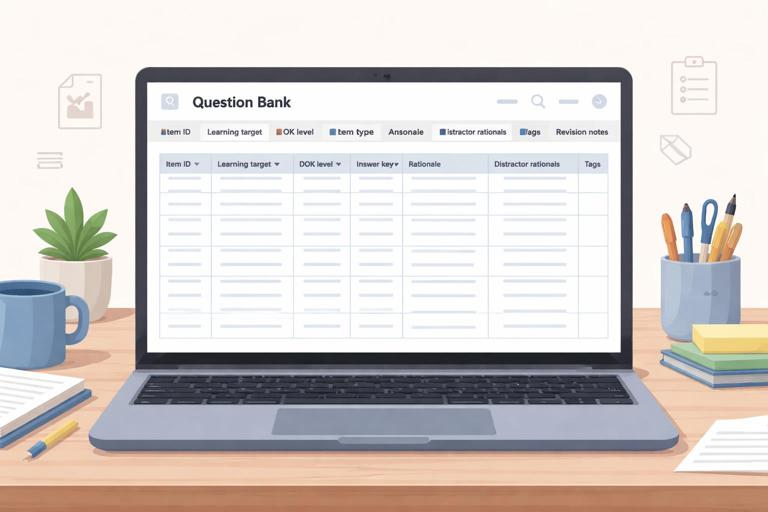
- Item ID: unique label (for tracking revisions and reuse)
- Course/Unit/Lesson: where it fits
- Learning target: one clear statement of what is being measured
- Standard code (optional): if your context uses them
- Item type: multiple choice, multiple select, short answer, matching, ordering, constructed response
- Prompt/stem: the question students see
- Answer key: correct option(s) or expected response
- Rationale: why the correct answer is correct
- Distractor rationales: what misconception each wrong option represents
- DOK level: 1, 2, 3, or 4
- Difficulty estimate: easy/medium/hard (or 1–5)
- Tags: vocabulary, sub-skill, representation (graph/table/text), etc.
- Revision notes: what changed and why
When you ask AI to generate items, you should also ask it to output them in this structure. That way, you can paste directly into a spreadsheet or item bank document and maintain consistency across units.
Depth of Knowledge (DOK): controlling cognitive demand
DOK is a way to describe the cognitive demand of a task, not how hard it feels. Two questions can be equally “hard” but sit at different DOK levels. DOK helps you avoid assessments that over-measure recall (DOK 1) or that accidentally demand complex reasoning when you intended basic skill practice.
- Listen to the audio with the screen off.
- Earn a certificate upon completion.
- Over 5000 courses for you to explore!

Download the app
DOK levels in assessment terms
- DOK 1 (Recall and Reproduction): recall a fact, perform a routine procedure, identify a definition, compute using a known algorithm. The path is direct and familiar.
- DOK 2 (Skills and Concepts): apply a skill with some decision-making: classify, organize, summarize, compare, interpret information, choose a method, or solve a multi-step but routine problem.
- DOK 3 (Strategic Thinking): justify reasoning, use evidence, analyze constraints, explain why, revise an approach, or solve a non-routine problem where the method is not immediately obvious.
- DOK 4 (Extended Thinking): synthesize across sources, design an investigation, develop and test a model, or complete a task over time with multiple steps and reflection. DOK 4 is rarely a single multiple-choice item; it is usually a performance task or extended response.
When building an assessment, decide your intended DOK distribution. For example, a short quiz might be 50% DOK 1, 40% DOK 2, 10% DOK 3. A unit test might include more DOK 2 and DOK 3. The key is alignment: the DOK distribution should match what you taught and practiced, and it should match the purpose of the assessment.
Item types and when to use them
Different item types measure different things efficiently. Multiple-choice items are efficient for broad coverage and quick scoring, but they can overemphasize recognition unless carefully written. Short answer items are better for checking recall without cues and for capturing brief reasoning. Constructed response items are best for DOK 3 reasoning and explanation. Matching and ordering are useful for vocabulary, sequences, and categorization, but they can become pattern-based if overused.
When prompting AI, specify the item type and the evidence you want from students. For example: “short answer requiring one sentence justification” or “multiple choice with a short rationale for each option.” This reduces the risk of items that look fine but do not actually measure the intended skill.
Step-by-step workflow: generate a DOK-balanced mini bank
This workflow produces a small, high-quality bank you can expand over time. The steps include planning, generation, quality review, and tagging. You can repeat the cycle each week and steadily grow your bank.
Step 1: Define the assessment targets and constraints
Write 3–6 learning targets for the bank. For each target, decide the DOK levels you want represented. Also decide constraints such as grade level, allowed tools, reading level, and item count. Keep targets narrowly defined; broad targets lead to vague items.
Step 2: Ask AI for an item blueprint before writing items
Instead of jumping straight to questions, request an item blueprint: a table listing target, DOK level, item type, and the specific evidence students must produce. This blueprint acts as a checklist and prevents accidental overproduction of one DOK level.
Generate an item blueprint for a question bank. Context: [subject], [grade], unit topic: [topic]. Create 12 items total across 3 learning targets. DOK distribution: 4 items DOK1, 6 items DOK2, 2 items DOK3. For each item, specify: learning target, DOK level, item type, and what evidence the student must show. Keep reading level appropriate for [grade].Step 3: Generate items in small batches with full metadata
Generate 3–5 items at a time. Smaller batches make it easier to review and revise. Require the AI to include: correct answer, rationale, distractor rationales, DOK tag, and a “common error” note. This turns each item into a teachable diagnostic tool, not just a score point.
Create 4 multiple-choice items for Learning Target 1: [paste target]. Include: stem, 4 options (A–D), correct answer, rationale, and for each wrong option a distractor rationale describing the misconception. Tag each item with DOK level (1 or 2 as specified) and an estimated time in minutes. Avoid trick wording and avoid “all of the above/none of the above.”Step 4: Run an item-quality check (AI as editor)
After generation, use AI as a reviewer. Ask it to flag issues like ambiguous stems, multiple correct answers, irrelevant difficulty, cultural references that may confuse, or distractors that are obviously wrong. Require it to propose revisions and explain why.
Review these items for quality. Check for: alignment to the learning target, DOK accuracy, clarity, single correct answer, plausible distractors, and reading load. List any problems and propose revised versions. Also identify what misconception each distractor targets and whether it is realistic for this grade.Step 5: Tag, store, and version your items
Paste the final items into your bank template. Add tags consistently. If you revise an item after using it, keep the old version with a note (for example, “v2: revised distractor B because it was too obvious”). Versioning matters because it helps you learn which items perform well and which need improvement.
Distractors: how to write wrong answers that diagnose learning
Distractors are not filler. Good distractors represent plausible incorrect thinking. They help you identify misconceptions and they increase the validity of multiple-choice items. Weak distractors (silly answers, unrelated options, or obviously wrong choices) reduce the item to a guessing game where students can eliminate options without understanding.
Principles of strong distractors
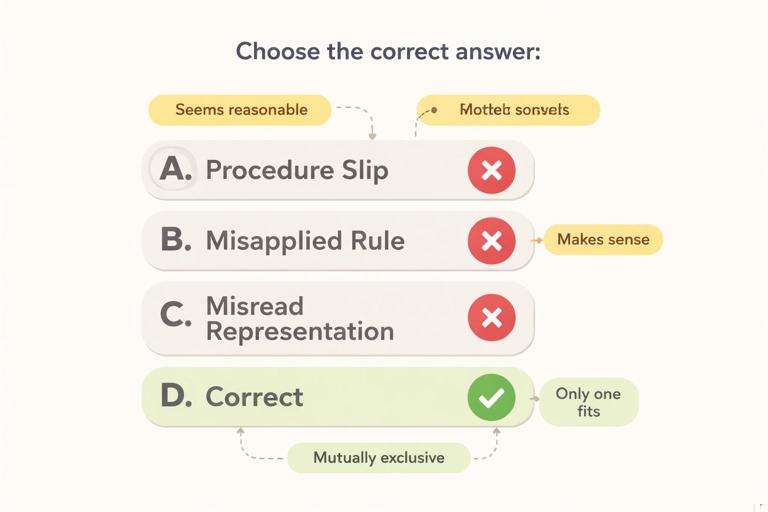
- Plausible: a student who partially understands could choose it.
- Misconception-based: each distractor maps to a specific error pattern.
- Parallel structure: options look similar in length, grammar, and format.
- Mutually exclusive: options do not overlap or both seem correct.
- Not trick-based: avoid “gotcha” wording; measure the target, not test-taking skills.
Common distractor sources you can prompt for
- Procedure slip: correct method, small arithmetic or sign error.
- Misapplied rule: using a rule from a related topic in the wrong context.
- Overgeneralization: applying a pattern too broadly.
- Misread representation: confusing axes, units, labels, or categories.
- Language confusion: misunderstanding a key term (use carefully; avoid unfair traps).
Step-by-step: generating misconception-driven distractors
Start with the correct solution path. Then list 3–4 common wrong paths. Finally, convert each wrong path into an option and label the misconception. AI can help at each step, but you should supply the target and the typical errors you see in your classroom when possible.
For this item stem and correct answer, generate 3 distractors. Each distractor must correspond to a different misconception. Provide: distractor text, the misconception label, and a one-sentence explanation of the wrong reasoning. Keep options parallel in format and similar in length. Stem: [paste stem]. Correct answer: [paste]. Common misconceptions to use (if possible): [list 2–4].If you do not have a misconception list yet, ask AI to propose one, then choose the ones that match your students. This keeps distractors realistic rather than generic.
List 6 common misconceptions students have about [topic/skill] at [grade]. For each, give a short description and an example wrong answer pattern. Then recommend which 3 misconceptions would make the best distractors for a multiple-choice item assessing: [learning target].Designing for DOK: what changes across levels
To intentionally write across DOK levels, change the kind of thinking required, not just the numbers or vocabulary. A DOK 1 item can be made “hard” by using messy numbers, but it is still DOK 1 if the procedure is routine. A DOK 2 item requires choices: selecting a method, organizing information, or interpreting a representation. A DOK 3 item requires reasoning and justification, often with constraints or competing options.
Practical transformations: one target, three DOK levels
Choose one learning target and ask AI to produce a DOK ladder: three items that measure the same target at DOK 1, 2, and 3. This is a powerful way to ensure your bank is balanced and to create built-in scaffolds for reteaching.
Create a DOK ladder for this learning target: [paste target]. Produce 3 items: one DOK1, one DOK2, one DOK3. Keep the context consistent across items. Provide answer keys and rationales. For DOK3, require a brief justification or explanation, not just a final answer.Quality pitfalls to avoid (and how to prompt against them)
AI can generate items quickly, but speed increases the risk of subtle flaws. Use a checklist and prompt the AI to self-check. The most common pitfalls include: unclear stems, unintended multiple correct answers, negative phrasing (“Which is NOT…”), clues in grammar, and distractors that are not parallel. Another pitfall is mis-tagging DOK: an item may be labeled DOK 3 but only requires recall, or labeled DOK 1 while actually requiring interpretation.
Item-writing checklist you can reuse
- Does the item measure the stated learning target (and only that)?
- Is the stem clear without reading the options first?
- Is there exactly one best answer (for single-select MCQ)?
- Are distractors plausible and misconception-based?
- Are options parallel in structure and length?
- Is the reading load appropriate, or is it testing reading more than the skill?
- Is the DOK tag accurate based on the thinking required?
Act as an assessment editor. Use the checklist: alignment, clarity, single best answer, distractor plausibility, parallel options, reading load, and DOK accuracy. For each item, rate each criterion as Pass/Revise and provide a specific revision if needed. Then provide the revised item.Building multiple forms and retakes from the same bank
Once you have a tagged bank, you can generate parallel forms: different questions that measure the same target at the same DOK level with similar difficulty. This supports retakes, academic integrity, and spaced practice. The key is to keep the construct the same while changing surface features (numbers, contexts, representations) without changing the underlying skill.
Step-by-step: creating parallel items
Start with an anchor item that you trust. Ask AI to create two parallel versions and to explain why they are equivalent in target and DOK. Then review for unintended changes in difficulty.
Create 2 parallel versions of this item. Keep the same learning target and DOK level, and keep difficulty similar. Change surface features (numbers/context) but do not change the underlying skill. Provide answer keys and rationales. Also explain in 2–3 sentences why each version is equivalent. Item: [paste].Using question banks for feedback, not just grades
A well-built bank supports fast, targeted feedback. Because each distractor is linked to a misconception, you can map student choices to next steps. For example, if a student chooses distractor B, you can assign a specific mini-practice set or a short explanation that addresses that misconception. AI can help you draft these feedback snippets, but the bank structure is what makes it scalable.
Step-by-step: generate misconception-based feedback statements
For each distractor in these items, write a brief feedback statement (1–2 sentences) that: names the likely misconception in student-friendly language, gives a hint (not the answer), and suggests one next step practice action. Also write a feedback statement for the correct answer that reinforces the reasoning. Items: [paste].This approach turns multiple-choice data into instruction. It also helps you maintain consistency: students who make the same error receive the same high-quality feedback across different assessments.
Mini bank example output format (ready for a spreadsheet)
When you request items, ask for a compact, copy-friendly format. Below is an example schema you can reuse. The goal is not the specific content, but the structure that makes your bank searchable and reusable.
ItemID | LearningTarget | DOK | Type | Stem | A | B | C | D | Correct | Rationale | DistractorA_Misconception | DistractorB_Misconception | DistractorC_Misconception | DistractorD_Misconception | TimeMin | TagsAfter you paste items into this structure, you can sort by target, filter by DOK, and quickly assemble assessments with intentional coverage. Over time, you can add performance notes (for example, “Distractor C chosen by 35% of students”) to improve future instruction and refine distractors.