Why a Work Breakdown Structure (WBS) matters in construction scheduling
A Work Breakdown Structure (WBS) is a structured decomposition of the project into smaller, manageable parts so that planning, estimating, scheduling, tracking, and reporting can be done consistently. In construction scheduling, the WBS is not the schedule itself; it is the organizing framework that makes the schedule buildable and controllable. A good WBS creates a common “map” that connects deliverables, quantities, costs, responsibilities, and schedule activities.
Deliverable-based planning means the WBS is organized around tangible outputs (things you can inspect, measure, and accept), not around vague actions. Instead of planning by “what people will do,” you plan by “what will be produced.” This reduces ambiguity, improves handoffs between trades, and makes progress measurement more objective.
WBS vs. schedule activities: how they relate
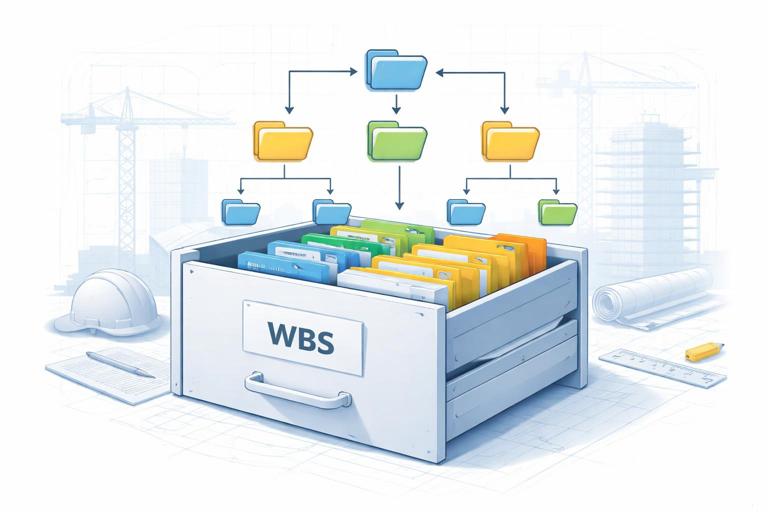
Think of the WBS as the filing cabinet and the schedule activities as the folders and documents inside. The WBS defines the hierarchy of deliverables; the schedule defines the sequence and timing of the work needed to create those deliverables. One WBS element can contain multiple schedule activities (e.g., “Level 02 Concrete” may contain formwork, rebar, embed placement, pour, cure, strip, and patch). Conversely, one activity should map to a single WBS element to keep reporting clean.
What “deliverable-based” means in construction
A deliverable is a verifiable output. In construction, deliverables can be physical (e.g., “Roof membrane installed and tested”), documented (e.g., “As-built drawings submitted”), or regulatory (e.g., “Final inspection passed”). Deliverable-based planning uses these outputs as the backbone of the WBS so that each element has a clear definition of done.
- Good deliverable: “Fire alarm system installed, programmed, and acceptance-tested.”
- Weak deliverable: “Work on fire alarm.”
- Good deliverable: “Level 03 drywall hung, taped, sanded, and ready for primer.”
- Weak deliverable: “Drywall activities.”
Core principles of a high-quality WBS
1) 100% rule (completeness)
The WBS should represent 100% of the project scope in the form of deliverables, including temporary works, testing, commissioning, closeout documentation, and owner training if applicable. If it is not in the WBS, it is easy to forget to plan and track it.
- Listen to the audio with the screen off.
- Earn a certificate upon completion.
- Over 5000 courses for you to explore!

Download the app
2) Mutually exclusive elements (no overlap)
Each deliverable should belong to one place in the hierarchy. Overlap creates double-counting in progress and confusion in responsibility. For example, decide whether “Sleeves and embeds” live under Structural Concrete or under MEP Rough-In, and keep it consistent.
3) Decomposition to the right level
Decompose until the deliverable is small enough to estimate, assign, and track, but not so small that the WBS becomes unmanageable. A practical target in construction is that a WBS element should represent a package that can be completed and verified within a reporting period (often weekly or biweekly) or a clearly bounded area/system.
4) Standardized coding and naming
WBS codes enable sorting, filtering, and roll-up reporting. Names should be consistent and specific. A common pattern is: Area/Level + System/Trade + Deliverable state (e.g., “L2 | HVAC | Ductwork Rough-In Complete”).
5) Ownership and acceptance criteria
Each WBS element should have an accountable owner (company/role) and acceptance criteria (how you will verify completion). This is essential for progress measurement and for avoiding “almost done” reporting.
Common WBS structures in construction (and when to use them)
Product/Deliverable (systems-based)
Organize by building systems or components (e.g., foundations, structure, envelope, interiors, MEP systems). This is strong for commissioning and turnover because it aligns with how the building is accepted and operated.
Location-based (area/level/zone)
Organize by floors, zones, or grid areas. This is strong for repetitive work and trade flow (e.g., high-rise residential, hotels, hospitals with wings). It supports takt planning and zone-based control.
Hybrid (location + system)
Often the most practical: Level 1 is the project, Level 2 is location (e.g., Level 01, Level 02, Roof), Level 3 is system/trade (e.g., Concrete, Framing, Electrical), Level 4 is deliverable state (e.g., “Rough-In Complete,” “Trim Complete,” “Tested”). This structure supports both production flow and system turnover.

Phase-based (design/procure/build/commission)
Useful for EPC-style projects or when procurement and long-lead equipment dominate. In building construction, phase-only WBS can be too coarse unless combined with systems or locations.
Step-by-step: build a deliverable-based WBS for a construction project
Step 1: List the major deliverables (Level 2)
Start with the highest-level deliverables that represent the project’s major parts. For a typical building, these might include: Sitework, Substructure, Superstructure, Building Envelope, Interior Build-Out, MEP Systems, Vertical Transportation, Life Safety, Site Utilities, Commissioning & Turnover.
Keep Level 2 limited (often 8–15 items). If you have 40 items at Level 2, you are likely mixing levels of detail.
Step 2: Choose the primary organizing axis (location, system, or both)
Decide what will make planning and tracking easiest. Ask: Where will constraints and handoffs occur most often? If the project is a repetitive multi-floor build, location-first is usually best. If the project is system-intensive (e.g., process plant, data center), system-first may be better.
Step 3: Decompose into controllable deliverables (Level 3–4)
Break each major deliverable into smaller deliverables that can be assigned and verified. Use nouns and “complete” states. Avoid mixing verbs like “installing” or “working on.”
Example decomposition for “Building Envelope”:
- Envelope
- Exterior framing complete
- Sheathing complete
- Air/vapor barrier installed and inspected
- Windows installed and water-tested
- Exterior cladding installed
- Roof membrane installed and flood-tested
- Sealants complete
Step 4: Define “done” for each deliverable
For each WBS element, write acceptance criteria. This can be as simple as a checklist that references inspections, tests, or measurable quantities.
- “Windows installed and water-tested” done when: all windows in the zone installed, perimeter sealed, water test passed per spec, punch items closed.
- “Level 02 Electrical rough-in complete” done when: conduits, boxes, and homeruns installed per drawings; in-wall inspection passed; sleeves/firestopping coordinated where applicable.
Step 5: Assign responsibility (owner) and interfaces
Assign a responsible party (trade contractor or internal team) and identify key interfaces (who must hand off to whom). Interfaces are where delays often occur, so capturing them early improves schedule logic later.
Example: “L3 | Drywall ready for primer” interfaces with MEP rough-in sign-off, framing inspection, and above-ceiling inspection. If those are not complete, the deliverable cannot be accepted.
Step 6: Add WBS codes and naming conventions
Create a coding scheme that supports sorting and rollups. Keep it stable across the project lifecycle.
Example code structure: AA-BB-CC
- AA = Location (01 = Level 01, 02 = Level 02, RF = Roof)
- BB = System/Trade (ST = Structural, AR = Architectural, EL = Electrical, ME = Mechanical, FP = Fire Protection)
- CC = Deliverable state (RI = Rough-In, CL = Close-in, FN = Finish, TS = Tested)
So “02-EL-RI” could represent “Level 02 Electrical Rough-In Complete.”
Step 7: Validate against procurement, inspections, and turnover
Check that the WBS includes deliverables for long-lead equipment, submittals that gate installation, inspections that gate concealment, and commissioning/turnover deliverables. The WBS should make it hard to forget these items when building the schedule.
Turning the WBS into a schedule-ready plan
Work packages: bridging WBS and activities
A WBS element becomes actionable through work packages: defined chunks of work with a clear output, duration estimate, crew assumptions, and constraints. In scheduling terms, work packages often map to a group of activities that collectively produce the deliverable.
Example: WBS “02-AR-CL (Level 02 Architectural Close-in Complete)” might include activities such as: install insulation, hang drywall, tape/mud, sand, install doors/frames, and complete above-ceiling close-in inspections.
Activity mapping rules that keep CPM clean
- Each activity should map to one WBS element (one-to-one mapping for reporting).
- Use activities to represent transformations (work that changes the state of the deliverable), and milestones to represent acceptance (inspection passed, test complete).
- Keep activity names aligned with deliverable states (e.g., “L2 Electrical Rough-In Install” leading to milestone “L2 Electrical Rough-In Accepted”).
Example: mini WBS and activity mapping (Level-based interior build-out)
Suppose you are planning Level 05 of a high-rise residential project. A simplified WBS slice could look like:
- 05-AR-RI: Level 05 Architectural rough-in complete
- 05-ME-RI: Level 05 Mechanical rough-in complete
- 05-EL-RI: Level 05 Electrical rough-in complete
- 05-FP-RI: Level 05 Fire protection rough-in complete
- 05-AR-CL: Level 05 Close-in complete (walls closed)
- 05-AR-FN: Level 05 Finishes complete
- 05-ME-TS: Level 05 HVAC tested and balanced (as applicable)
- 05-EL-TS: Level 05 Electrical tested (megger, functional checks as applicable)
Now map to activities:
- Activity: “L5 Frame walls” (WBS 05-AR-RI)
- Activity: “L5 MEP rough-in install” (WBS 05-ME-RI / 05-EL-RI / 05-FP-RI split by trade)
- Milestone: “L5 In-wall inspection passed” (WBS 05-AR-RI)
- Activity: “L5 Hang drywall” (WBS 05-AR-CL)
- Milestone: “L5 Close-in accepted” (WBS 05-AR-CL)
- Activity: “L5 Paint and flooring” (WBS 05-AR-FN)
- Milestone: “L5 Unit punch complete” (WBS 05-AR-FN)
This structure makes it easier to report progress by floor and by trade, while still supporting CPM logic between activities.
Practical techniques for deliverable-based planning
Define deliverables using “state changes”
Deliverables become clearer when expressed as a state change. Common construction states include: installed, inspected, tested, commissioned, accepted, ready for next trade.
- Instead of “Install ductwork,” consider “Ductwork installed and pressure-tested.”
- Instead of “Concrete work,” consider “Slab on grade poured, cured, and strength verified.”
Use measurable quantities where possible
Even though the WBS is deliverable-based, it benefits from quantity alignment for objective progress. Attach quantities to WBS elements (square feet of drywall, linear feet of conduit, number of fixtures). This supports earned value style progress or simple quantity-based percent complete.
Example: “L2 drywall ready for primer” could be tied to 18,000 SF. If 9,000 SF is fully taped/sanded and accepted, progress is 50% for that deliverable.
Separate production from acceptance
Many schedule problems come from treating “installed” as “complete.” Deliverable-based planning encourages you to separate:
- Production activity: perform the work
- Quality/acceptance milestone: inspection/test/punch closure
This separation improves realism and makes float analysis more meaningful because inspections and testing can become critical constraints.
Plan interfaces explicitly (handoff deliverables)
Create deliverables that represent handoffs between trades. These are often the true gates in the field.
- “Sleeves and embeds installed and surveyed” (handoff from MEP/steel to concrete)
- “Above-ceiling inspection passed” (handoff from MEP rough-in to ceiling close)
- “Equipment pads and housekeeping complete” (handoff from concrete to mechanical)
WBS dictionary: the missing piece that makes the WBS usable
A WBS dictionary is a short definition for each WBS element. In construction, it prevents disputes about what is included and what “done” means, without redoing scope definition. It is a planning tool for consistency across the schedule, cost reports, and field tracking.
Recommended fields for a practical WBS dictionary entry:
- WBS code and name
- Description (what the deliverable is)
- Inclusions/exclusions (boundaries)
- Acceptance criteria (inspection/test/punch requirements)
- Responsible party (trade/lead)
- Related submittals or prerequisites (as references)
- Measurement method (quantity, checklist, milestone)
Example WBS dictionary entry:
WBS: 02-EL-RI | Level 02 Electrical Rough-In Complete Description: Conduit, boxes, supports, and homeruns installed for Level 02 in-wall areas. Includes coordination with framing and sleeves. Excludes device trim-out and final terminations. Acceptance criteria: In-wall inspection passed; firestopping installed where required; QA walk complete with no open critical punch. Responsible: Electrical subcontractor Measurement: Quantity-based (LF conduit + device box count) plus inspection milestoneProgress tracking and reporting using the WBS
Roll-up reporting
The WBS hierarchy allows progress to roll up from detailed deliverables to major project areas. For example, you can report “Level 04 Finishes 65%” based on the completion of its child deliverables (paint, flooring, millwork, doors/hardware, final punch). This is more reliable than subjective percent complete at a high level.
Choosing a progress method per deliverable
- Milestone (0/100): best for inspections, tests, approvals, turnovers.
- Weighted milestones: useful when a deliverable has clear intermediate acceptance points (e.g., 30% hang, 60% tape, 10% sand/ready).
- Quantity-based: best for repetitive measurable work (drywall SF, pipe LF, fixtures count).
Deliverable-based planning works best when the progress method is defined upfront in the WBS dictionary so field teams report consistently.
Common mistakes and how to avoid them
Mistake: building a “to-do list” instead of a deliverable structure
If WBS elements are written as actions (install, coordinate, manage), you lose the ability to verify completion objectively. Rewrite as outputs with acceptance states.
Mistake: mixing cost codes, bid packages, and WBS without a mapping
Cost codes and bid packages are procurement/accounting structures; the WBS is a planning/control structure. They can align, but they do not have to be identical. Create a mapping table so schedule progress can be reconciled with cost reporting without forcing a poor WBS.
Mistake: decomposing too far (micromanagement)
If the WBS becomes thousands of tiny elements, it becomes impossible to maintain. Use activities for sequencing detail and keep WBS at a level that supports reporting and accountability.
Mistake: ignoring temporary works and enabling deliverables
Temporary works (scaffolding, shoring, temporary power, hoists) and enabling deliverables (layout control, survey benchmarks, mockups) often control the start of production. Include them as deliverables where they gate other work.
Practical example: creating a hybrid WBS for a mid-rise office building
Below is an illustrative hybrid WBS outline (location + system + deliverable state). This is not a full project WBS, but it shows how deliverable-based planning creates clarity.

- 01 Site & Utilities
- 01.01 Site clearing complete
- 01.02 Temporary power and water operational
- 01.03 Underground utilities installed and tested
- 02 Substructure
- 02.01 Foundations complete (excavate, form, rebar, pour, cure, strength verified)
- 02.02 Slab on grade complete (vapor barrier, reinforcement, pour, finish, cure)
- 03 Superstructure
- 03.01 Level 01 slab complete
- 03.02 Level 02 slab complete
- 03.03 Level 03 slab complete
- 04 Envelope
- 04.01 Air/vapor barrier installed and inspected (by elevation/zone)
- 04.02 Windows installed and tested (by elevation/zone)
- 04.03 Roof membrane installed and flood-tested
- 05 Interiors (by level)
- 05.02 Level 02 MEP rough-in complete
- 05.03 Level 03 MEP rough-in complete
- 05.02 Level 02 close-in complete
- 05.03 Level 03 close-in complete
- 05.02 Level 02 finishes complete
- 05.03 Level 03 finishes complete
- 06 Systems & Commissioning
- 06.01 HVAC equipment installed and started up
- 06.02 TAB complete
- 06.03 Fire alarm acceptance test passed
- 06.04 Sprinkler hydrostatic test passed
- 06.05 Integrated systems testing complete (if required)
- 07 Turnover
- 07.01 O&M manuals submitted and accepted
- 07.02 Training complete
- 07.03 Substantial completion achieved (milestone)
Notice how each line is a deliverable with a verifiable completion state. This makes it straightforward to create schedule activities, define predecessors/successors, and track progress without relying on subjective reporting.
Checklist: quality control for your WBS before scheduling
- Does the WBS cover 100% of required deliverables, including testing and turnover?
- Are WBS elements written as outputs with acceptance states (not vague actions)?
- Is each element mutually exclusive with clear boundaries?
- Is there a consistent coding and naming convention?
- Does each element have an owner and acceptance criteria (WBS dictionary)?
- Can progress be measured objectively (milestone, quantity, or weighted milestones)?
- Do key trade handoffs appear as deliverables?
- Is the level of detail appropriate for reporting and control?