What “Responsible Collaboration” Means When Students Use AI
Definition and purpose: Responsible collaboration is a set of classroom norms that treat AI as a partner for thinking, practice, and communication—without letting it replace the student’s own learning. The goal is to make student work both authentic (it reflects what the student can do) and supported (it benefits from tools that improve clarity, organization, and revision).
Two roles, one boundary: In this chapter, “collaboration” means students can use AI to brainstorm, plan, check, and revise. “Integrity boundaries” means students cannot use AI to produce the core intellectual work that the assignment is designed to measure. The boundary is not “AI or no AI.” The boundary is: What part of the work must come from the student’s mind and evidence?
Why guidelines matter: Without explicit guidelines, students guess what is allowed, and different students interpret “help” differently. Clear guidelines reduce anxiety, reduce unfair advantage, and make it easier for you to respond consistently when a student’s AI use crosses the line.
Integrity Boundaries: A Simple Model Students Can Understand
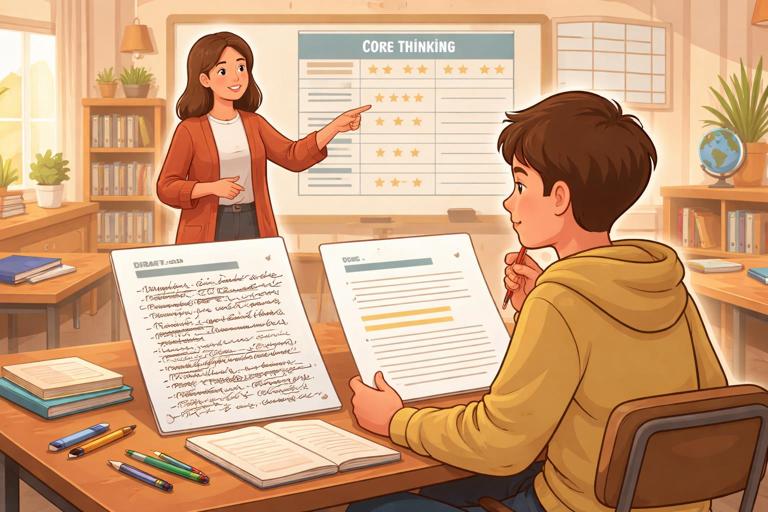
The “Core vs. Support” model: Divide any assignment into two categories. Core work is the learning target you are assessing (the thinking you want to see). Support work is everything that helps the student express, organize, or polish that thinking. AI can often help with support work, but core work must remain student-generated.
Examples of core work: Choosing a claim based on class evidence; solving the key steps of a math problem; interpreting a lab result; selecting quotes and explaining how they support an argument; writing a personal reflection; making design decisions in a project; answering comprehension questions that check reading.
- Listen to the audio with the screen off.
- Earn a certificate upon completion.
- Over 5000 courses for you to explore!

Download the app
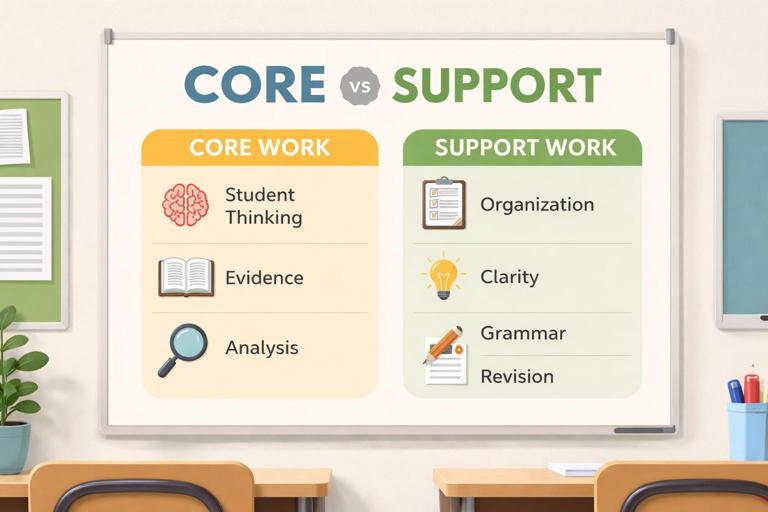
Examples of support work: Generating a list of possible topics; creating an outline template; suggesting transitions; checking grammar; reformatting citations; turning bullet points into paragraphs when the bullet points are the student’s own ideas; practicing with additional questions; summarizing the student’s own notes.
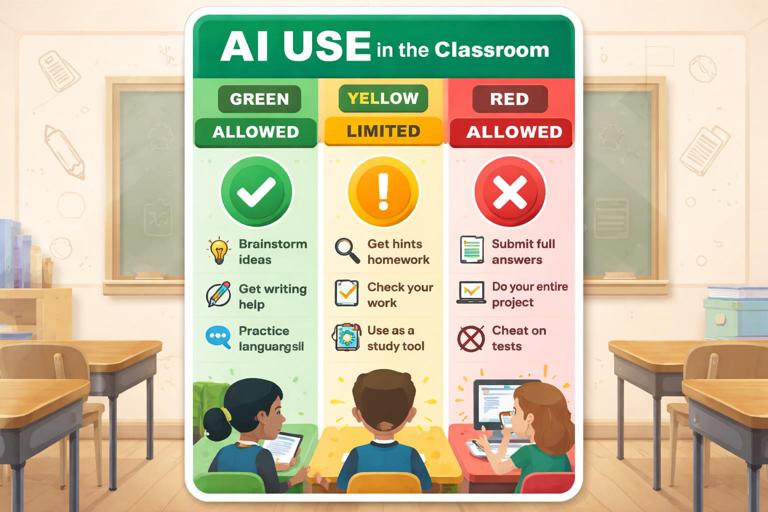
Allowed, Limited, and Not Allowed: A Classroom “Traffic Light” Guide
Green (allowed): Uses that improve learning without replacing the student’s thinking. Students should be able to show their inputs, explain what changed, and defend the final work.
- Brainstorming topic options, examples, or counterarguments (student chooses and justifies).
- Creating study questions from student notes or class materials.
- Explaining a concept in a different way after the student attempts it first.
- Grammar, clarity, tone, and formatting edits on student-written text.
- Generating practice problems similar to class examples (not the exact assigned problems).
- Helping plan a revision checklist or peer review questions.
Yellow (limited / requires disclosure or teacher permission): Uses that can be helpful but can easily replace the targeted learning if students rely on them too heavily.
- Drafting a paragraph from a student outline (allowed only if the outline is detailed and student-created, and the student revises substantially).
- Summarizing a source (allowed only if the student also reads the source and verifies accuracy).
- Generating code, calculations, or solutions (allowed only when the assignment is about debugging, critique, or explanation—not producing the solution).
- Creating visuals, slides, or scripts (allowed only if content decisions are student-made and sources are verified).
Red (not allowed): Uses that produce the core work, hide the student’s process, or misrepresent authorship.
- Submitting AI-generated answers to questions meant to measure understanding.
- Having AI write an essay, lab report, reflection, or discussion post that the student did not meaningfully author.
- Using AI to paraphrase a source to avoid citation or to disguise copying.
- Using AI during closed-note or no-assistance assessments.
- Fabricating sources, quotes, data, or “research” through AI.
Step-by-Step: How Students Should Use AI Without Crossing the Line
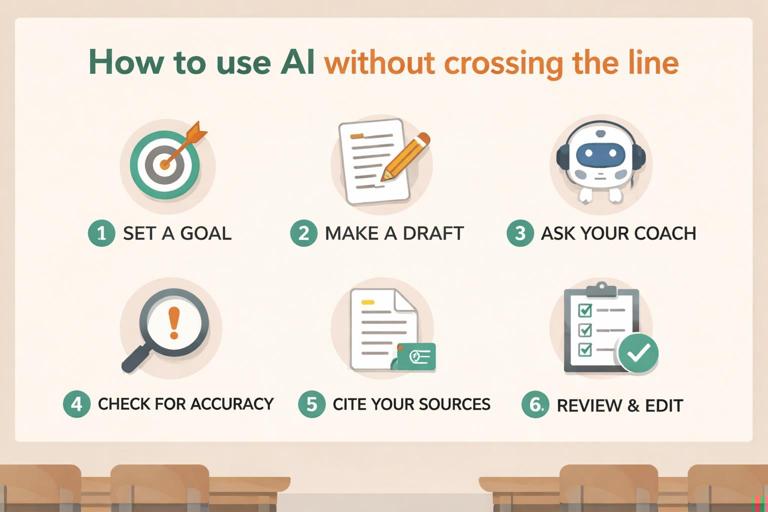
Step 1: Identify the “non-negotiable” learning target: Students write one sentence: “This assignment is measuring my ability to ______.” If they cannot name it, they should ask you before using AI. This step prevents accidental misuse.
Step 2: Attempt first, then consult: Students produce an initial attempt (notes, rough solution, messy draft, or outline) before asking AI for help. The attempt becomes evidence of authorship and a starting point for meaningful feedback.
Step 3: Ask for coaching, not completion: Students phrase requests so the AI acts like a tutor or editor. For example: “Ask me questions to clarify my claim,” “Point out gaps in my reasoning,” or “Suggest two ways to reorganize my paragraphs.” This keeps the student in control of decisions.
Step 4: Verify and decide: Students must evaluate suggestions. They should be able to say, “I accepted this change because…” or “I rejected that because it doesn’t match the evidence.” If they cannot explain choices, the AI has taken too large a role.
Step 5: Document the collaboration: Students keep a short “AI use note” (one to three sentences) or attach a screenshot of the key prompt and output. The goal is transparency, not punishment. Documentation also teaches students to treat AI as a tool with traceable influence.
Step 6: Final integrity check: Before submitting, students answer: “Could I explain every part of this work out loud?” If not, they revise until they can. This is a practical self-test for authentic learning.
Practical Classroom Language: What Students Can Say and Write
Student-facing integrity statement: Provide a simple statement students can include when required: “I used AI to help with ______ (brainstorming/outline/grammar). The ideas and evidence are mine, and I reviewed and revised the suggestions.” This normalizes appropriate use and makes expectations visible.
Permission request script: Teach students a quick way to ask before they use AI in a “yellow” area: “I want to use AI for ______. The learning target is ______. My plan is to use it only for ______ and I will show you ______ as proof of my process. Is that okay?”
Reflection prompts for responsible use: Use short check-ins that reinforce metacognition: “What did the AI help you notice?” “What did you change after reviewing the AI output?” “What part was hardest to do without AI?” “What will you try on your own next time?”
Designing Assignments That Make Integrity Easier
Make the process visible: When students submit only a final product, it is hard to tell what they learned. Add lightweight process artifacts that do not overload grading: an outline, a planning page, a revision log, a short audio explanation, or a “three decisions I made” note. These artifacts encourage genuine work and reduce pressure to outsource thinking.
Use “personalized anchors”: Ask students to connect work to something specific: a class discussion, a lab observation, a unique dataset, a local example, or a personal experience. AI can still help with clarity, but it cannot easily invent the student’s lived context without sounding generic.
Require evidence alignment: For analytical tasks, require students to point to exact evidence (page numbers, timestamps, data table rows, steps in reasoning). This makes it harder to submit generic AI writing and easier for students to stay grounded in real materials.
Include an oral or in-class component: Short conferences, quick “explain your reasoning” checks, or in-class writing bursts reduce the incentive to outsource. These do not need to be high-stakes; they can be brief checkpoints that confirm understanding.
Collaboration Norms: What “Help” Looks Like Between Students and AI
AI is not a co-author; it is a coach: Students can treat AI like a tutor that asks questions, offers options, and points out issues. The student remains responsible for claims, evidence, and final wording. This mirrors acceptable human help: a peer can suggest improvements, but cannot do the thinking for you.
One student, one account, one voice: If your setting uses accounts, clarify that students should not share logins or submit work generated under someone else’s account. Even when collaboration is allowed, each student must produce their own version and be able to explain it.
Group work boundaries: In group projects, clarify what can be shared (research notes, brainstorm lists, outlines) and what must be individual (reflections, individual analysis sections, individual quizzes). If AI is used, decide whether the group uses one shared prompt log or each student documents their own interactions.
Academic Honesty Scenarios Students Commonly Misjudge
Scenario 1: “I used AI to paraphrase so it wouldn’t be plagiarism.” Paraphrasing without citation is still plagiarism, and AI paraphrasing can hide it. Guideline: If the idea or information comes from a source, cite the source. AI can help rewrite, but it cannot remove the need for attribution.
Scenario 2: “I asked AI for a thesis and then wrote the essay.” If the thesis is the core thinking, outsourcing it undermines the assignment. Guideline: Students generate multiple thesis options themselves first; AI may help critique them or suggest refinements after the student drafts.
Scenario 3: “I didn’t understand the reading, so I asked AI to summarize it.” If reading comprehension is the target, this crosses the boundary. Guideline: Students may ask AI to explain confusing parts after they annotate and identify specific questions, and they must verify against the text.
Scenario 4: “I used AI to check my answers.” This can be appropriate for practice, but not for graded work where the answers are the assessment. Guideline: AI checking is allowed only when the assignment is explicitly practice or when you provide a structured “check” step that requires students to explain corrections.
Scenario 5: “AI wrote my first draft, but I edited it a lot.” Editing does not automatically make it the student’s work. Guideline: The student must show a student-created plan, evidence selection, and substantial rewriting that reflects their voice and reasoning. If the core structure and ideas came from AI, it is not an acceptable draft.
Documentation: Simple Ways to Make AI Use Transparent
AI use note (short form): Students answer three items: “Tool used,” “What I asked,” “What I changed.” This can be one small text box at submission.
Prompt-and-response excerpt: Students paste only the most relevant excerpt (not everything). This keeps privacy and workload manageable while still showing the nature of help received.
Revision snapshot: Students highlight two sentences they improved and explain what changed (clarity, evidence, organization). This shifts attention from “Did you use AI?” to “Did you learn?”
Teacher Responses When Boundaries Are Crossed (Without Turning It Into a Trap)
Assume confusion before misconduct: Many students are new to these tools. Start with a learning conversation: “Show me your process and what you asked the AI.” If the student can explain and provide drafts, it may be a guideline misunderstanding rather than intentional deception.
Use a “redo with constraints” option: When misuse occurs, a productive response is to require a redo that demonstrates the targeted skill: an in-class rewrite, an oral explanation, or a new prompt that forces student reasoning. This keeps the focus on learning while still holding the boundary.
Escalate only when patterns appear: If a student repeatedly submits work they cannot explain, move to stronger accountability measures consistent with your school policy. The guideline should be predictable: transparency first, then coaching, then consequences for repeated misrepresentation.
Student Checklist: Responsible AI Collaboration for Any Assignment
- I can state what skill this assignment is measuring.
- I made an attempt before using AI.
- I used AI for support, not for the core thinking.
- I verified suggestions and kept only what matches the evidence and task.
- I can explain every part of my final work in my own words.
- I documented how I used AI (brief note or excerpt).
- I cited any sources I used, even if AI helped me paraphrase.
Ready-to-Use Student Handout: Integrity Boundaries in One Page
What you may do: Brainstorm ideas, ask for explanations after you try, get feedback on clarity, grammar, and organization, create study questions from your notes, practice with new problems, and get suggestions for revision.
What you must do: Do the core thinking yourself, choose and use evidence yourself, verify accuracy, cite sources, keep your voice, and be able to explain your work.
What you may not do: Submit AI-written answers as your own, use AI to avoid reading or thinking, fabricate sources or data, or use AI during no-assistance assessments.
If you are unsure: Ask before you use it. Show your plan and your first attempt. Transparency protects you.