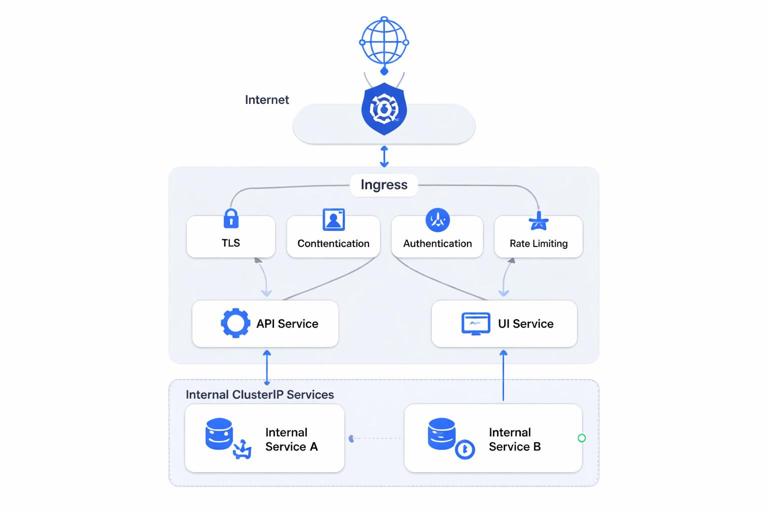
Why Service Networking Matters
In Kubernetes, Pods are ephemeral: they can be rescheduled, recreated, and their IPs can change frequently. Service networking provides stable addressing and load balancing so clients can reliably reach an application even as the underlying Pods change. On top of that, Ingress routing provides HTTP(S) entry points into the cluster, and TLS termination provides secure transport, certificate management, and a clean separation between edge concerns and application logic.

This chapter focuses on how traffic flows through Kubernetes: from a client to an Ingress endpoint, through routing rules, into Services, and finally to Pods. You will also learn how to terminate TLS at the edge, how to validate routing, and how to troubleshoot common issues.
Kubernetes Services: Stable Endpoints for Dynamic Pods
Core idea: label selectors + virtual IP
A Kubernetes Service selects a set of Pods using labels and exposes them through a stable virtual IP (ClusterIP) and DNS name. The Service does not run as a process; it is an API object. The actual forwarding is implemented by kube-proxy (iptables/IPVS) or by an eBPF-based CNI, depending on your cluster.
Key properties:
- Stable DNS name:
<service>.<namespace>.svc.cluster.local - Stable virtual IP (ClusterIP) for in-cluster access
- Load balancing across matching Pod endpoints
- Decoupling between clients and Pod lifecycle
Service types and when to use them
- ClusterIP: Default. Exposes the Service on an internal cluster IP. Use for internal APIs, databases behind a proxy, and any service-to-service traffic.
- NodePort: Exposes the Service on each Node’s IP at a static port. Useful for simple setups, debugging, or when integrating with external load balancers manually.
- LoadBalancer: Provisions an external load balancer via your cloud provider (or MetalLB on-prem). Good for exposing TCP/UDP services directly, or as an alternative to Ingress for simple HTTP services.
- ExternalName: Maps a Service DNS name to an external DNS name (CNAME). Useful when you want a stable in-cluster name for an external dependency.
Endpoints and readiness: what actually receives traffic
Services route to Endpoints (or EndpointSlices) representing Pod IPs and ports. A Pod is only added as a ready endpoint when it passes readiness checks. This is crucial: if your readiness probe is wrong, your Service may route to Pods that cannot serve traffic, or route to none at all.
- Listen to the audio with the screen off.
- Earn a certificate upon completion.
- Over 5000 courses for you to explore!

Download the app
Practical checks:
- Inspect endpoints:
kubectl get endpoints <svc> -n <ns> -o wide - Inspect EndpointSlices:
kubectl get endpointslices -n <ns> -l kubernetes.io/service-name=<svc>
Example: internal Service for an HTTP API
The following Service exposes port 80 and forwards to Pods listening on container port 8080. The selector must match the Pod labels.
apiVersion: v1
kind: Service
metadata:
  name: api
  namespace: app
spec:
  type: ClusterIP
  selector:
    app: api
  ports:
    - name: http
      port: 80
      targetPort: 8080
Common pitfalls:
- Selector mismatch: Service has no endpoints because labels don’t match.
- Port mismatch: Service forwards to the wrong targetPort.
- Readiness not passing: endpoints exist but are not ready, or none are ready.
DNS and Service Discovery in Practice
Kubernetes provides DNS-based service discovery via CoreDNS. For a Service named api in namespace app, the typical in-cluster DNS names include:
api(when resolving within the same namespace)api.appapi.app.svcapi.app.svc.cluster.local
To test DNS from inside the cluster, run a temporary Pod and query the service:
kubectl -n app run -it --rm dns-test --image=busybox:1.36 --restart=Never -- sh
nslookup api
wget -qO- http://api/health
If DNS resolution fails, check CoreDNS Pods and logs, and ensure your network policies (if used) allow DNS traffic to the kube-dns service.
Ingress Routing: HTTP(S) Entry into the Cluster
Ingress vs. Ingress Controller
An Ingress is a Kubernetes resource that defines HTTP(S) routing rules (hostnames, paths, and backends). An Ingress Controller is the actual component that implements those rules by configuring a reverse proxy/load balancer (for example, NGINX Ingress, HAProxy, Traefik, or a cloud provider’s controller).
Important: creating an Ingress object does nothing unless an Ingress Controller is installed and watching it.
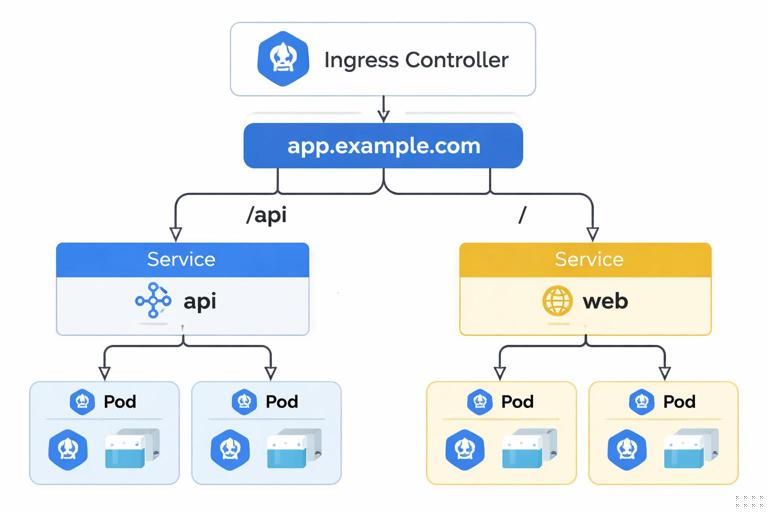
Traffic flow overview
- Client connects to a public IP/DNS name.
- That IP routes to the Ingress Controller (often via a Service of type LoadBalancer).
- The controller matches the request by host/path rules.
- The controller forwards the request to a Kubernetes Service.
- The Service load-balances to a ready Pod endpoint.
IngressClass: selecting the controller
Clusters can have multiple controllers. The Ingress resource can specify which controller should handle it using ingressClassName. If you omit it, behavior depends on defaults and controller configuration, which can lead to confusion in multi-controller clusters.
Example: host + path routing
This Ingress routes https://app.example.com/api to the api Service and https://app.example.com/ to the web Service.
apiVersion: networking.k8s.io/v1
kind: Ingress
metadata:
  name: app-ingress
  namespace: app
spec:
  ingressClassName: nginx
  rules:
    - host: app.example.com
      http:
        paths:
          - path: /api
            pathType: Prefix
            backend:
              service:
                name: api
                port:
                  number: 80
          - path: /
            pathType: Prefix
            backend:
              service:
                name: web
                port:
                  number: 80
Notes on path matching:
- Prefix matches based on URL path prefixes (common for routing).
- Exact matches the exact path only.
- Some controllers support additional path matching features, but you should rely on standard behavior unless you control the controller and its configuration.
TLS Termination: Encrypt at the Edge
What TLS termination means
TLS termination is when the Ingress Controller (or external load balancer) handles the TLS handshake and decrypts incoming HTTPS traffic. It then forwards traffic to backends over HTTP or re-encrypts it (TLS passthrough or TLS re-encryption) depending on your security requirements.
Common patterns:
- Edge termination: Client → HTTPS to Ingress; Ingress → HTTP to Service/Pods. Simple and common.
- Re-encryption: Client → HTTPS to Ingress; Ingress → HTTPS to Service/Pods. Useful when you require encryption inside the cluster.
- Passthrough: Ingress forwards encrypted traffic to the backend without terminating TLS. Requires SNI-based routing and controller support; reduces L7 features like path routing.
Kubernetes TLS secrets
Ingress TLS typically references a Secret of type kubernetes.io/tls containing:
tls.crt: certificate chaintls.key: private key
Create a TLS secret from local files:
kubectl -n app create secret tls app-example-tls \
  --cert=./tls.crt \
  --key=./tls.key
Ingress with TLS
Add a tls section to the Ingress and reference the Secret. The hostnames in rules.host should match the certificate’s SAN/CN.
apiVersion: networking.k8s.io/v1
kind: Ingress
metadata:
  name: app-ingress
  namespace: app
spec:
  ingressClassName: nginx
  tls:
    - hosts:
        - app.example.com
      secretName: app-example-tls
  rules:
    - host: app.example.com
      http:
        paths:
          - path: /
            pathType: Prefix
            backend:
              service:
                name: web
                port:
                  number: 80
After applying, validate that the Ingress has an address and that HTTPS works:
kubectl -n app get ingress app-ingress -o wide
curl -vk https://app.example.com/
If the certificate is wrong, you will typically see hostname mismatch or trust errors. For internal testing, -k ignores trust validation, but you should still verify the certificate chain in real environments.
Step-by-Step: Expose a Service via Ingress with TLS
Step 1: Ensure your Services exist and have endpoints
Before involving Ingress, confirm that the Service routes to ready Pods.
kubectl -n app get svc
kubectl -n app get endpoints api -o wide
kubectl -n app port-forward svc/api 8080:80
curl -v http://localhost:8080/health
If port-forward works, your Service and Pods are likely correct, and issues are more likely in Ingress/controller/DNS/TLS.
Step 2: Confirm the Ingress Controller is reachable
Most Ingress controllers are exposed via a Service (often LoadBalancer). Find its external address:
kubectl -n ingress-nginx get svc
kubectl -n ingress-nginx get svc ingress-nginx-controller -o wide
If you do not have a cloud load balancer, you may see a pending external IP. In that case, you might need a solution like MetalLB (on-prem) or use NodePort for testing.
Step 3: Create or install a certificate
For production, certificates are usually issued by a CA and rotated automatically. For a manual workflow, create a TLS secret as shown earlier and ensure the certificate includes the hostname you will use.
Validate the Secret exists:
kubectl -n app get secret app-example-tlsStep 4: Apply the Ingress resource
kubectl -n app apply -f app-ingress.yaml
kubectl -n app describe ingress app-ingress
In describe, look for controller events such as configuration reloads or errors referencing missing services, missing secrets, or invalid annotations.
Step 5: Configure DNS (or test with /etc/hosts)
Your hostname (for example, app.example.com) must resolve to the Ingress controller’s external IP. In a real environment, create an A/AAAA record in DNS. For quick testing, add an entry to /etc/hosts pointing to the external IP.
Then test:
curl -vk https://app.example.com/
curl -vk https://app.example.com/api
Advanced Service Networking Topics You Will Use Often
Session affinity (sticky sessions)
By default, Service load balancing is stateless. If you have legacy apps that require a client to consistently hit the same backend, you can enable session affinity at the Service level:
apiVersion: v1
kind: Service
metadata:
  name: web
  namespace: app
spec:
  selector:
    app: web
  sessionAffinity: ClientIP
  ports:
    - port: 80
      targetPort: 8080
Be cautious: stickiness can create uneven load distribution and can hide scaling problems. Prefer stateless apps and external session stores when possible.
Preserving client IP
When traffic passes through load balancers and proxies, the backend may not see the original client IP. Depending on your environment and controller, you may need to configure:
- Proxy headers (like
X-Forwarded-For) and ensure your app trusts them only from known proxies. - Service externalTrafficPolicy for LoadBalancer/NodePort to preserve source IP at the cost of potentially uneven routing across nodes.
apiVersion: v1
kind: Service
metadata:
  name: ingress-nginx-controller
  namespace: ingress-nginx
spec:
  type: LoadBalancer
  externalTrafficPolicy: Local
  ports:
    - name: http
      port: 80
      targetPort: 80
    - name: https
      port: 443
      targetPort: 443
With Local, only nodes running an ingress controller Pod will accept traffic, which preserves client IP but requires enough replicas and correct scheduling.
Named ports and clarity
Using named ports in Pods and Services improves readability and reduces mistakes when port numbers change. Many controllers and tools also prefer named ports for clarity.
apiVersion: v1
kind: Service
metadata:
  name: api
  namespace: app
spec:
  selector:
    app: api
  ports:
    - name: http
      port: 80
      targetPort: http
This assumes the container exposes a port named http.
Troubleshooting: A Practical Checklist
1) Ingress exists but no external address
- Check the Ingress controller Service type and external IP provisioning.
- Check cloud provider integration or on-prem load balancer setup.
- Verify the controller Pods are running and ready.
kubectl -n ingress-nginx get pods
kubectl -n ingress-nginx get svc ingress-nginx-controller -o wide
2) 404 from Ingress
A 404 often means the controller received the request but did not match any rule (host/path mismatch) or is using a default backend.
- Confirm the request Host header matches
rules.host. - Confirm path rules and
pathTypebehavior. - Check that the Ingress is associated with the right controller via
ingressClassName.
kubectl -n app describe ingress app-ingress
curl -v -H 'Host: app.example.com' http://<ingress-external-ip>/
3) 502/503 from Ingress
These usually indicate upstream/backends are unavailable.
- Service has no endpoints (selector mismatch or Pods not ready).
- Backend port mismatch (Service port vs container port).
- NetworkPolicy blocks traffic from Ingress namespace to app namespace.
kubectl -n app get endpoints web -o wide
kubectl -n app get pods -o wide
kubectl -n app describe svc web
4) TLS errors
- Secret missing or in the wrong namespace (Ingress can only reference Secrets in its namespace).
- Certificate does not include the hostname.
- Intermediate chain missing (clients fail to build trust chain).
kubectl -n app get secret app-example-tls -o yaml
kubectl -n app describe ingress app-ingress
openssl s_client -connect app.example.com:443 -servername app.example.com -showcerts
5) Works inside cluster, fails from outside
- DNS not pointing to the Ingress external IP.
- Firewall/security group blocks 80/443.
- Ingress controller not exposed correctly (Service misconfigured).
Routing Beyond Basic Ingress: When You Need More Control
Multiple hostnames and multiple certificates
Ingress supports multiple hosts and multiple TLS entries. This is common for multi-tenant setups or separating API and UI domains.
apiVersion: networking.k8s.io/v1
kind: Ingress
metadata:
  name: multi-host
  namespace: app
spec:
  ingressClassName: nginx
  tls:
    - hosts:
        - api.example.com
      secretName: api-tls
    - hosts:
        - web.example.com
      secretName: web-tls
  rules:
    - host: api.example.com
      http:
        paths:
          - path: /
            pathType: Prefix
            backend:
              service:
                name: api
                port:
                  number: 80
    - host: web.example.com
      http:
        paths:
          - path: /
            pathType: Prefix
            backend:
              service:
                name: web
                port:
                  number: 80
Redirect HTTP to HTTPS
HTTP-to-HTTPS redirects are typically controller-specific (often configured via annotations). The exact mechanism varies, so treat it as an implementation detail of your chosen controller. Operationally, you should decide whether to:
- Serve both HTTP and HTTPS but redirect to HTTPS.
- Serve only HTTPS and block HTTP at the edge.
When you rely on controller-specific features, document them and keep them consistent across environments to avoid “works in staging, fails in prod” surprises.
Practical Patterns for Developers
Pattern: internal-only services + a single public entry
A common approach is to keep most Services as ClusterIP (internal) and expose only a small number of entry points via Ingress. This reduces the external attack surface and centralizes TLS, authentication, and rate limiting at the edge (depending on your controller and platform).
Pattern: separate Ingress for API and UI
Even if both are served from the same cluster, separating them can simplify caching rules, timeouts, and security headers. It also makes it easier to rotate certificates and change routing without impacting unrelated components.
Pattern: health endpoints and timeouts
Ingress controllers often have default timeouts that may not fit long-running requests (file uploads, streaming, server-sent events). When debugging intermittent failures, check whether the controller is closing idle connections or timing out upstream responses. Even if the application is healthy, edge timeouts can look like random 504 errors.