Why rubrics and examples raise output quality
When you ask an AI to generate a lesson, quiz, or feedback, the model is not “trying to be correct” in the way a student is. It is trying to produce text that matches patterns it has seen. A rubric turns your expectations into an explicit scoring target, and examples show the model what “good” looks like in your specific teaching context. Iteration then becomes a controlled improvement cycle: you evaluate the output against the rubric, identify gaps, and adjust inputs until the work meets your standard.
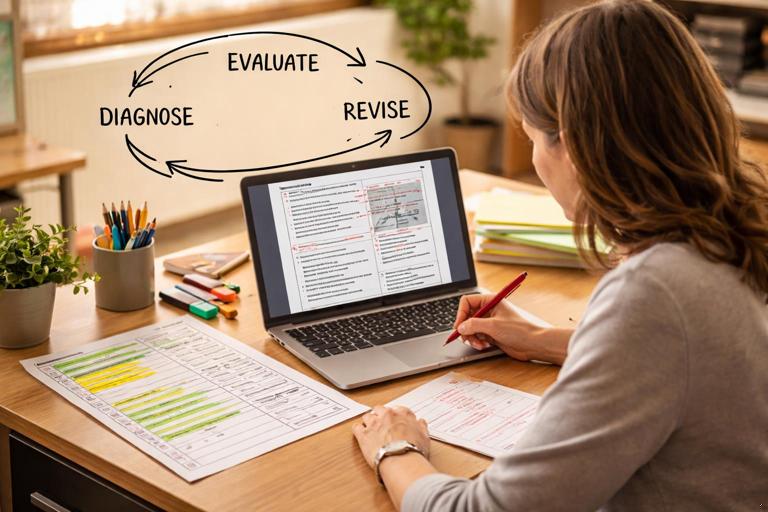
In practice, rubrics, examples, and iteration work together. The rubric defines the dimensions of quality (accuracy, alignment, clarity, differentiation, tone, etc.). Examples anchor those dimensions with concrete demonstrations. Iteration is the loop that uses rubric-based feedback to refine the next draft. This approach is especially useful for educators because it mirrors how we help students improve: criteria, models, feedback, revision.
Designing an AI-facing rubric (not a student-facing rubric)
A student-facing rubric often includes broad descriptors and pedagogical language. An AI-facing rubric should be more operational: it should specify observable features in the output and reduce ambiguity. Think of it as a checklist plus a scoring guide that the AI can apply to its own work or that you can apply quickly when reviewing.
Step-by-step: build a rubric the AI can follow
- Step 1: Choose 4–7 criteria. Too few criteria makes the rubric vague; too many makes it hard to apply. Common educator criteria include: curriculum alignment, factual accuracy, cognitive demand, clarity and structure, accessibility/differentiation, assessment quality, and tone/safety.
- Step 2: Define each criterion in observable terms. Replace “engaging” with “includes a hook question connected to students’ experience” or “uses at least one real-world scenario.” Replace “clear” with “uses numbered steps, short sentences, and defines key terms.”
- Step 3: Add performance levels. A simple 0–2 or 1–4 scale is often enough. Each level should describe what is present or missing.
- Step 4: Add non-negotiables. These are pass/fail requirements such as “no invented citations,” “no personal data requests,” “no medical/legal advice,” “age-appropriate language,” or “must include answer key.”
- Step 5: Include a self-check instruction. Ask the AI to score its own output and revise until it meets a minimum threshold, or to provide a short “rubric compliance report” you can scan.
Example: AI-facing rubric for a 10-question formative quiz
The following rubric is written so an AI can generate and self-evaluate a quiz. You can adapt it to any subject by changing the alignment and constraints.
AI-Facing Rubric: 10-Question Formative Quiz (Middle School Science) Non-negotiables (pass/fail): - Includes an answer key with brief rationales (1–2 sentences each). - No trick questions; language is age-appropriate. - No fabricated sources or references. Criterion A: Alignment to target skill (1–4) 1 = Questions loosely related; multiple off-topic items. 2 = Mostly related but some questions assess different skills. 3 = All questions clearly assess the target skill. 4 = All questions assess the target skill and vary contexts (lab, real-world, data). Criterion B: Cognitive demand (1–4) 1 = Mostly recall/definitions. 2 = Mix of recall and basic application. 3 = Majority require application or interpretation (data, scenarios). 4 = Includes at least 3 higher-order items (explain reasoning, compare, justify). Criterion C: Clarity and accessibility (1–4) 1 = Confusing wording; missing definitions; long sentences. 2 = Mostly clear; a few ambiguous stems. 3 = Clear stems; key terms defined or supported by context. 4 = Clear and concise; includes supports (units, labeled data, consistent formatting). Criterion D: Quality of distractors (MC items) (1–4) 1 = Distractors obviously wrong or silly. 2 = Some plausible distractors; some giveaways. 3 = Distractors plausible and tied to common misconceptions. 4 = Distractors systematically map to misconceptions; rationales address them. Minimum target: Average score ≥ 3.0 and all non-negotiables met.Using examples effectively: “show, don’t just tell”
Examples reduce guesswork. If you only provide criteria, the AI may meet them in an unexpected style. If you provide one strong example, you anchor format, tone, and level. If you provide multiple examples, you can show variation while keeping standards consistent.
- Listen to the audio with the screen off.
- Earn a certificate upon completion.
- Over 5000 courses for you to explore!

Download the app
Types of examples that work well
- Format examples: Show the structure you want (headings, bullet patterns, table-like layout in plain text).
- Level examples: Show what “grade-appropriate” looks like, including vocabulary and sentence length.
- Misconception examples: Show common wrong answers and how feedback should address them.
- Boundary examples: Show what to avoid (e.g., overly long teacher talk, vague praise, or feedback that gives away answers).
Example pair: strong vs. weak feedback (for the AI to imitate/avoid)
Providing a contrast pair helps the AI learn what not to do. You can include these as “reference examples” and instruct the AI to match the strong style.
Weak feedback example (avoid): “Good job. Review the notes and try again.” Strong feedback example (imitate): “You correctly identified the dependent variable. Next, check the independent variable: it should be the factor the scientist changes on purpose. In this experiment, the scientist changes the amount of sunlight, so sunlight is the independent variable. Re-read the question and underline what is being changed.”Combining rubric + examples inside one prompt package
A practical pattern is to provide: (1) the task, (2) the rubric, (3) one or two examples, and (4) a required self-check. This reduces back-and-forth and makes the first draft closer to usable.
Step-by-step: create a “quality pack” prompt
- Step 1: Paste the rubric. Keep it short enough to scan, but specific enough to score.
- Step 2: Add one “gold standard” mini-example. It can be a single question with rationale, a short feedback snippet, or a mini-lesson segment.
- Step 3: Add a self-evaluation instruction. Require the AI to score itself and revise once before showing you the final.
- Step 4: Add an output template. A template prevents the AI from inventing new sections or omitting required parts.
Example: quality pack for generating feedback comments
Task: Write 6 feedback comments for a student’s short answer responses. Context: Grade 8, topic = forces and motion. Tone = supportive, specific, not overly wordy. Output template (must follow): 1) Comment (2–4 sentences) - What was correct: ... - Next step: ... - Quick strategy: ... Rubric (score 1–4 each): A Specificity: names the concept and points to evidence in the student response. B Actionability: gives a concrete next step the student can do. C Accuracy: correct science; no misleading statements. D Brevity: 2–4 sentences; no filler. Gold example: “What was correct: You described friction as a force that opposes motion, which is accurate. Next step: clarify that friction acts in the opposite direction of the object’s movement along the surface. Quick strategy: draw an arrow for motion first, then draw friction in the opposite direction.” Self-check: Draft the 6 comments, score each criterion, revise once to reach average ≥ 3.5, then present only the final comments.Iteration as a teaching workflow: evaluate, diagnose, revise
Iteration is not random tweaking. It is a repeatable workflow: you evaluate the output against the rubric, diagnose what caused the weaknesses, and revise the inputs accordingly. Educators already do this with lesson plans and assessments; the difference is that you can run multiple drafts quickly.
Step-by-step: a fast iteration loop for educators
- Step 1: Generate Draft 1. Use your quality pack (task + rubric + example + template).
- Step 2: Score Draft 1. Either you score it quickly, or you ask the AI to score it and you verify. Look for low-scoring criteria.
- Step 3: Diagnose the cause. Common causes include: missing constraints (length, format), unclear target skill, insufficient examples, or the need for misconception-based distractors.
- Step 4: Revise the prompt inputs. Add or tighten the rubric descriptors, add a second example, or add a “must include” list.
- Step 5: Regenerate Draft 2. Ask for a revised version, not a brand-new approach, unless you want variety.
- Step 6: Spot-check for non-negotiables. Verify accuracy, appropriateness, and required components.
Common iteration fixes (and the prompt edits that solve them)
When quality is low, the fix is often a small, targeted edit. Below are frequent classroom-use issues and how to address them with rubric language and examples.
Problem: output is too generic
- Rubric fix: Add a criterion for “uses specific details from the provided text/data/student work.”
- Example fix: Provide one example that quotes or references a specific line from the input.
- Prompt edit: “Each item must reference at least one concrete detail (number, term, quote, or step) from the input.”
Problem: questions are misaligned to the skill
- Rubric fix: Add “alignment check” descriptors and require a one-line mapping: question → skill.
- Example fix: Show a small mapping table for 2 questions.
- Prompt edit: “After drafting, include a mapping line for each question: ‘Assesses: ____ because ____.’ Then revise any that do not match.”
Problem: reading level is off
- Rubric fix: Add “sentence length and vocabulary control” descriptors.
- Example fix: Provide a short sample written at the desired level.
- Prompt edit: “Use sentences under 18 words on average; define any term above grade level in parentheses.”
Problem: feedback gives away answers
- Rubric fix: Add a non-negotiable: “feedback must not provide the final answer; it must guide.”
- Example fix: Provide a strong feedback example that prompts a strategy rather than stating the solution.
- Prompt edit: “Use hinting: point to the step to revisit, ask a guiding question, or suggest a check, but do not state the final answer.”
Problem: multiple-choice distractors are weak
- Rubric fix: Require distractors tied to misconceptions.
- Example fix: Provide 2 misconceptions and show how they become distractors.
- Prompt edit: “For each MC item, label each distractor with the misconception it represents (in parentheses), then remove labels in the final version.”
Rubrics for different educator outputs
You can reuse a small set of rubric templates across many tasks. The key is to adjust the criteria to match the product: a lesson needs structure and pacing; a quiz needs alignment and scoring clarity; feedback needs specificity and actionability.
Mini-rubric: lesson segment (10–15 minutes)
Criteria (1–4): 1) Objective alignment: activities directly support the objective. 2) Instructional clarity: steps are numbered; teacher vs. student actions are clear. 3) Checks for understanding: includes at least 2 quick checks with expected responses. 4) Differentiation: includes one support and one extension. Non-negotiables: time estimates included; materials listed; no unsafe activities.Mini-rubric: short constructed-response question + exemplar
Criteria (1–4): 1) Prompt clarity: asks one main thing; includes necessary context. 2) Evidence requirement: requires reasoning or evidence, not just recall. 3) Exemplar quality: exemplar answers the prompt and models reasoning. 4) Scoring guidance: 2–3 bullet points describing what earns full credit. Non-negotiables: exemplar is accurate; no ambiguous scoring language.Using “few-shot” examples without overfitting the output
Few-shot prompting means giving a small number of examples to guide the model. The risk is overfitting: the AI copies the example too closely, repeats surface features, or locks into one narrow style. You can prevent this by explicitly instructing what should stay consistent (structure, tone, rigor) and what should vary (topic details, contexts, numbers, names, scenarios).
Step-by-step: control what varies vs. what stays fixed
- Step 1: Label the invariants. For example: “Keep the same headings and the same 3-part feedback structure.”
- Step 2: Label the variables. For example: “Change the scenario, numbers, and examples; do not reuse sentences.”
- Step 3: Add a duplication check. Ask the AI to ensure no sentence is copied verbatim from the example.
Instruction snippet: “Match the structure and tone of the gold example. Do not reuse any sentence verbatim. Vary contexts (sports, classroom, home) while keeping the same skill focus.”Self-evaluation and revision prompts that actually help
Asking the AI to “check your work” can produce vague assurances. A better approach is to require evidence: a scored rubric table, citations to where criteria are met (by pointing to question numbers or sections), and a specific revision plan. You can also require the AI to revise only the parts that fail, which keeps good sections intact.
Step-by-step: force a useful self-check
- Step 1: Require a rubric score with justification. “Give a 1–4 score and one sentence of evidence.”
- Step 2: Require targeted edits. “Revise only items scoring below 3.”
- Step 3: Require a second score. “Rescore after revision.”
- Step 4: Control what you see. If you do not want the scoring report in the final output, ask for it first, then the final clean version.
Self-check prompt pattern: “First, provide a rubric score report (A–D) with evidence referencing item numbers. Then revise only the items scoring < 3. Then provide the final clean version with no rubric report.”Instructor-in-the-loop: quick review techniques using the rubric
Even with strong rubrics, educators should do a fast human review. The rubric helps you review efficiently because you know exactly what to look for. A practical method is to scan in this order: non-negotiables, alignment, accuracy, then clarity and differentiation. If something fails early (for example, missing an answer key), you can request a targeted fix without rereading everything.
Step-by-step: a 3-minute rubric scan
- Pass/fail scan: Are required sections present? Is tone appropriate? Any unsafe or sensitive content?
- Alignment scan: Do 2–3 random items clearly match the target skill? If not, alignment is likely off across the set.
- Accuracy scan: Check the answer key and rationales for 2–3 items; if errors appear, request a correction pass.
- Clarity scan: Look for ambiguous stems, inconsistent units, or missing context.
Iteration prompts for common educator tasks
The following prompt snippets are designed to support iterative improvement without rewriting everything from scratch. They assume you already have a draft and want a better version based on rubric gaps.
Revise for alignment (keep format)
Here is Draft 1. Revise it to improve Criterion A (Alignment) to at least 3/4 while keeping the same format and number of items. For each revised item, ensure it directly assesses: [target skill]. Do not add new sections. Provide the revised version only.Revise for accessibility and differentiation
Revise Draft 1 to improve accessibility: simplify wording, define key terms in context, and add one support and one extension per activity. Keep the original learning objective and sequence. Maintain total length within ±10%.Revise distractors using misconceptions
Improve the multiple-choice distractors in Draft 1. For each question, create 3 distractors that reflect realistic misconceptions. Then provide a brief rationale explaining why each distractor might tempt a student. Keep the correct answer unchanged unless it is wrong; if you change it, explain why.Building a reusable “rubric library” for your teaching
Once you have a few strong AI-facing rubrics, you can reuse them across units and subjects with small edits. A rubric library saves time and keeps quality consistent across your materials. Store each rubric with: the intended output type, the non-negotiables, a gold example, and a short checklist you personally use when reviewing.
Step-by-step: create a rubric library entry
- Name the output: “Exit ticket (5 items)”, “Short feedback set (6 comments)”, “Mini-lesson (12 minutes)”.
- Paste the rubric: 4–7 criteria plus non-negotiables.
- Add one gold example: Keep it short but high quality.
- Add your review notes: The 2–3 mistakes you often see and the prompt edits that fix them.