What “Prompt Engineering” Means in an Educator’s Workflow
Definition (in classroom terms). Prompt engineering is the deliberate design of instructions you give an AI so it produces useful, safe, and classroom-appropriate outputs. For educators, it is less about “tricking” a tool and more about specifying: (1) the teaching task, (2) the learner context, (3) the constraints (time, reading level, standards, policies), and (4) the format you need (rubric, quiz, feedback, examples).
Why it matters. The same AI can generate a high-quality worksheet or a confusing one depending on how clearly you define the goal and boundaries. Prompt engineering helps you reduce rework, avoid vague outputs, and keep materials aligned to your learning objectives and assessment criteria.
Think of prompts as lesson plans for the AI. A strong prompt plays the role of a mini lesson plan: it sets the objective, provides relevant context, anticipates misconceptions, and defines what “good” looks like in the output.
Core Building Blocks of a Strong Prompt
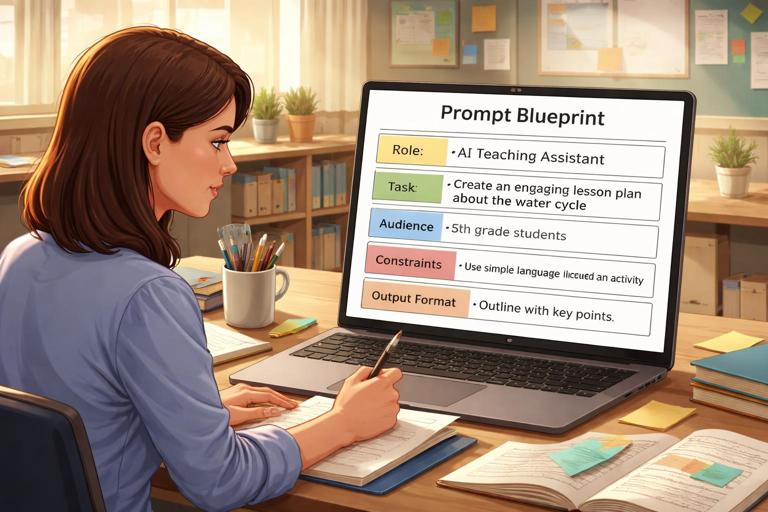
1) Role: Who should the AI act as?
Role is a short statement that frames expertise and tone. In education, roles help the AI choose appropriate language and priorities. Examples: “Act as a middle-school science teacher,” “Act as an instructional coach,” “Act as an exam item writer.” Roles are not magic; they simply guide style and focus.
2) Task: What should it do?
Task is the verb: generate, revise, critique, classify, summarize, differentiate, or provide feedback. Educator prompts work best when the task is singular and concrete. If you need multiple outputs (e.g., a quiz and an answer key), list them as numbered deliverables.
- Listen to the audio with the screen off.
- Earn a certificate upon completion.
- Over 5000 courses for you to explore!

Download the app
3) Audience: For whom is it written?
Specify grade level, language proficiency, and any relevant learning needs. This is where you set reading level, vocabulary constraints, and scaffolds. Example: “Grade 7, emerging bilingual students, avoid idioms, include sentence frames.”
4) Context: What does the AI need to know?
Context includes the topic, what students have already learned, common misconceptions, and the time available. Without context, AI tends to over-explain or assume background knowledge. Provide just enough to anchor the output.
5) Constraints: What must be true?
Constraints prevent unusable outputs. Common constraints: time limit, number of questions, question types, alignment to a skill, allowed resources, and classroom policies. Constraints also include “do not” instructions (e.g., “Do not include trick questions,” “Do not reference external websites,” “Do not use sensitive personal examples”).
6) Output format: What should the result look like?
Format instructions reduce editing. Ask for tables, bullet lists, headings, JSON-like structures, or clearly labeled sections. If you want something you can paste into a document, say so: “Provide in a copy-ready format with headings and numbered items.”
7) Quality criteria: How will you judge it?
Quality criteria are the success conditions: “Include plausible distractors,” “Ensure each question targets one skill,” “Provide rationales for correct answers,” “Use culturally neutral contexts,” “Maintain academic tone.” This is the closest equivalent to a rubric for the AI’s output.
A Reusable Prompt Template for Educators
Use this as a starting structure and fill in the brackets. It is intentionally explicit to reduce ambiguity.
Role: You are [role relevant to the task]. Task: Create [specific deliverable]. Audience: For [grade/age], [language level], [learning needs if relevant]. Context: Students have already learned [prior knowledge]. The focus skill is [skill]. The topic is [topic]. Constraints: [time], [length], [number of items], [allowed tools], [must avoid]. Output format: Provide [sections], labeled clearly. Include [answer key/rationale/rubric]. Quality criteria: Ensure [alignment], [clarity], [difficulty], [accessibility]. Ask: If anything is unclear, ask up to [1–3] clarifying questions before writing.Notice the final line: asking the AI to request clarifications can prevent wasted iterations when your initial prompt is missing a key detail (like the standard, the text students are reading, or the assessment type).
Step-by-Step: Turning a Vague Idea into a High-Quality Prompt
Step 1: Write the “teacher intent” in one sentence
Start with what you would tell a colleague. Example: “I need a short formative check to see if students can identify claims and evidence in an article.” This sentence becomes the backbone of the prompt.
Step 2: Identify the single target skill
Choose one measurable skill to avoid mixed signals. “Identify claims and evidence” is clearer than “understand argument.” If you need multiple skills, create separate prompts or separate sections with explicit boundaries.
Step 3: Add learner context and constraints
Add grade level, reading level, time, and any accommodations. Example constraints: “10 minutes,” “no more than 8 items,” “include 2 scaffolded examples,” “avoid culturally specific references that require background knowledge.”
Step 4: Specify the output format and scoring
Decide how you will use it: printed handout, slides, LMS quiz import, or oral questioning. Ask for an answer key and brief rationales if you want fast grading or consistent feedback.
Step 5: Add a self-check instruction
Include a final instruction that forces the AI to verify alignment. Example: “After writing, include a checklist showing how each item targets the skill and the intended difficulty.” This often improves coherence and reduces errors.
Worked example: from vague to precise
Vague prompt: “Make a quiz about arguments.”
Improved prompt (copy-ready):

Role: You are a grade 8 ELA teacher. Task: Create an 8-item formative quiz to assess students’ ability to identify (a) the author’s claim and (b) two pieces of supporting evidence in a short informational text. Audience: Grade 8, mixed reading levels; keep language clear and avoid idioms. Context: Students have practiced distinguishing claim vs. evidence, but confuse evidence with opinions. Constraints: 10 minutes total; include 2 scaffolded items first, then 6 independent items; no trick questions. Output format: Provide (1) a 200–250 word informational passage on a neutral topic, (2) the 8 questions, (3) an answer key, (4) one-sentence rationale per answer. Quality criteria: Each question targets only claim/evidence identification; distractors should reflect the common misconception (opinion vs. evidence). If any detail is missing, ask up to 2 clarifying questions before writing.Instruction Types Educators Use Most (and When to Use Them)
Generative prompts (create new materials)
Use generative prompts when you need first drafts: examples, practice sets, discussion questions, rubrics, or differentiated versions. These prompts benefit from strict constraints and explicit formats so outputs are immediately usable.
Transformative prompts (adapt what you already have)
Transformative prompts revise, simplify, translate, or reformat existing materials. They work best when you paste the original text and specify what must remain unchanged (key vocabulary, learning objective, or assessment criteria).
Evaluative prompts (critique and improve)
Evaluative prompts ask the AI to check alignment, bias, clarity, or difficulty. They are useful for quality assurance: “Find ambiguous wording,” “Check if distractors are plausible,” “Identify where students might misinterpret the question.”
Interactive prompts (tutoring-style dialogue)
Interactive prompts guide the AI to ask students questions, provide hints, and adapt based on responses. For educator use, you can design these as scripts for small-group instruction or as practice dialogues students can follow.
Prompt Patterns That Consistently Improve Classroom Outputs
Pattern: “Specify the rubric first”
When you want consistent feedback or assessment items, provide the rubric or criteria before asking for outputs. This anchors the AI’s decisions. Example: “Use this 4-level rubric for reasoning; then generate 3 student responses at different levels.”
Pattern: “Give a positive example and a non-example”
AI responds well to contrast. Provide one example of what you want and one of what you do not want. This is especially helpful for tone (supportive vs. harsh), complexity (simple vs. dense), and format (short vs. long).
Pattern: “Force labeling”
Ask the AI to label parts explicitly: “Label the claim,” “Underline evidence,” “Tag each question with the skill.” Labels make it easier for you to verify quality quickly.
Pattern: “Generate, then audit”
Split the work into two passes: first generate the material, then run an audit prompt. Example audit checks: reading level, alignment to objective, accessibility, and potential ambiguity.
Pattern: “Constrain creativity with a content boundary”
When you need safe, predictable outputs, define a boundary: “Use everyday school contexts,” “Avoid medical, legal, or traumatic scenarios,” “Use neutral names and settings.” This reduces the chance of inappropriate examples.
Common Failure Modes (and How to Fix Them)
Failure mode: The output is too generic
Fix: Add context and constraints. Include the exact skill, time limit, and what students already know. Ask for specific deliverables (e.g., “6 multiple-choice + 2 short answer”).
Failure mode: The reading level is off
Fix: Specify grade level and add concrete language constraints: “Use sentences under 18 words,” “Use only high-frequency vocabulary except for these 8 required terms.” You can also ask for two versions: on-level and scaffolded.
Failure mode: Questions don’t match the objective
Fix: Add a mapping requirement: “After each item, state which sub-skill it assesses.” If the mapping looks wrong, you can revise the prompt rather than editing each question.
Failure mode: Distractors are weak or silly
Fix: Tell the AI what misconceptions to target. Example: “Distractors should reflect confusion between correlation and causation.” Also request rationales for why distractors are wrong.
Failure mode: The AI invents facts
Fix: Provide the source text or data inside the prompt and instruct: “Use only the information provided.” If you need factual accuracy, ask the AI to flag statements that require verification rather than asserting them.
Failure mode: Output is long and hard to use
Fix: Specify length and structure. Example: “No more than 12 bullet points,” “Provide a one-page handout,” “Use headings: Objective, Materials, Steps, Checks for Understanding.”
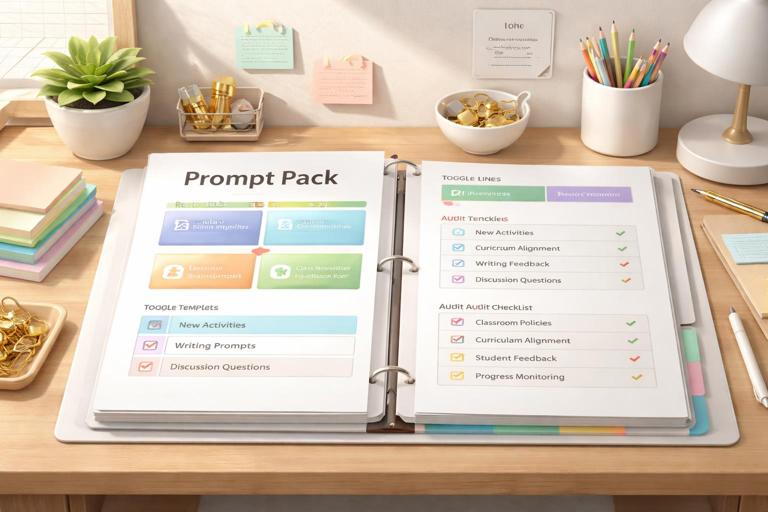
Practical Step-by-Step: Building a “Prompt Pack” You Can Reuse All Year
Step 1: Choose 5 recurring teacher tasks
Pick tasks you repeat often, such as: creating exit tickets, writing feedback comments, generating discussion questions, differentiating readings, and drafting rubrics. Reusability is the goal.
Step 2: Create one template per task
Use the reusable prompt template and keep each one focused. Store them in a document with placeholders like [topic], [skill], [grade], [time].
Step 3: Add “toggle lines” for differentiation
Include optional lines you can turn on or off, such as: “Create a scaffolded version with sentence frames,” “Create an extension version with higher-order questions,” “Include vocabulary support.” This makes differentiation fast without rewriting the whole prompt.
Step 4: Add an audit prompt for each template
Pair every generative template with a short audit template. Example: “Check for alignment to the objective, reading level, and ambiguity. List fixes as bullet points.” Audits reduce the risk of quietly flawed materials.
Step 5: Test, then refine with a change log
When you edit a template, note what you changed and why: “Added misconception-based distractors,” “Reduced word count,” “Added requirement for rationales.” Over time, your prompt pack becomes a personalized instructional toolkit.
Practical Examples You Can Copy and Adapt
Example 1: Differentiated practice set (two levels)
Role: You are a math teacher. Task: Create practice problems on solving one-step linear equations. Audience: Grade 6. Context: Students can isolate a variable but make sign errors. Constraints: 12 problems total. Output format: Provide Level A (scaffolded) with 6 problems and worked examples for the first 2; Level B (on-level) with 6 problems; include answer key. Quality criteria: Problems should progress from easy to moderate; include common sign-error traps but keep wording clear.Example 2: Feedback comment bank aligned to a rubric
Role: You are an instructional coach. Task: Write a bank of feedback comments for student paragraphs. Audience: Grade 9. Context: Rubric categories are (1) Claim, (2) Evidence, (3) Reasoning, (4) Conventions. Constraints: Provide 5 comments per category at three performance levels: Developing, Proficient, Advanced. Output format: A table with Category x Level, each cell containing 5 short comments (1–2 sentences) plus one actionable next step. Quality criteria: Comments must be specific, kind, and focused on revision actions, not student traits.Example 3: Audit prompt for a quiz you already have
Role: You are an assessment editor. Task: Audit the quiz pasted below for alignment, clarity, and accessibility. Audience: Grade 7. Context: Objective is to identify main idea and supporting details. Constraints: Do not rewrite the entire quiz; instead, list issues and propose minimal edits. Output format: (1) Alignment check per item, (2) Ambiguity/wording issues, (3) Reading level concerns, (4) Suggested edits. Quality criteria: Flag any item that assesses a different skill than the objective.How to Iterate Efficiently: A Simple Revision Loop
Iteration loop: Ask for options, then narrow
Instead of requesting one perfect output, ask for two or three options with brief differences, then choose one to refine. Example: “Provide 3 versions of the passage: science, social studies, and everyday life contexts.” This reduces the chance you get stuck editing an unsuitable direction.
Iteration loop: Use targeted edits, not full rewrites
When something is off, specify the change precisely: “Keep questions 1–6, replace questions 7–8 with items that assess inference,” or “Maintain the passage but reduce sentence length.” Targeted edits preserve what works.
Iteration loop: Lock what’s correct
Tell the AI what to keep unchanged: “Do not change the learning objective, the number of items, or the answer key format.” Locking prevents accidental drift during revisions.
Safety and Appropriateness as Prompt Requirements (Not Afterthoughts)
Set boundaries for examples and scenarios
In classroom materials, you can prevent inappropriate content by defining acceptable contexts: school, sports, hobbies, nature, and everyday problem-solving. Add explicit exclusions when needed: “Avoid violence, self-harm, illegal activities, or medical advice scenarios.”
Protect student privacy in your workflow
When requesting feedback or revisions, avoid including personally identifying student information. Instead of names and details, use anonymized labels like “Student A” and paste only the work needed for the task.
Require neutral, inclusive language
You can prompt for inclusivity directly: “Use diverse but non-stereotyped names,” “Avoid assumptions about family structure,” “Avoid culturally loaded idioms.” These instructions improve classroom fit and reduce unintended bias.