Why procurement and logistics must live inside the schedule
On many projects, the schedule shows “install” work but treats buying, expediting, shipping, receiving, and on-site handling as background noise. That separation creates predictable failures: crews arrive with partial kits, long-lead items show up without storage plans, deliveries block access roads, and inspections get delayed because the right documentation is not on site. Integrating procurement and logistics into the schedule means turning “stuff will be here” into planned, measurable activities with clear handoffs, dates, and responsibilities.
Integration does not mean adding every email and phone call to the CPM network. It means identifying the procurement and logistics events that can control field progress, then scheduling them with enough detail to manage risk: submittals and approvals, fabrication release, shipping windows, customs (if applicable), delivery appointments, receiving and QA checks, staging, internal moves, and “kitting” or pre-assembly. When these are tied to installation activities, the schedule becomes a tool to coordinate vendors, freight, site access, and crews.
What “procurement and logistics” includes (in scheduling terms)
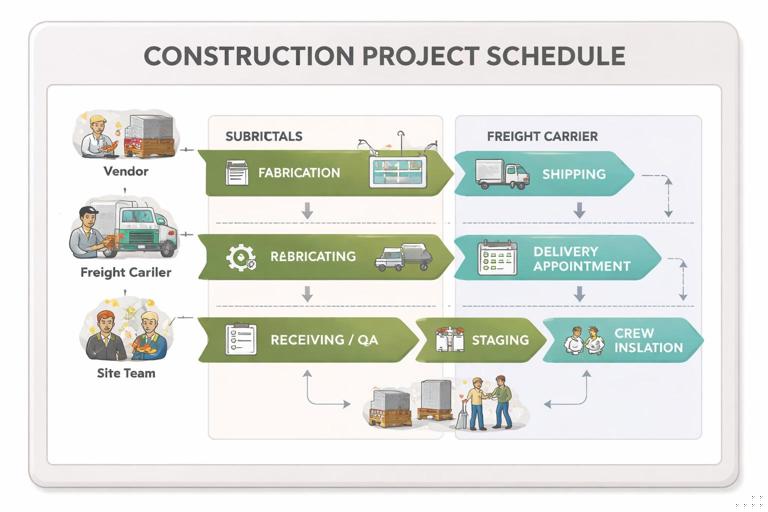
For scheduling purposes, procurement and logistics can be grouped into a few repeatable chains. Each chain has distinct decision points and measurable outputs that can be used as activity completion criteria.
Procurement chain (commercially and technically ready to buy)
- Package definition and buyout readiness: scope and technical requirements are stable enough to solicit and award.
- Submittals and approvals: shop drawings, product data, samples, mockups, delegated design calculations, and owner/architect approvals.
- Release for fabrication: the moment the vendor can start producing (often gated by approved submittals and deposit).
- Fabrication / assembly: manufacturing time, including factory QA, testing, and packing.
- Documentation readiness: O&M manuals, warranties, certificates, test reports, and compliance documents that may be required before installation or inspection.
Logistics chain (physically available and usable on site)
- Freight planning: carrier selection, route constraints, permits for oversized loads, delivery appointment booking, and site access coordination.
- Shipping / transit: movement from factory to site or to a consolidation warehouse.
- Receiving: unloading, count verification, damage inspection, and sign-off.
- QA/QC and acceptance: verifying correct model/finish, testing, calibration, or pre-install checks.
- Storage and protection: laydown allocation, environmental controls, security, and weather protection.
- Staging and internal distribution: moving materials to floors/areas, hoisting, forklift runs, and kitting for crews.
- Returns / replacements: resolving damaged or incorrect items, which often becomes a new critical path if not planned.
Integration approach: schedule the handoffs, not the chatter
The most effective schedules treat procurement/logistics as a set of handoffs between parties: designer/owner, GC/CM, subcontractor, vendor, freight carrier, and site logistics. Each handoff should have a “definition of done” that can be verified in a meeting.
Use these principles:
- Listen to the audio with the screen off.
- Earn a certificate upon completion.
- Over 5000 courses for you to explore!

Download the app
- Model procurement as deliverables: “Approved submittal for RTU-1” is a deliverable; “order HVAC equipment” is not specific enough unless it includes a purchase order issued and acknowledged.
- Separate technical approval from commercial award: you can award a package before final approval, but you cannot release fabrication without the right approvals. Schedule both if they are distinct on your project.
- Include logistics capacity constraints: hoist availability, elevator commissioning, laydown limits, street closures, and delivery hours are schedule constraints just like crews.
- Plan for inspection/acceptance gates: receiving inspection and QA checks are not optional if they can stop installation.
- Use “need-on-site” dates backward: start from the first installation date and work backward through staging, receiving, transit, fabrication release, and approvals to set required dates.
Step-by-step: building a procurement-logistics chain for a schedule
Step 1: Identify “schedule-sensitive” procurement packages
Not every item deserves schedule real estate. Choose packages that can stop or resequence field work, create rework, or require special logistics. Typical triggers include: custom fabrication, high dollar value, limited storage, special handling, commissioning dependencies, or multi-trade interfaces.
Create a short list of packages and define the installation “first use” activity for each (e.g., “Set switchgear,” “Hang storefront frames,” “Install casework,” “Set AHUs,” “Install fire pump”).
Step 2: Define the minimum activity set (template)
For each selected package, use a consistent template so the schedule remains readable. A practical minimum set is:
- Submittal prepared & submitted
- Submittal review cycle(s) (include resubmittals if typical)
- Approved submittal / release for fabrication
- Fabrication
- Ship
- Deliver to site / consolidation point
- Receive & inspect
- Stage / distribute to work area
- Install
Keep durations realistic but not overly granular. If your schedule is weekly, “Receive & inspect” might be a 1–2 day activity; if it is daily, you may split “Unload” and “QA check.”
Step 3: Assign clear completion criteria for each activity
Completion criteria prevent “90% done” ambiguity. Examples:
- Submittal submitted: uploaded to the project system with all required attachments and transmittal number.
- Approved submittal: status “Approved” or “Approved as Noted” with fabrication release permitted.
- Ship: bill of lading issued; tracking number provided; packing list received.
- Deliver: truck checked in and unloaded; delivery ticket signed with quantity verified.
- Receive & inspect: count complete; damage report closed or exceptions logged; items tagged and stored.
- Stage: materials placed in the correct zone/floor with protection and labels; kits prepared per crew plan.
Step 4: Link the chain to field work using “need-by” logic
Integration is about logic ties. The “Install” activity should have a predecessor that represents “Material staged and accepted.” Avoid tying installation directly to “Ship” or “Deliver” because delivery does not guarantee usability.
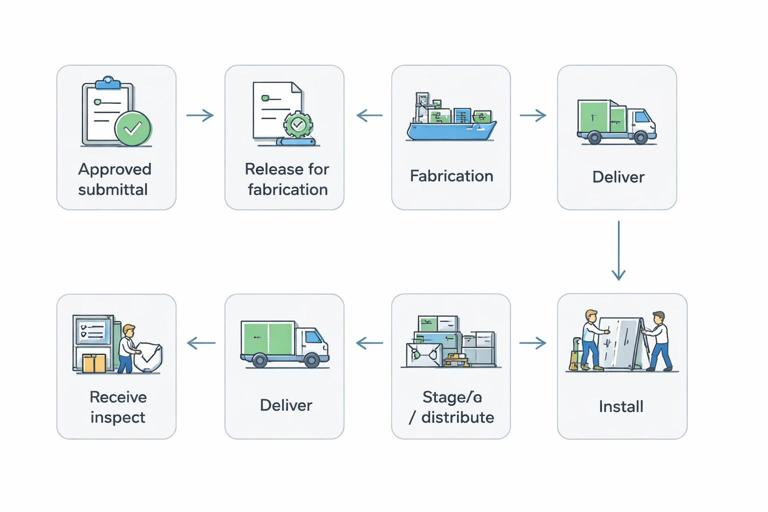
A robust logic pattern is:
- Install has predecessor Stage / distribute
- Stage / distribute has predecessor Receive & inspect
- Receive & inspect has predecessor Deliver
- Deliver has predecessor Ship
- Ship has predecessor Fabrication complete
- Fabrication has predecessor Release for fabrication
- Release for fabrication has predecessor Approved submittal
This chain makes it obvious where slippage occurs and who owns recovery actions.
Step 5: Add logistics “site capacity” activities where they constrain multiple trades
Some logistics elements are shared resources: a tower crane, a material hoist, a loading dock, a single access road, or limited laydown. These should be scheduled as enabling activities or time windows that multiple deliveries must respect.
Examples of schedule elements that often deserve their own activities:
- Loading dock operational (including striping, barriers, lighting, and staffing plan)
- Material hoist installed and certified
- Freight elevator commissioned
- Laydown area prepared (base rock, fencing, drainage, security)
- Traffic control plan active (if deliveries require it)
Then, tie “Deliver” or “Stage” activities to these enabling activities as predecessors, so the schedule reflects real constraints.
Step 6: Build a procurement/logistics look-ahead that mirrors the CPM
The CPM schedule provides the network; the look-ahead provides operational control. Create a rolling 3–8 week procurement/logistics look-ahead that is directly derived from scheduled activities and includes:
- Package name and vendor
- Scheduled dates for approvals, ship, delivery, staging
- Responsible party for each step
- Required site conditions (dock time, hoist slot, storage location)
- Open issues and decision deadlines
This look-ahead should be reviewed in the same rhythm as production planning meetings, so procurement and logistics are treated as production constraints, not administrative tasks.
Practical example: integrating a “finish package” delivery with limited storage
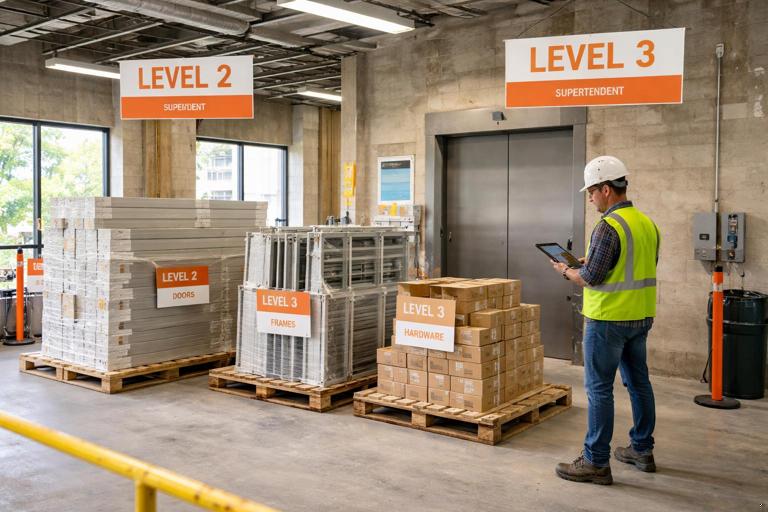
Assume a mid-size commercial interior buildout with limited laydown. A finish package (doors, frames, hardware) is needed floor-by-floor. The risk is receiving everything at once with nowhere to store it, leading to damage, missing parts, and installation delays.
How to schedule it
- Define phased deliveries: create separate schedule chains per floor or per zone (e.g., “Doors/Frames/Hardware – Level 2,” “Level 3”).
- Add a consolidation/kitting step: include an activity “Kit hardware sets by opening” before staging to the floor.
- Include QA gate: “Verify door schedule vs. delivered labels” as part of receiving/inspection.
- Link to installation sequence: “Install frames” depends on “Frames staged Level 2,” not on “Doors delivered.”
What changes in the field
The superintendent can now coordinate dock time and elevator runs based on scheduled staging dates. The subcontractor can plan labor knowing kits will be ready. If the vendor slips fabrication, the schedule shows the first impacted floor, enabling resequencing (e.g., start Level 3 first) rather than discovering the issue when crews are idle.
Procurement and logistics coding: make it filterable and reportable
To manage procurement/logistics at scale, you need to be able to filter the schedule by package, status, and responsibility. Use schedule codes (or activity codes) consistently.
Recommended code structure
- Discipline/CSI division: e.g., 08 Openings, 23 HVAC, 26 Electrical
- Procurement package ID: e.g., PKG-08-001 Doors/Frames/Hardware
- Process step: SUBMIT, APPROVE, FAB, SHIP, DELIV, RECEIVE, STAGE, INSTALL
- Responsible party: GC, Sub, Vendor, Designer/Owner, Logistics
- Location/zone: Level 2, Area A, Gridline range
With this structure, you can generate schedule views such as “All activities with Process Step = DELIV in the next 4 weeks” or “All packages where APPROVE is late and drives INSTALL.”
Managing partial deliveries, substitutions, and split shipments
Real projects rarely deliver in perfect, complete sets. The schedule should anticipate partials and define what “enough to start” means.
Technique: define “minimum installable quantity” milestones
For items that can be installed in phases, add milestones such as:
- First installable lot received (e.g., enough fixtures for Area A)
- Balance of materials received
Then tie early installation to “First installable lot received” and later completion to “Balance received.” This prevents the schedule from assuming all-or-nothing delivery.
Technique: schedule substitution decision deadlines
When alternates or substitutions are likely, create explicit decision activities such as “Approve alternate manufacturer” with a deadline tied backward from “Release for fabrication.” This keeps the decision from silently consuming float and turning into a last-minute crisis.
Site logistics as a production system: appointments, routes, and internal moves
Logistics integration is not only about when a truck arrives; it is about whether the site can absorb the delivery and convert it into installed work. A delivery that arrives on time but cannot be unloaded is effectively late.
Step-by-step: planning a delivery that requires controlled access
- Step 1: Identify access constraints: delivery hours, street permits, gate widths, turning radii, overhead power lines, noise restrictions.
- Step 2: Reserve capacity: schedule a “Delivery appointment window” activity if dock/hoist time is scarce.
- Step 3: Plan unloading method: forklift/crane requirements, rigging crew, dunnage, and weather limits.
- Step 4: Plan internal path: elevator/hoist availability, floor loading limits, protection of finished surfaces.
- Step 5: Define staging location: exact room/zone, racks/pallet positions, and protection requirements.
- Step 6: Confirm documentation: packing list, certificates, and any required tags for inspection or commissioning.
In the schedule, this often translates into a small set of activities: “Delivery appointment,” “Unload & receive,” “Internal distribute,” and “Stage.” The detail lives in the logistics plan, but the schedule holds the time and the dependencies.
Integrating vendor dates and expediting into schedule control
Vendors often provide dates in their own format: “estimated ship week,” “lead time after approval,” or “subject to material availability.” To integrate these into a CPM schedule, convert vendor commitments into schedule activities with measurable milestones.
Practical method: vendor date normalization
- Convert “X weeks after approval” into a fabrication activity that starts at “Approved submittal” and lasts X weeks.
- Convert “ship week of” into a ship milestone placed on the last day of that week (or a conservative date) and track variance.
- Add a buffer only where you can manage it (e.g., between “Deliver” and “Stage”), not hidden inside fabrication where it cannot be controlled.
Expediting as scheduled work
Expediting is often treated as informal follow-up. If a package is schedule-sensitive, make expediting visible by adding recurring checkpoints such as “Vendor progress check” or “Factory readiness review” at key points (e.g., 25%, 50%, 75% fabrication). These do not need to be numerous; two or three checkpoints can provide early warning and justify corrective action.
Receiving and quality gates: preventing schedule rework
Receiving is where procurement becomes field-ready. If receiving is rushed, the project pays later through rework, missing components, and installation stoppages. Scheduling receiving and QA gates creates time and accountability to do it correctly.
What to include in a receiving/QA activity
- Quantity verification against packing list
- Damage inspection and photo documentation
- Model/finish verification against approved submittals
- Tagging and location assignment (where it is stored/staged)
- Exception handling: NCR, RMA, replacement order initiation
For high-risk items (custom glazing, switchgear, generators, prefabricated racks), consider a separate activity “Factory acceptance / pre-ship inspection” as a predecessor to “Ship,” because discovering issues after delivery is often too late.
How to show procurement/logistics in different schedule levels
Different audiences need different levels of detail. Integration works best when procurement/logistics is represented consistently across levels.
Level 1 (executive milestones)
- Key procurement milestones: “Release major equipment,” “Building dried-in for interior material deliveries,” “Permanent power available for commissioning deliveries.”
Level 2 (phase schedule)
- Procurement chains for major packages and any package that can drive phase completion.
- Logistics enabling milestones: hoist/elevator readiness, dock operations start, laydown readiness.
Level 3 (control schedule)
- Phased deliveries by area/level, receiving/staging activities, internal distribution, and QA gates tied directly to installation tasks.
The key is alignment: Level 3 details should roll up cleanly to Level 2 milestones so procurement and logistics status can be communicated without losing the operational truth.
Common integration pitfalls and how to avoid them
Pitfall 1: “Delivery” is scheduled but staging is not
If staging is missing, the schedule assumes the crew can install immediately after delivery. Add “Receive & inspect” and “Stage/distribute” as explicit predecessors to installation.
Pitfall 2: One procurement activity covers too much
Activities like “Procure electrical gear” hide the real gating steps. Break it into approval, fabrication release, fabrication, ship, deliver, receive, stage. Keep the chain consistent so it can be tracked.
Pitfall 3: Logistics constraints are managed verbally
If hoist time, dock access, or street closures are not in the schedule, they will be overbooked. Add enabling activities and appointment windows, then tie deliveries to them.
Pitfall 4: No plan for exceptions
Damaged or incorrect deliveries are common. Include an “Exception resolution” allowance for high-risk packages or at least a milestone “All exceptions closed” before installation completion where appropriate.
Mini-template: procurement and logistics activity set (copy/paste)
PKG-[ID] Submittal Submitted (Done: uploaded complete) PKG-[ID] Submittal Approved / Release for Fab (Done: approved as noted) PKG-[ID] Fabrication (Done: vendor confirms complete) PKG-[ID] Ship (Done: BOL issued, tracking received) PKG-[ID] Deliver to Site (Done: unloaded, ticket signed) PKG-[ID] Receive & Inspect (Done: count verified, exceptions logged/closed) PKG-[ID] Stage/Distribute to [Area] (Done: placed, protected, labeled/kitted) Install [Item] in [Area] (Start allowed only after staging accepted)Use this template for each schedule-sensitive package, then adjust for project-specific needs such as consolidation warehouses, phased floor deliveries, factory acceptance tests, or special handling.