Why Look-Ahead Planning Exists (and What It Solves)
A CPM schedule can be logically correct and still fail in the field if the team cannot reliably turn planned activities into completed work each week. Look-ahead planning and Weekly Work Planning (WWP) are the bridge between the master schedule and day-to-day production. They translate “what should happen” into “what will happen” by focusing on readiness: making sure tasks are workable before crews arrive, and making commitments that match real site conditions.
Look-ahead planning typically operates in a rolling window (often 3 to 6 weeks). It is not a re-baselining exercise and not a replacement for the CPM schedule. Instead, it is a production-control layer that answers three practical questions:
- What work is coming soon? (from the schedule)
- What could prevent that work from being done? (constraints and prerequisites)
- What will we commit to completing next week? (weekly plan)
Weekly Work Planning is the short-cycle commitment meeting and plan that sets clear, measurable promises for the next week. The weekly plan is only as good as the look-ahead process that makes work “ready.”
Key Terms Used on Site
Look-Ahead Window
A rolling time horizon used to prepare upcoming work. Common windows are 3 weeks (fast-moving interiors), 6 weeks (mixed trades), or 8 weeks (complex coordination). The right window is long enough to remove constraints but short enough to stay realistic.
Make-Ready (Constraint Removal)
The disciplined process of identifying and clearing anything that would stop a task from being executed safely and efficiently. The output is a list of constraints, owners, and due dates.
- Listen to the audio with the screen off.
- Earn a certificate upon completion.
- Over 5000 courses for you to explore!

Download the app
Weekly Work Plan (WWP)
A one-week set of commitments by foremen/superintendents: specific tasks, locations, quantities (or measurable completion criteria), and required resources. It is a promise-based plan, not a wish list.
Workable Backlog
A buffer of tasks that are fully ready to execute. If weather, access, or an inspection disrupts the primary plan, the team can pivot to backlog work without losing the week.
Percent Plan Complete (PPC)
A reliability metric: the number of planned assignments completed as promised divided by the total planned assignments. PPC is used to learn and improve planning quality, not to punish.
How Look-Ahead Planning Connects to the CPM Schedule (Without Repeating It)
The CPM schedule provides the sequence and target dates. Look-ahead planning pulls the near-term activities from that schedule and tests them against reality: access, design details, field measurements, crew continuity, and coordination. When the look-ahead reveals that upcoming work is not ready, the team does not simply “push it a week” informally. Instead, the team either (1) removes constraints to keep the planned date, (2) resequences within allowable logic to protect flow, or (3) escalates decisions early enough to avoid last-minute firefighting.

Think of the CPM schedule as the map and look-ahead planning as checking road conditions and clearing obstacles before the convoy arrives.
Step-by-Step: Running a 6-Week Look-Ahead Planning Cycle
Step 1: Pull the 6-Week Work List
At a consistent cadence (often weekly), extract all activities expected to start or finish within the next 6 weeks for the relevant area(s). On many projects, it is helpful to organize by zone (e.g., Level 2 East, Unit Stack A, Corridor) and by trade.
Practical tip: If the extracted list is too long to manage, you are likely pulling activities that are too broad for field control. Break them into smaller, location-based assignments for look-ahead purposes (without turning this into a full rescheduling effort).
Step 2: Convert Activities into “Ready-to-Run” Checks
For each upcoming assignment, ask: “What must be true before a crew can start and finish this without stopping?” Use a standard checklist so the team does not rely on memory.
A common readiness checklist includes:
- Design/Information: latest drawings available, RFIs answered, details clarified, dimensions verified in field
- Access: area released, previous trade complete, laydown path clear, scaffolding/lifts available
- Materials/Tools: on site and kitted, correct quantities, special tools available, consumables stocked
- Labor: crew confirmed, foreman assigned, skill mix appropriate
- Safety/Quality: JHA/Task plan prepared, permits to work if needed, mockups/first-in-place requirements met
- Prerequisite work: embeds installed, rough-ins tested, substrate cured, tolerances verified
- Coordination: no trade stacking conflicts, inspections/tests sequenced, shared equipment scheduled
Step 3: Identify Constraints and Log Them
Any missing prerequisite becomes a constraint. Capture it in a constraint log with:
- Constraint description (specific, observable)
- Related assignment (trade, location, date needed)
- Owner (person, not company)
- Due date (the date it must be cleared to protect the plan)
- Status (open/in progress/cleared)
Example constraints written well vs. poorly:
- Poor: “Need drywall ready.”
- Better: “Level 3 West corridor: confirm above-ceiling MEP rough-in inspection passed and ceiling grid layout issued before drywall close-in can start on 1/22.”
Step 4: Make-Ready Actions (Assign, Track, Escalate)
During the look-ahead meeting, assign each constraint to an owner and confirm the clearing action. Between meetings, the superintendent (or field engineer) tracks progress and escalates early if due dates are at risk.
Practical escalation rule: If a constraint is not cleared by the “need-by” date minus one week (or another agreed buffer), it must be escalated to the project manager or design lead for resolution.
Step 5: Build a Workable Backlog
As constraints are cleared, tasks become “workable.” Maintain a short list of workable tasks by zone/trade that can be executed if the primary plan is disrupted. The backlog should be truly ready—no hidden dependencies.
Examples of good backlog items:
- Install door hardware in completed rooms where punch prerequisites are met
- Paint touch-up in areas released by other trades
- Complete firestopping in shafts where inspections are not gating
Step 6: Prepare Inputs for the Weekly Work Plan
At the end of the look-ahead cycle, you should have:
- A list of assignments that are ready for next week
- A list of assignments that are not ready with constraints and owners
- A workable backlog
- Known coordination points (shared lifts, shutdowns, hot work windows, access restrictions)
Step-by-Step: Building a Strong Weekly Work Plan (WWP)
Step 1: Hold the Weekly Planning Meeting with the Right People
The weekly plan must be built by the people who control production: superintendent, general foremen/foremen, key subcontractor leads, and anyone controlling shared resources (hoist, crane, lift scheduling). If the meeting is attended only by management without field decision-makers, the plan becomes a forecast rather than a commitment.
Step 2: Start with “Ready Work Only”
Only pull tasks into the weekly plan if they are workable (constraints cleared) or will be cleared before the planned start with high confidence. This is the core discipline that improves reliability.
If a task is important but not ready, do not “hope” it becomes ready. Put the constraint-clearing action in the plan instead (e.g., “Complete above-ceiling inspection in Zone 2 by Tuesday 10am”).
Step 3: Define Assignments at the Right Level of Detail
A weekly assignment must be small enough to be completed within the week and specific enough to verify. A good assignment includes:
- Who: trade/crew/foreman
- What: task with clear scope boundaries
- Where: location/zone/room numbers
- How much: quantity, linear feet, number of rooms, or “complete to inspection-ready”
- When: planned start/finish day (or sequence within the week)
- Acceptance: what “done” means (tested, inspected, signed off, ready for next trade)
Example of a strong weekly assignment:
- “Drywall Crew A: Hang and screw 5/8" GWB on Level 2 East corridor walls from Grid D to F, Rooms 210–218, complete to tape-ready by Thursday EOD; maintain 1-hour fire rating details per detail A5.2.”
Step 4: Balance the Week for Flow, Not Just Volume
Weekly planning is not only about maximizing each trade’s output; it is about maintaining flow across trades and locations. Avoid stacking too many trades in the same tight area on the same day. Use simple visual tools (a whiteboard zone map or a location-by-day matrix) to spot congestion.
A practical method is a “zone-day grid”:
            Mon     Tue     Wed     Thu     Fri
Zone 2E     MEP     MEP     Drywall Drywall Punch
Zone 2W     Frame   Frame   MEP     MEP     Drywall
Corridor    Layout  Layout  Hang    Hang    Tape
This does not replace the schedule; it makes the weekly plan executable.
Step 5: Confirm Support Needs (Site Services)
Many weekly failures happen because support needs are assumed. Confirm in the meeting:
- Material staging locations and delivery times
- Lift/scaffold reservations and operator availability
- Trash removal, housekeeping, and access paths
- Temporary power/water/lighting needs
- Layout needs (who provides, when)
Write these as explicit assignments with owners. “Superintendent to provide lift” is not enough; specify which lift, where, and when.
Step 6: Lock Commitments and Publish the Plan
At the end of the meeting, each foreman should be able to state what they will complete by week’s end. Publish the plan the same day in a simple format: one page or a photo of the board, plus the constraint log updates. The goal is field usability, not perfect formatting.
Daily Control: Keeping the Weekly Plan Alive
A weekly plan fails when it is treated as a document rather than a control system. Use short daily huddles (10–15 minutes) to confirm:
- What was completed yesterday (by assignment)
- What will be completed today
- New constraints discovered in the field
- Safety/quality risks for today’s work
- Coordination needs (access, inspections, shared equipment)
Daily huddles are also where the workable backlog becomes valuable. If a planned area is blocked, the crew can pivot to a backlog assignment without losing momentum.
Measuring Reliability: PPC and Reasons for Variance
How to Calculate PPC
PPC = (Number of weekly assignments completed as promised) / (Total number of weekly assignments planned) × 100.
Important: PPC is only meaningful if assignments are written in a way that can be clearly judged as complete or not complete.
Track Reasons for Variance (Learning Loop)
When an assignment is not completed, record the primary reason. Keep the list consistent so trends appear. Common categories include:
- Prerequisite work not complete
- Access/area not released
- Information missing/late clarification
- Labor shortage or crew reassigned
- Equipment unavailable/breakdown
- Quality rework
- Weather impacts
- Coordination conflict/trade interference
Use the reasons to improve the make-ready process. For example, if “access not released” is frequent, the team may need clearer handoff criteria between trades or better zone turnover discipline.
Practical Example: Interior Build-Out with Rolling Zones
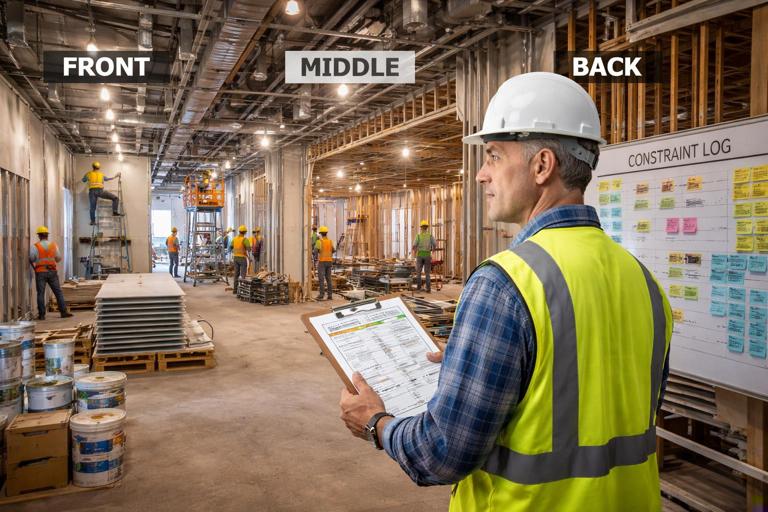
Scenario: A small-to-mid commercial interior build-out is divided into three zones: Front, Middle, Back. The next 6 weeks include framing, above-ceiling rough-in, inspections, drywall, and ceiling grid.
Look-Ahead Output (Excerpt)
- Zone Front: Drywall hang planned Week 3. Constraints: above-ceiling inspection must pass; confirm firestopping at penetrations; verify door frame anchors installed.
- Zone Middle: MEP rough-in planned Week 2. Constraints: final equipment cut sheets confirmed; layout points set; access to ceiling plenum cleared of stored materials.
- Zone Back: Framing planned Week 1. Constraints: slab penetrations located; material staged; wall types clarified at corridor intersection.
Weekly Work Plan (Week 1)
- Framing Foreman: Frame Zone Back offices B101–B108, complete to “MEP rough-in ready” by Friday.
- Layout Tech: Provide layout for Zone Back walls by Monday noon; verify corridor centerline.
- Superintendent: Clear stored materials from Zone Middle ceiling access path by Tuesday 9am.
- MEP Foreman: Rough-in Zone Middle main corridor to 80% by Friday, excluding areas awaiting layout revision.
- Field Engineer: Schedule and confirm above-ceiling inspection for Zone Front for Week 2 Wednesday.
Notice that the plan includes both production tasks and make-ready tasks. This is how the team protects future weeks while still producing this week.
Common Failure Modes (and How to Prevent Them)
Failure Mode 1: Weekly Plan Is a Copy of the Schedule
If the weekly plan is just scheduled activities pasted into a list, it will ignore readiness and field constraints. Prevention: only include workable assignments with clear acceptance criteria and locations.
Failure Mode 2: Assignments Are Too Big to Finish
“Complete drywall Level 2” is not a weekly assignment. Prevention: break work by zone/rooms and define measurable completion (e.g., “hang and screw,” “tape and sand,” “ready for primer”).
Failure Mode 3: Constraints Are Identified but Not Owned
A constraint log without owners and due dates is a wish list. Prevention: assign a person, a due date, and a clearing action; review status every week.
Failure Mode 4: Trades Commit Without Seeing the Site Reality
Commitments made from the trailer can miss access issues, congestion, or incomplete prerequisite work. Prevention: do a short “walk-the-work” before or after the meeting, focusing on next week’s zones.
Failure Mode 5: PPC Is Used as a Weapon
If PPC is used to blame, teams will game the system by writing easy assignments or redefining “done.” Prevention: treat PPC as a learning metric; focus on removing recurring causes of variance.
Templates You Can Use on Site
Constraint Log (Simple Format)
ID | Assignment/Location | Constraint | Owner | Need-by Date | Status | Notes
01 | Zone 2E Drywall     | Above-ceiling inspection not scheduled | FE | 01/22 | Open | Request AHJ slot
02 | Zone 2W MEP Rough   | Missing hanger detail at beam pocket   | PM | 01/18 | In Prog | RFI #34
03 | Corridor Grid       | Lift needed for duct install           | Supt | 01/15 | Cleared | Lift reserved
Weekly Work Plan (One-Page Structure)
Week of: ________

Assignments (Ready Work)
- Trade/Crew | Location | Task | Qty/Acceptance | Start | Finish | Notes

Make-Ready / Constraint Clearing
- Owner | Action | Related Work | Due Day/Time

Workable Backlog (Ready if needed)
- Trade | Location | Task | Acceptance

Shared Resources / Coordination
- Lifts/Scaffold: ________
- Shutdowns/Hot Work: ________
- Inspections/Tests: ________
These formats are intentionally simple so they can be used on a whiteboard, in a spreadsheet, or in a field app without changing the underlying thinking.
How to Improve Week Over Week (Practical Routine)
Weekly Learning Review (15–20 Minutes)
At the start of each weekly planning meeting, review last week’s plan:
- Calculate PPC
- List incomplete assignments
- Agree on the primary reason for each miss
- Pick the top 1–2 recurring reasons and define a countermeasure
Countermeasures should be specific and testable. Example: If “information missing” is recurring, implement a rule that any task requiring a sketch/detail must have it attached to the look-ahead package two weeks before execution.
Stabilize Hand-offs Between Trades
Many weekly misses happen at trade handoffs. Define “release criteria” for common handoffs, such as:
- Framing released to MEP rough-in only when walls are plumb, openings framed, backing installed, and layout verified
- MEP rough-in released to drywall only when pressure tests complete, inspections passed, and penetrations firestopped (or clearly assigned)
Write these criteria where foremen can see them and use them during daily huddles.
Protect Crew Continuity
Even when labor is available, productivity drops when crews are constantly moved. Use the look-ahead to protect continuity by ensuring the next zone is ready before the crew finishes the current one. This is one of the biggest practical benefits of look-ahead planning: fewer starts and stops.