


What a Helm Chart Is and Why It Matters for Reuse
A Helm chart is a versioned, installable package that describes a Kubernetes application as a set of templates plus default configuration. The key authoring goal is to make the chart reusable across environments and teams without forking YAML. Reuse comes from three ideas: (1) templates that generate Kubernetes manifests, (2) a values schema that exposes safe knobs for operators, and (3) packaging/versioning so the same artifact can be promoted through environments.
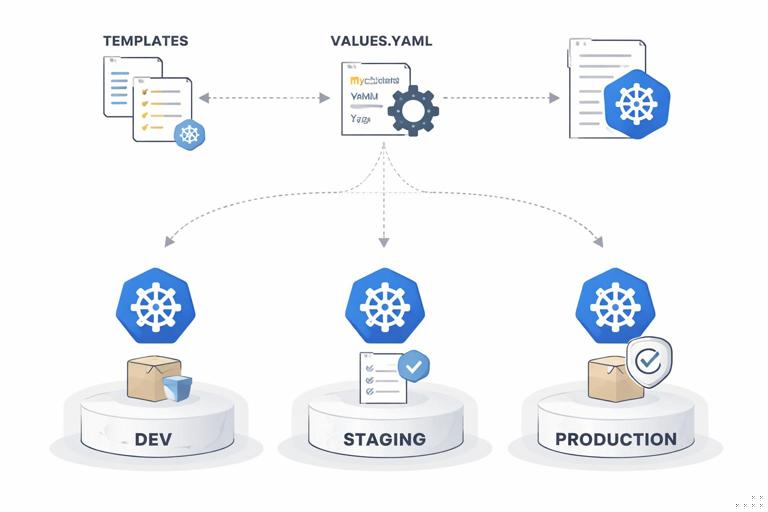
As a chart author, you are designing an interface. The interface is the values.yaml (and optionally a JSON schema) plus the outputs your templates produce. A good chart hides internal complexity, provides sensible defaults, and makes it hard to misconfigure common things (like ports, labels, probes, or resource requests) while still allowing overrides when needed.
Chart Anatomy: Files and Responsibilities
A typical chart structure looks like this:
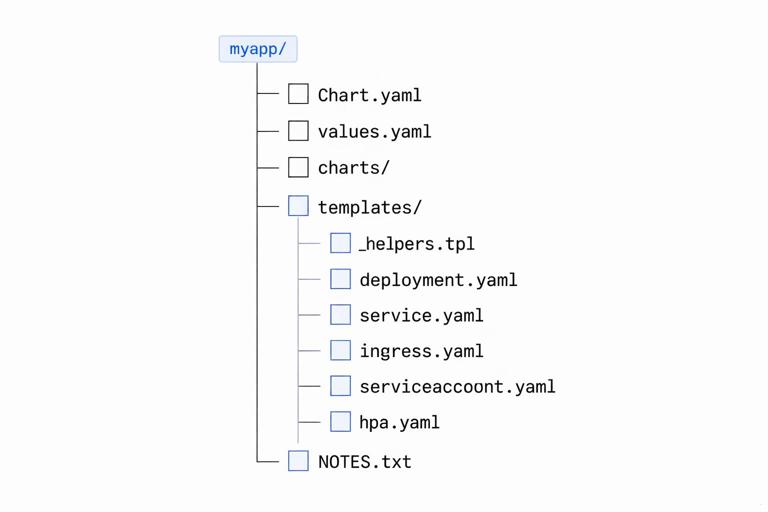
myapp/ Chart.yaml values.yaml charts/ templates/ _helpers.tpl deployment.yaml service.yaml ingress.yaml serviceaccount.yaml hpa.yaml NOTES.txtChart.yaml: chart metadata (name, version, appVersion, dependencies).values.yaml: default configuration values (the public interface).templates/: Kubernetes manifest templates rendered with Go templating.templates/_helpers.tpl: reusable template functions/macros (names, labels, selectors).charts/: dependency charts (either vendored or populated byhelm dependency build).NOTES.txt: post-install hints (how to access the app, next steps).
Keep templates small and composable. Put repeated logic (naming, labels, common annotations) into helpers so you don’t copy/paste across resources.
Step-by-Step: Scaffold a New Chart and Set a Reuse Baseline
1) Create the chart skeleton
helm create myappThis generates a working example, but you should treat it as a starting point and simplify it to match your app. Remove resources you do not need, and align the values interface to your organization’s conventions.
- Listen to the audio with the screen off.
- Earn a certificate upon completion.
- Over 5000 courses for you to explore!

Download the app
2) Define minimal, stable metadata in Chart.yaml
Example Chart.yaml:
apiVersion: v2name: myappdescription: Reusable chart for MyApp services.type: applicationversion: 0.1.0appVersion: "1.0.0"versionis the chart package version (SemVer). Increment it when templates/values change.appVersionis the underlying application version (often the container tag). It’s informational but useful for UIs and audit trails.
3) Design values.yaml as an API, not a dumping ground
A reusable chart exposes a small set of high-value knobs. Organize values by concern and keep naming consistent:

image: repository: ghcr.io/example/myapp tag: "" pullPolicy: IfNotPresentreplicaCount: 2service: type: ClusterIP port: 8080resources: requests: cpu: 100m memory: 128Mi limits: cpu: 500m memory: 512Mienv: []podAnnotations: {}podLabels: {}serviceAccount: create: true name: ""autoscaling: enabled: false minReplicas: 2 maxReplicas: 10 targetCPUUtilizationPercentage: 80Guidelines:
- Prefer structured objects over many flat keys.
- Use empty strings to indicate “auto” (for example,
image.tagempty means default to.Chart.AppVersion). - Expose lists for extensibility (for example,
envas a list of name/value pairs). - Keep defaults safe and production-friendly (requests set, non-root security context if applicable, etc.).
Templating Fundamentals for Chart Authors
Helm templates are Kubernetes YAML with Go template directives. You’ll commonly use:
{{ .Values ... }}to read values.{{ .Chart ... }}and{{ .Release ... }}for metadata.- Pipelines and functions like
default,required,quote,toYaml,nindent,include. - Control structures:
if,with,range.
Two practical rules prevent most rendering issues: (1) always manage indentation when injecting YAML blocks, and (2) avoid emitting empty keys or invalid YAML when values are unset.
Helpers: consistent naming and labels
Create helpers in templates/_helpers.tpl:
{{- define "myapp.name" -}}{{- default .Chart.Name .Values.nameOverride | trunc 63 | trimSuffix "-" -}}{{- end -}}{{- define "myapp.fullname" -}}{{- if .Values.fullnameOverride -}}{{- .Values.fullnameOverride | trunc 63 | trimSuffix "-" -}}{{- else -}}{{- printf "%s-%s" .Release.Name (include "myapp.name" .) | trunc 63 | trimSuffix "-" -}}{{- end -}}{{- end -}}{{- define "myapp.labels" -}}app.kubernetes.io/name: {{ include "myapp.name" . }}app.kubernetes.io/instance: {{ .Release.Name }}app.kubernetes.io/managed-by: {{ .Release.Service }}helm.sh/chart: {{ printf "%s-%s" .Chart.Name .Chart.Version | replace "+" "_" }}{{- end -}}{{- define "myapp.selectorLabels" -}}app.kubernetes.io/name: {{ include "myapp.name" . }}app.kubernetes.io/instance: {{ .Release.Name }}{{- end -}}Use these helpers everywhere so selectors and labels remain stable. Stable selectors are critical: if you change them accidentally, Kubernetes may treat resources as unrelated and cause downtime or orphaned pods.
Authoring a Reusable Deployment Template
Below is a simplified templates/deployment.yaml showing common reuse patterns: defaults, optional blocks, and helper usage.

apiVersion: apps/v1kind: Deploymentmetadata: name: {{ include "myapp.fullname" . }} labels: {{- include "myapp.labels" . | nindent 4 }}spec: replicas: {{ .Values.replicaCount }} selector: matchLabels: {{- include "myapp.selectorLabels" . | nindent 6 }} template: metadata: labels: {{- include "myapp.selectorLabels" . | nindent 8 }} {{- with .Values.podLabels }} {{- toYaml . | nindent 8 }} {{- end }} {{- with .Values.podAnnotations }} annotations: {{- toYaml . | nindent 8 }} {{- end }} spec: serviceAccountName: {{ include "myapp.serviceAccountName" . }} containers: - name: {{ include "myapp.name" . }} image: "{{ .Values.image.repository }}:{{ default .Chart.AppVersion .Values.image.tag }}" imagePullPolicy: {{ .Values.image.pullPolicy }} ports: - name: http containerPort: {{ .Values.service.port }} protocol: TCP {{- with .Values.env }} env: {{- toYaml . | nindent 12 }} {{- end }} resources: {{- toYaml .Values.resources | nindent 12 }}Notes on reuse:
default .Chart.AppVersion .Values.image.tagkeeps the chart installable without specifying a tag, while still allowing explicit pinning.withblocks avoid emitting empty YAML keys when maps/lists are empty.toYaml | nindentis the standard pattern for injecting nested YAML from values.
ServiceAccount helper
Add a helper to compute the service account name:
{{- define "myapp.serviceAccountName" -}}{{- if .Values.serviceAccount.create -}}{{- default (include "myapp.fullname" .) .Values.serviceAccount.name -}}{{- else -}}{{- default "default" .Values.serviceAccount.name -}}{{- end -}}{{- end -}}This makes the chart work in clusters where teams prefer pre-created service accounts.
Conditionally Rendering Resources (Feature Flags)
Reusable charts often include optional resources such as autoscaling, ingress, or service monitors. Use boolean flags and if blocks so the chart can fit multiple deployment profiles.
Example: HPA template guarded by a flag
{{- if .Values.autoscaling.enabled }}apiVersion: autoscaling/v2kind: HorizontalPodAutoscalermetadata: name: {{ include "myapp.fullname" . }} labels: {{- include "myapp.labels" . | nindent 4 }}spec: scaleTargetRef: apiVersion: apps/v1 kind: Deployment name: {{ include "myapp.fullname" . }} minReplicas: {{ .Values.autoscaling.minReplicas }} maxReplicas: {{ .Values.autoscaling.maxReplicas }} metrics: - type: Resource resource: name: cpu target: type: Utilization averageUtilization: {{ .Values.autoscaling.targetCPUUtilizationPercentage }}{{- end }}Keep the values grouped under autoscaling so users can discover related settings easily.
Values Validation with values.schema.json
Helm supports JSON Schema validation via values.schema.json. This is one of the most effective ways to make charts reusable because it fails fast with clear errors when users pass invalid values.
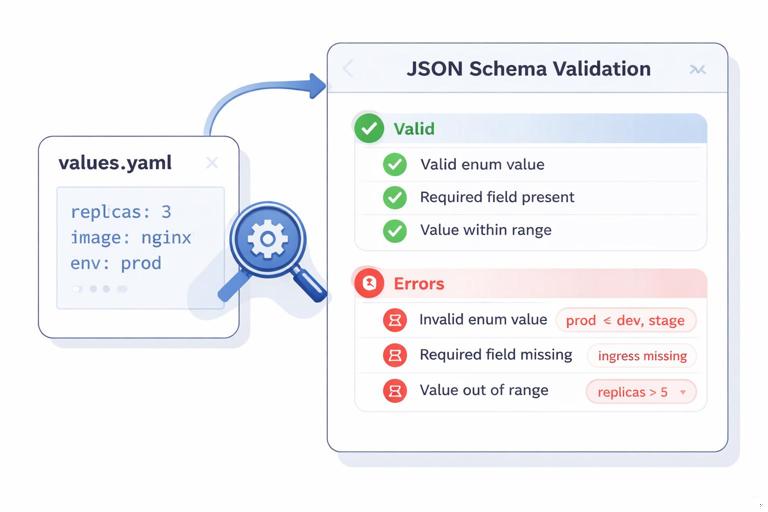
Example schema snippet:
{ "$schema": "https://json-schema.org/draft-07/schema#", "type": "object", "properties": { "replicaCount": { "type": "integer", "minimum": 1 }, "image": { "type": "object", "properties": { "repository": { "type": "string", "minLength": 1 }, "tag": { "type": "string" }, "pullPolicy": { "type": "string", "enum": ["Always", "IfNotPresent", "Never"] } }, "required": ["repository"] }, "service": { "type": "object", "properties": { "type": { "type": "string", "enum": ["ClusterIP", "NodePort", "LoadBalancer"] }, "port": { "type": "integer", "minimum": 1, "maximum": 65535 } }, "required": ["port"] } }}Practical tips:
- Validate enums (like pull policy, service type) to prevent typos.
- Set numeric bounds for ports and replica counts.
- Use
requiredsparingly; prefer defaults when possible.
Making Charts Composable with Dependencies
Helm supports chart dependencies so you can reuse common components (for example, a database, a cache, or a shared “library chart” of helpers). Dependencies are declared in Chart.yaml and fetched into charts/.
Declaring a dependency
dependencies: - name: redis version: 19.0.0 repository: https://charts.bitnami.com/bitnami condition: redis.enabledThen in values.yaml you can add:
redis: enabled: falseThe condition field allows users to enable/disable the dependency via values. This keeps the parent chart reusable: some environments may provide Redis externally, while others want it installed alongside the app.
Dependency build workflow
helm dependency update ./myapphelm dependency build ./myappUse dependency update during development to fetch the latest allowed versions, and dependency build in CI to reproduce builds from Chart.lock.
Library Charts for Shared Helpers and Standards
If you maintain multiple services, a library chart is a powerful reuse mechanism. A library chart contains only templates/helpers and is not installable by itself. It lets you standardize labels, naming, pod security defaults, and common snippets (like container env injection patterns) across many charts.
In the library chart’s Chart.yaml:
apiVersion: v2name: platform-libtype: libraryversion: 1.2.0In an application chart, add it as a dependency and then call helpers via include. This reduces drift and makes it easier to roll out organization-wide improvements (for example, new standard labels or annotations) by bumping a dependency version.
Advanced Templating Patterns for Reuse
Using tpl to render user-provided templates safely
Sometimes you want to allow users to pass templated strings (for example, annotations that reference release name). Helm provides tpl to render a string as a template in the current context.
metadata: annotations: example.com/info: {{ tpl .Values.extraInfoTemplate . | quote }}Use this sparingly: it increases power but also complexity. Document clearly which values accept templates.
Generating lists with range
For configurable extra ports:
{{- with .Values.extraPorts }}ports: - name: http containerPort: {{ $.Values.service.port }} {{- range . }} - name: {{ .name }} containerPort: {{ .containerPort }} protocol: {{ default "TCP" .protocol }} {{- end }}{{- end }}Notice the use of $ to reference the root context inside a range.
Failing fast with required
For values that truly must be provided (for example, an external hostname when a feature is enabled):
{{- if .Values.external.enabled }}host: {{ required "external.host is required when external.enabled=true" .Values.external.host }}{{- end }}This prevents partial installs that render invalid manifests.
Testing and Linting Charts During Authoring
Reusable packaging requires fast feedback. Use these commands continuously while editing templates:
helm lint ./myappto catch common issues and schema violations.helm template ./myapp -f values-dev.yamlto render manifests locally and inspect output.helm template ./myapp --debugto see computed values and rendering context.helm install --dry-run --debug myapp ./myappto simulate an install with server-side checks where possible.
A practical workflow is to maintain a small set of example values files that represent real scenarios (for example, minimal, production, with autoscaling, with dependency enabled) and render them in CI to ensure templates remain valid across use cases.
Example: render multiple scenarios
helm template myapp ./myapp -f ./examples/minimal.yaml > /tmp/minimal.yamlhelm template myapp ./myapp -f ./examples/production.yaml > /tmp/production.yamlhelm template myapp ./myapp -f ./examples/with-redis.yaml > /tmp/with-redis.yamlThen validate the rendered YAML with Kubernetes schema validation tools in CI if your organization uses them.
Packaging, Versioning, and Distribution
Once authored, charts are packaged into a .tgz artifact. This artifact is what you publish and promote.
Package a chart
helm package ./myapp --destination ./distThis produces something like dist/myapp-0.1.0.tgz. Versioning guidance:
- Bump
versionwhen any template/values/schema changes. - Use SemVer: breaking changes to values or rendered resources should be a major bump.
- Keep
appVersionaligned to the default image tag behavior you implement.
Create and update a chart repository index
If you host charts in a simple HTTP-backed repository, you’ll maintain an index:
helm repo index ./dist --url https://example.com/chartsUsers can then add the repo and install by version:
helm repo add example https://example.com/chartshelm install myapp example/myapp --version 0.1.0Even if you distribute charts through an OCI registry, the authoring principles remain the same: treat the chart as a versioned artifact with a stable configuration interface.
Documentation Inside the Chart: NOTES.txt and Values Comments
Reusable charts reduce support load when they are self-explanatory. Two places matter:
values.yamlcomments: explain what a value does, acceptable ranges, and examples.templates/NOTES.txt: show the user how to access the service, where to look for logs, and which values are commonly overridden.
Example NOTES.txt snippet:
1. Get the application URL: kubectl get svc {{ include "myapp.fullname" . }} -n {{ .Release.Namespace }}2. View pods: kubectl get pods -l app.kubernetes.io/instance={{ .Release.Name }} -n {{ .Release.Namespace }}Keep NOTES focused on immediate operational steps, not long explanations.
Common Chart Authoring Pitfalls (and How to Avoid Them)
Changing selectors or names unintentionally
Selectors should be derived from stable helpers and rarely changed. If you must change label keys used in selectors, treat it as a breaking change and bump the major chart version.
Overexposing internal details in values
If users must set many low-level fields, the chart becomes hard to reuse. Prefer higher-level values (for example, service.port rather than exposing the entire Service spec), and add “escape hatches” only where necessary (for example, extraAnnotations, extraEnv, extraVolumes).
Indentation and empty YAML blocks
Most Helm rendering bugs are indentation-related. Use nindent consistently and wrap optional blocks with with/if so you don’t emit empty keys like annotations: with no children.
Not pinning dependency versions
Dependencies should be versioned and locked. Commit Chart.lock and use helm dependency build in CI to ensure reproducible packaging.
Practical Mini-Exercise: Turn a Single-Service Chart into a Reusable Template
This exercise focuses on authoring decisions rather than Kubernetes basics.
Step 1: Identify what must vary across environments
- Replica count and autoscaling settings
- Image repository/tag
- Resource requests/limits
- Pod annotations/labels for integrations
Move these into values.yaml under clear keys.
Step 2: Extract repeated logic into helpers
- Full name computation
- Standard labels and selector labels
- Service account naming
Replace inline label blocks with {{ include "..." . }} calls.
Step 3: Add optional resources behind flags
- Add
autoscaling.enabledand guard the HPA template. - If you include additional integrations, ensure each is independently toggleable.
Step 4: Add a schema to validate values
Create values.schema.json and validate the most error-prone fields (ports, enums, required fields when features are enabled).
Step 5: Render and lint multiple scenarios
Create example values files and run:
helm lint ./myapphelm template ./myapp -f ./examples/minimal.yamlhelm template ./myapp -f ./examples/production.yamlInspect the rendered output to ensure labels/selectors match, optional resources appear only when enabled, and defaults produce valid manifests.







