


What GitOps Delivery Means in Practice
GitOps delivery is an operating model where the desired state of your Kubernetes workloads is defined declaratively in a Git repository, and an automated controller continuously reconciles the live cluster to match what is in Git. Instead of “pushing” changes to the cluster with imperative commands, you “commit” changes to Git and let the system apply them. This shifts deployments from a human-driven activity to a controlled, auditable, and repeatable process.
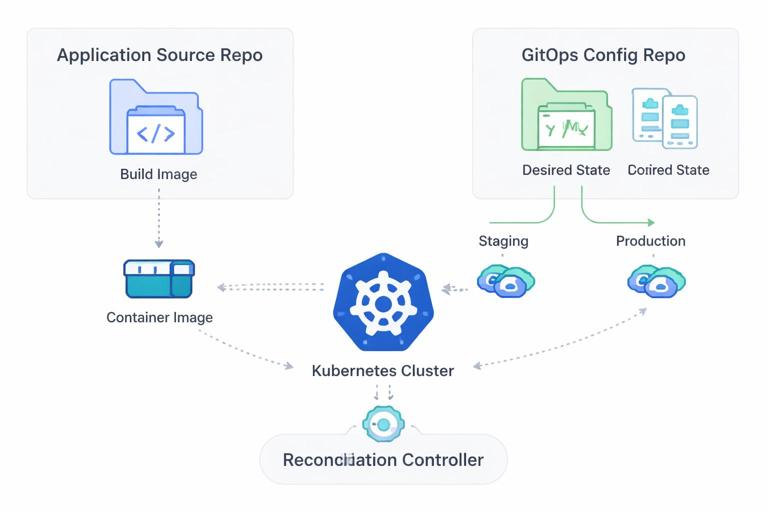
Two ideas make GitOps delivery work reliably: declarative deployments and reconciliation. Declarative deployments mean you describe what you want (manifests, Kustomize overlays, Helm releases, policy objects), not the steps to get there. Reconciliation means a controller compares desired state (Git) to actual state (cluster) and continuously corrects drift. If someone manually edits a Deployment in the cluster, the controller will detect the divergence and revert it back to the Git-defined state.
GitOps is not just “CI/CD with Git.” CI is still used to build, test, and publish artifacts (container images, Helm charts). GitOps focuses on CD: promoting a version by changing Git state and letting the cluster pull and apply it. This pull-based approach reduces the need for CI systems to have cluster-admin credentials and makes the cluster the final authority on what is running.
Declarative Deployments: The Core Building Blocks
Desired state as versioned configuration
In GitOps, every deployment-relevant change is represented as a diff in Git: image tags, resource requests, feature flags, autoscaling parameters, and Kubernetes objects. Because Git is the source of truth, you get a complete audit trail: who changed what, when, and why (via commit messages and pull requests). Rollbacks become a Git revert, not a scramble to remember which command was run.
Reconciliation loops and drift control
A GitOps controller (commonly Argo CD or Flux) runs in the cluster and performs reconciliation. It watches Git repositories (or OCI artifacts) and applies changes. It also watches the cluster and reports whether the live state matches the desired state. Drift detection is a key operational benefit: it prevents “configuration snowflakes” where clusters diverge over time due to manual hotfixes.
- Listen to the audio with the screen off.
- Earn a certificate upon completion.
- Over 5000 courses for you to explore!

Download the app
What “declarative” implies for rollbacks
With imperative deployments, rollback logic is often custom: scripts that attempt to undo previous steps. With declarative deployments, rollback is simply returning the desired state to a previous known-good commit. The controller then reconciles the cluster back to that state. This is more reliable because it does not depend on remembering the exact inverse of each action; it depends on re-applying a complete desired state snapshot.
Repository Layout for GitOps Delivery
A practical GitOps setup typically separates application source code from delivery configuration. The application repository produces an image; the GitOps repository declares what version runs where. This separation reduces accidental coupling and makes promotions explicit.
Example: a GitOps repository structure
gitops-repo/ apps/ payments-api/ base/ deployment.yaml service.yaml hpa.yaml overlays/ staging/ kustomization.yaml patch-image.yaml patch-resources.yaml production/ kustomization.yaml patch-image.yaml patch-resources.yaml clusters/ staging/ kustomization.yaml apps.yaml production/ kustomization.yaml apps.yaml policies/ kyverno/ gatekeeper/This structure supports a few important patterns: shared base manifests, environment-specific overlays, and cluster-level composition. A controller can sync a cluster root (for example, clusters/production) and that root references the apps and policies that should exist in that cluster.
Step-by-Step: Implementing GitOps Delivery with Argo CD
The following steps show a common workflow using Argo CD. The same concepts map to Flux, but the custom resources differ.
Step 1: Install Argo CD
Install Argo CD into a dedicated namespace. In production, you would also configure SSO, RBAC, and network policies, but the core installation is straightforward.
kubectl create namespace argocd kubectl apply -n argocd -f https://raw.githubusercontent.com/argoproj/argo-cd/stable/manifests/install.yamlExpose the Argo CD API/UI via an Ingress or port-forward depending on your environment.
Step 2: Register the Git repository
Argo CD needs read access to your GitOps repository. Use a deploy key or a GitHub App token. The key point is: the controller pulls from Git; your CI does not need to push to the cluster.
Step 3: Define an Argo CD Application
An Application object tells Argo CD what to sync (repo/path), where to sync it (cluster/namespace), and how to sync (automated or manual, prune, self-heal).
apiVersion: argoproj.io/v1alpha1 kind: Application metadata: name: payments-api-staging namespace: argocd spec: project: default source: repoURL: https://github.com/acme-org/gitops-repo.git targetRevision: main path: apps/payments-api/overlays/staging destination: server: https://kubernetes.default.svc namespace: payments syncPolicy: automated: prune: true selfHeal: true syncOptions: - CreateNamespace=trueprune: true ensures removed objects are deleted from the cluster. selfHeal: true enforces drift correction. These are powerful: use them intentionally and pair them with good review practices and policy checks.
Step 4: Promote a version by changing Git
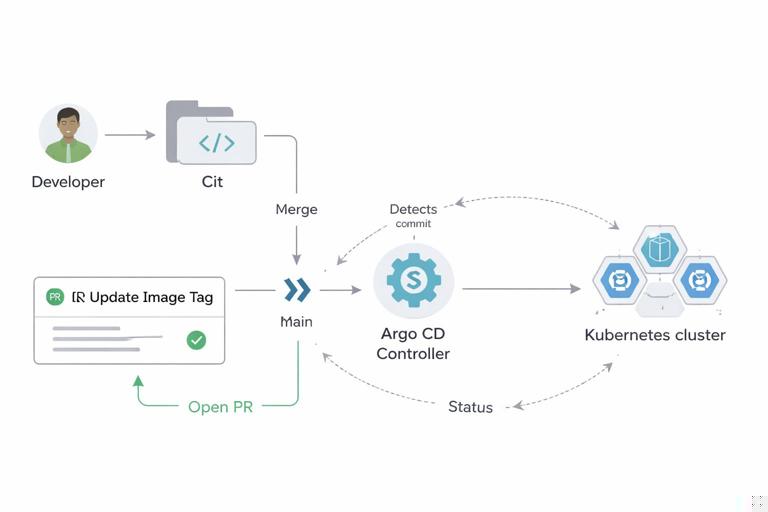
Assume your staging overlay pins the image tag in a patch. A promotion is a pull request that updates the tag.
# apps/payments-api/overlays/staging/patch-image.yaml apiVersion: apps/v1 kind: Deployment metadata: name: payments-api spec: template: spec: containers: - name: app image: ghcr.io/acme-org/payments-api:1.8.3When the PR merges, Argo CD detects the new commit and syncs the change. The deployment happens as a reconciliation event, not as a CI job running kubectl apply.
Automated Rollbacks: What They Are and What They Are Not
In GitOps, rollback can mean two related but distinct mechanisms: reverting desired state in Git, and automatically recovering from a bad rollout based on health signals. The first is always available and deterministic. The second requires defining what “healthy” means and wiring those signals into the delivery system.
Rollback via Git revert (deterministic)
If a deployment introduces a regression, you can revert the commit that changed the image tag or configuration. The controller reconciles back to the previous state. This is the simplest rollback and works even if the cluster is partially degraded, as long as the controller can still operate.
# Revert the commit that introduced 1.8.3 git revert <bad-commit-sha> git push origin mainBecause the desired state is versioned, this rollback is auditable and repeatable. It also works across clusters: every cluster watching that branch/path will converge to the reverted state.
Automated rollback based on health checks (reactive)
Automated rollback means the system detects that the new desired state is unhealthy and returns to a previous known-good state without a human initiating a revert. Kubernetes itself can restart containers and roll back ReplicaSets under certain conditions, but GitOps adds another layer: the controller can stop syncing, mark the application degraded, and optionally trigger a rollback workflow.
Important nuance: Argo CD and Flux do not “magically” know which previous version is good. You must define health criteria and a rollback policy. Many teams implement automated rollback using progressive delivery controllers (for example, Argo Rollouts or Flagger) while still using GitOps for declarative desired state. In that model, GitOps declares the rollout strategy and the target version; the progressive delivery controller manages analysis and can abort/rollback automatically.
Step-by-Step: GitOps + Progressive Delivery for Automated Rollbacks
This section shows a practical approach: use Argo CD to sync a Rollout resource, and use Argo Rollouts to perform canary analysis and rollback automatically when metrics fail. This avoids repeating general release strategy theory and focuses on how to wire it into GitOps delivery.
Step 1: Install Argo Rollouts controller
kubectl create namespace argo-rollouts kubectl apply -n argo-rollouts -f https://github.com/argoproj/argo-rollouts/releases/latest/download/install.yamlAlso install the kubectl plugin if you want CLI inspection, but the controller is the key component.
Step 2: Replace Deployment with Rollout in your manifests
In your app base, define a Rollout instead of a Deployment. The Rollout references the same container image but adds a canary strategy and analysis hooks.
apiVersion: argoproj.io/v1alpha1 kind: Rollout metadata: name: payments-api labels: app: payments-api spec: replicas: 4 revisionHistoryLimit: 5 selector: matchLabels: app: payments-api template: metadata: labels: app: payments-api spec: containers: - name: app image: ghcr.io/acme-org/payments-api:1.8.3 ports: - containerPort: 8080 readinessProbe: httpGet: path: /ready port: 8080 initialDelaySeconds: 5 periodSeconds: 5 strategy: canary: steps: - setWeight: 10 - pause: {duration: 60} - setWeight: 50 - pause: {duration: 120} - setWeight: 100 analysis: templates: - templateName: payments-api-error-rateThe readiness probe ensures Kubernetes only routes traffic to ready pods. The canary steps gradually shift traffic. The analysis template will decide whether to continue or abort.
Step 3: Define an AnalysisTemplate using Prometheus metrics
Automated rollback requires a signal. A common signal is HTTP error rate or latency from Prometheus. The analysis checks the metric during the rollout; if it fails, the rollout aborts and can automatically rollback to the stable ReplicaSet.
apiVersion: argoproj.io/v1alpha1 kind: AnalysisTemplate metadata: name: payments-api-error-rate spec: metrics: - name: http-5xx-rate interval: 30s count: 4 successCondition: result < 0.01 provider: prometheus: address: http://prometheus.monitoring.svc.cluster.local:9090 query: | sum(rate(http_requests_total{app="payments-api",status=~"5.."}[2m])) / sum(rate(http_requests_total{app="payments-api"}[2m]))This example expects your app exposes Prometheus metrics with labels. If your metrics differ, adapt the query. The key is to define a measurable condition that correlates with user impact.
Step 4: Sync via Argo CD and observe behavior
Commit the Rollout and AnalysisTemplate to Git, then let Argo CD sync them. When you update the image tag in Git, Argo CD applies the new desired state, and Argo Rollouts executes the canary. If the analysis fails, Argo Rollouts aborts and returns traffic to the stable version.
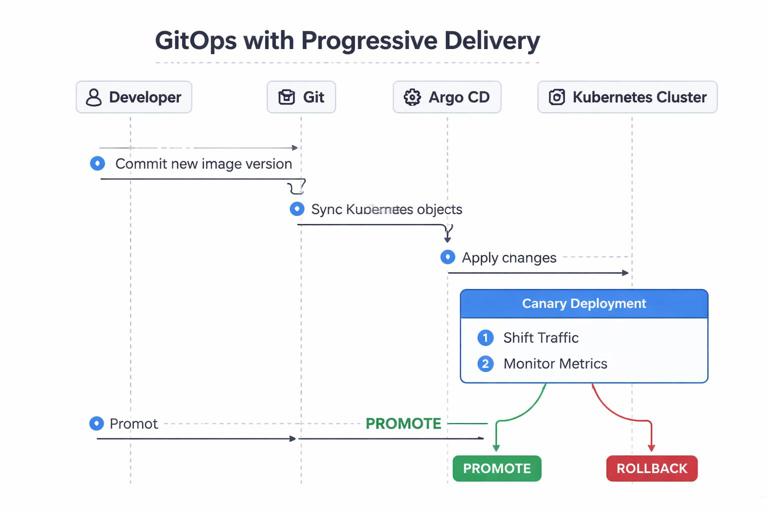
From a GitOps perspective, note the separation of responsibilities: Git declares “run version 1.8.3 with this rollout policy,” Argo CD ensures the objects exist as declared, and Argo Rollouts decides whether the rollout completes or rolls back based on runtime signals.
Designing Rollback-Safe Declarative Changes
Automated rollback is only as safe as the changes you make. Some changes are inherently harder to roll back than others, especially when state is involved. GitOps makes the rollback action easy; you still need to design changes so that reverting is meaningful.
Prefer backward-compatible changes during rollout windows
If a new version requires a schema change, a rollback might not restore compatibility. A practical approach is to ensure new versions can run against the old schema for a period of time, or to apply additive schema changes first. Even if you handle schema evolution elsewhere, the GitOps implication is: do not assume “git revert” restores full functionality if the change altered external state.
Keep declarative diffs small and reviewable
Large PRs that change many manifests at once are harder to reason about and harder to roll back cleanly. Prefer small, focused commits: one image bump, one resource tuning, one feature flag change. This improves both human review and automated policy evaluation.
Use immutable image references where possible
Tags can be retagged. If you promote by tag, you risk “rollback” pointing to a different artifact than when it was originally tested. Prefer immutable references (digest pins) in GitOps repos when your workflow allows it.
image: ghcr.io/acme-org/payments-api@sha256:2c26b46b68ffc68ff99b453c1d30413413422d706483bfa0f98a5e886266e7aeYou can still keep human-friendly tags in CI metadata, but the cluster runs exactly what Git specifies.
Sync Policies, Safety Rails, and Failure Modes
Automated sync vs manual sync
Automated sync applies changes as soon as Git changes. Manual sync requires an operator to approve the sync in the controller UI/CLI. Automated sync is common for lower environments and for well-guarded production pipelines. Manual sync can be useful when you are first adopting GitOps or when you need an explicit “deploy now” gate.
Prune and self-heal considerations
prune removes resources deleted from Git. This is desirable for drift control but can be dangerous if a path is misconfigured or if a ref changes unexpectedly. Use repository protections, code owners, and required reviews to reduce the chance of accidental deletions.
selfHeal reverts manual changes. This is a feature, not a punishment: it ensures the cluster matches the declared state. If you need emergency changes, the GitOps-friendly approach is to commit the hotfix to Git (even if it is temporary) and let the controller apply it, then follow up with a proper PR.
What happens when sync fails
Sync can fail due to invalid manifests, missing CRDs, admission policy violations, or runtime issues (for example, image pull errors). GitOps controllers typically surface these failures as application status conditions. Your operational response should treat sync failures as first-class incidents: they block desired state convergence and can prevent rollouts and rollbacks.
Step-by-Step: Building an Automated Rollback Runbook Around GitOps
Even with automated rollback, you need a clear operational procedure. The goal is to make rollback fast, consistent, and safe under pressure.
Step 1: Define “healthy” for the controller
Ensure your workloads expose readiness/liveness endpoints and that Argo CD health checks (built-in or custom) correctly reflect real availability. If the controller thinks a broken app is healthy, it will not help you detect regressions early.
Step 2: Ensure every deployment change is a Git change
Enforce that image updates and configuration changes happen via PRs to the GitOps repo. This ensures rollback is always possible by reverting commits. If teams bypass Git, you lose the audit trail and the deterministic rollback path.
Step 3: Add a “rollback” procedure using Git revert
- Identify the last known-good commit for the app path (for example, by looking at Argo CD sync history or Git history).
- Create a revert PR (preferred) or revert directly if your incident process allows it.
- Merge the revert and verify the controller syncs successfully.
- Confirm the cluster converges and the app health returns to green.
This procedure is simple, but it must be practiced. The biggest time sink during incidents is often identifying which change caused the regression and which commit to revert.
Step 4: Add automated rollback for common failure classes
Use progressive delivery analysis for issues that can be detected quickly: elevated 5xx rate, latency spikes, crash loops, or saturation signals. Automated rollback is most effective when the signal is reliable and the analysis window is short enough to limit blast radius.
Integrating CI with GitOps Without Reintroducing Imperative Deployments
A common anti-pattern is having CI build an image and then run kubectl set image or helm upgrade directly against the cluster. That defeats the pull-based security model and bypasses Git as the source of truth. Instead, CI should update Git (or create a PR) in the GitOps repository.

Step-by-step: CI creates a promotion PR
- CI builds and pushes
ghcr.io/acme-org/payments-api:1.8.4(or a digest). - CI opens a PR against the GitOps repo updating the image reference in the appropriate overlay.
- Required checks run on the PR: manifest validation, policy checks, and any environment-specific tests.
- After review/approval, the PR merges.
- The GitOps controller detects the merge and reconciles the cluster.
This keeps the deployment action in Git, preserves auditability, and ensures rollback is a Git operation.
Policy and Guardrails for Declarative Delivery
GitOps makes it easy to apply changes; guardrails ensure changes are safe. Admission policies (for example, Kyverno or Gatekeeper) can enforce standards: required labels, resource limits, allowed registries, and disallowing privileged pods. In a GitOps model, these policies become part of the platform contract: if a PR introduces a manifest that violates policy, sync fails and the change does not take effect.
Combine policy with Git protections: code owners for critical paths, required reviews for production overlays, and branch protections to prevent force pushes. These controls reduce the risk of accidental destructive changes, especially when prune is enabled.
Observability Hooks That Make Rollbacks Faster
Automated rollback depends on signals, and manual rollback depends on fast diagnosis. Ensure your GitOps controller status is observable: export metrics and alerts for sync failures, degraded applications, and reconciliation lag. Also ensure your rollout controller (if used) emits events and metrics for aborts and analysis failures.
Practical examples of what to alert on:
- Application out-of-sync for longer than an expected window (indicates reconciliation issues or blocked sync).
- Application health degraded (indicates runtime failure after a sync).
- Rollout aborted due to analysis failure (indicates automated rollback occurred or is required).
- High reconciliation error rate (indicates repository access issues, invalid manifests, or admission rejections).
These alerts should route to the same on-call path as service-level alerts, because a stuck delivery system can prevent both forward fixes and rollbacks.







