


Project Overview and Target Architecture
This mini-project stitches together a small but realistic application composed of three parts: a REST API, an asynchronous worker, and a database. The goal is to practice deploying and operating a multi-component system end-to-end, focusing on how components interact, how you validate behavior, and how you run safe upgrades and day-2 operations. You will deploy: (1) an API Deployment that accepts requests and enqueues jobs, (2) a Worker Deployment that consumes jobs and writes results, and (3) a PostgreSQL database StatefulSet with persistent storage.
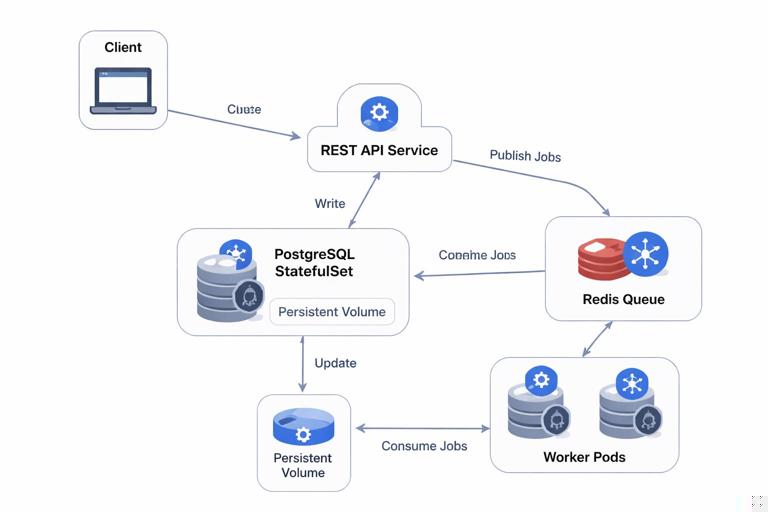
We will assume you already have a Kubernetes cluster and a container registry, and that you can apply manifests. We will not re-explain containerization, basic workload primitives, ingress/TLS, secrets/config, Helm/GitOps, autoscaling fundamentals, RBAC, or observability fundamentals. Instead, we will focus on the integration points that make this system work as a whole: schema initialization, job queue wiring, readiness and startup ordering, safe rollouts, data persistence, and verification.
Reference data flow
- Client calls API endpoint
POST /taskswith a payload. - API writes a task record to PostgreSQL and publishes a job to Redis (or a DB-backed queue if you prefer).
- Worker consumes jobs, performs work, and updates task status in PostgreSQL.
- Client polls
GET /tasks/{id}to read status/results.
To keep the project concrete, we will include Redis as a lightweight queue. If you want to avoid Redis, you can implement a DB polling worker, but Redis makes the async boundary explicit and common in real systems.
Namespace and Common Labels
Create a dedicated namespace so you can manage and delete everything cleanly.
kubectl create namespace mini-projectUse consistent labels across resources to simplify selection and troubleshooting.
- Listen to the audio with the screen off.
- Earn a certificate upon completion.
- Over 5000 courses for you to explore!

Download the app
commonLabels: &commonLabels
  app.kubernetes.io/part-of: mini-project
  app.kubernetes.io/managed-by: kubectl
If you are using plain YAML (not Kustomize), just repeat these labels in metadata.labels and spec.selector.matchLabels consistently.
Database: PostgreSQL StatefulSet with Persistent Storage
The database is stateful, so we use a StatefulSet with a PersistentVolumeClaim template. We also add a Service for stable DNS. The key operational details to get right are: (1) persistent volume sizing and access mode, (2) initialization of schema, and (3) readiness gating so the API/worker do not start failing immediately.
PostgreSQL Service
apiVersion: v1
kind: Service
metadata:
  name: postgres
  namespace: mini-project
  labels:
    app.kubernetes.io/name: postgres
    app.kubernetes.io/part-of: mini-project
spec:
  ports:
    - name: postgres
      port: 5432
      targetPort: 5432
  selector:
    app.kubernetes.io/name: postgres
PostgreSQL StatefulSet
apiVersion: apps/v1
kind: StatefulSet
metadata:
  name: postgres
  namespace: mini-project
  labels:
    app.kubernetes.io/name: postgres
    app.kubernetes.io/part-of: mini-project
spec:
  serviceName: postgres
  replicas: 1
  selector:
    matchLabels:
      app.kubernetes.io/name: postgres
  template:
    metadata:
      labels:
        app.kubernetes.io/name: postgres
        app.kubernetes.io/part-of: mini-project
    spec:
      containers:
        - name: postgres
          image: postgres:16
          ports:
            - containerPort: 5432
              name: postgres
          env:
            - name: POSTGRES_DB
              value: app
            - name: POSTGRES_USER
              value: app
            - name: POSTGRES_PASSWORD
              valueFrom:
                secretKeyRef:
                  name: postgres-auth
                  key: password
          volumeMounts:
            - name: data
              mountPath: /var/lib/postgresql/data
          readinessProbe:
            exec:
              command: ["sh", "-c", "pg_isready -U app -d app"]
            initialDelaySeconds: 5
            periodSeconds: 5
          livenessProbe:
            exec:
              command: ["sh", "-c", "pg_isready -U app -d app"]
            initialDelaySeconds: 20
            periodSeconds: 10
  volumeClaimTemplates:
    - metadata:
        name: data
      spec:
        accessModes: ["ReadWriteOnce"]
        resources:
          requests:
            storage: 10Gi
Create the password Secret (use your own value and your own secret management approach in real environments).
kubectl -n mini-project create secret generic postgres-auth --from-literal=password='change-me'Schema initialization via Job
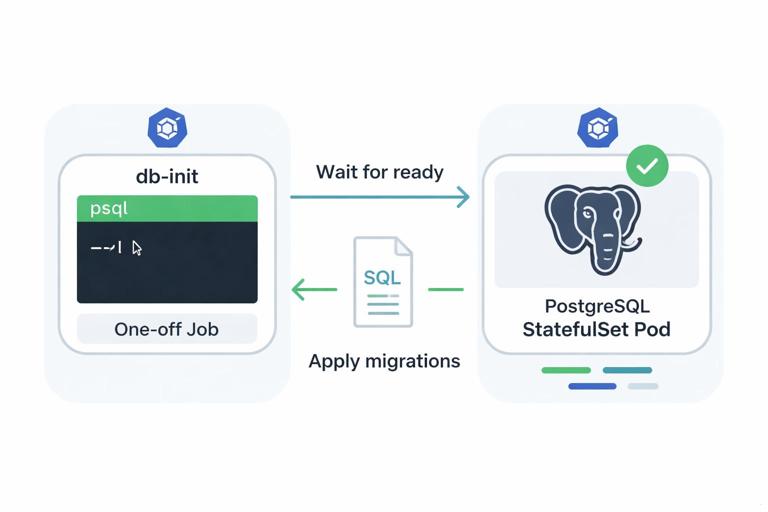
Rather than baking schema creation into the API container startup (which can cause race conditions and repeated migrations), run a one-off Job that applies SQL migrations. This makes initialization explicit and repeatable.
apiVersion: batch/v1
kind: Job
metadata:
  name: db-init
  namespace: mini-project
  labels:
    app.kubernetes.io/name: db-init
    app.kubernetes.io/part-of: mini-project
spec:
  backoffLimit: 3
  template:
    metadata:
      labels:
        app.kubernetes.io/name: db-init
        app.kubernetes.io/part-of: mini-project
    spec:
      restartPolicy: Never
      containers:
        - name: psql
          image: postgres:16
          env:
            - name: PGPASSWORD
              valueFrom:
                secretKeyRef:
                  name: postgres-auth
                  key: password
          command: ["sh", "-c"]
          args:
            - |
              until pg_isready -h postgres -U app -d app; do echo waiting for db; sleep 2; done;
              psql -h postgres -U app -d app <<'SQL'
              create table if not exists tasks (
                id uuid primary key,
                payload jsonb not null,
                status text not null,
                result jsonb,
                created_at timestamptz not null default now(),
                updated_at timestamptz not null default now()
              );
              SQL
Apply the database resources and wait for readiness.
kubectl apply -f postgres.yaml
kubectl apply -f db-init-job.yaml
kubectl -n mini-project wait --for=condition=ready pod -l app.kubernetes.io/name=postgres --timeout=180s
kubectl -n mini-project wait --for=condition=complete job/db-init --timeout=180s
Queue: Redis Deployment
Redis is used as a simple job queue. For a mini-project, a single replica Deployment is sufficient. In production you would consider persistence, replication, and operational hardening, but here we focus on wiring and health.
apiVersion: v1
kind: Service
metadata:
  name: redis
  namespace: mini-project
  labels:
    app.kubernetes.io/name: redis
    app.kubernetes.io/part-of: mini-project
spec:
  ports:
    - name: redis
      port: 6379
      targetPort: 6379
  selector:
    app.kubernetes.io/name: redis
---
apiVersion: apps/v1
kind: Deployment
metadata:
  name: redis
  namespace: mini-project
  labels:
    app.kubernetes.io/name: redis
    app.kubernetes.io/part-of: mini-project
spec:
  replicas: 1
  selector:
    matchLabels:
      app.kubernetes.io/name: redis
  template:
    metadata:
      labels:
        app.kubernetes.io/name: redis
        app.kubernetes.io/part-of: mini-project
    spec:
      containers:
        - name: redis
          image: redis:7
          ports:
            - containerPort: 6379
              name: redis
          readinessProbe:
            tcpSocket:
              port: 6379
            initialDelaySeconds: 3
            periodSeconds: 5
          livenessProbe:
            tcpSocket:
              port: 6379
            initialDelaySeconds: 10
            periodSeconds: 10
REST API: Deployment, Service, and Health Endpoints
The API is stateless and horizontally scalable. The important integration details are: (1) it must not report Ready until it can reach dependencies (or at least until it can serve meaningful traffic), (2) it should expose separate liveness and readiness endpoints, and (3) it should use a stable Service name to reach Postgres and Redis.
API Service
apiVersion: v1
kind: Service
metadata:
  name: api
  namespace: mini-project
  labels:
    app.kubernetes.io/name: api
    app.kubernetes.io/part-of: mini-project
spec:
  ports:
    - name: http
      port: 80
      targetPort: 8080
  selector:
    app.kubernetes.io/name: api
API Deployment
apiVersion: apps/v1
kind: Deployment
metadata:
  name: api
  namespace: mini-project
  labels:
    app.kubernetes.io/name: api
    app.kubernetes.io/part-of: mini-project
spec:
  replicas: 2
  selector:
    matchLabels:
      app.kubernetes.io/name: api
  template:
    metadata:
      labels:
        app.kubernetes.io/name: api
        app.kubernetes.io/part-of: mini-project
    spec:
      containers:
        - name: api
          image: ghcr.io/your-org/mini-api:1.0.0
          ports:
            - containerPort: 8080
              name: http
          env:
            - name: DATABASE_URL
              value: postgresql://app:$(POSTGRES_PASSWORD)@postgres:5432/app
            - name: POSTGRES_PASSWORD
              valueFrom:
                secretKeyRef:
                  name: postgres-auth
                  key: password
            - name: REDIS_ADDR
              value: redis:6379
          readinessProbe:
            httpGet:
              path: /ready
              port: http
            initialDelaySeconds: 3
            periodSeconds: 5
          livenessProbe:
            httpGet:
              path: /live
              port: http
            initialDelaySeconds: 10
            periodSeconds: 10
          startupProbe:
            httpGet:
              path: /ready
              port: http
            failureThreshold: 30
            periodSeconds: 2
Your API implementation should make /live return 200 if the process is running, and /ready return 200 only when it can talk to Postgres and Redis (or when it has completed any warm-up required to serve requests). This prevents traffic from being sent to pods that will immediately fail requests.
Example API behavior (conceptual)
POST /tasks: generate UUID, insert row with statusqueued, push job to Redis list/stream, return task id.GET /tasks/{id}: read row and return status/result.
Worker: Deployment with Dependency Checks and Concurrency Controls
The worker consumes jobs from Redis and updates Postgres. Operationally, workers often need careful shutdown behavior: on termination, they should stop taking new jobs and finish in-flight work. Kubernetes gives you a termination grace period and lifecycle hooks; your worker should honor SIGTERM and exit cleanly.
apiVersion: apps/v1
kind: Deployment
metadata:
  name: worker
  namespace: mini-project
  labels:
    app.kubernetes.io/name: worker
    app.kubernetes.io/part-of: mini-project
spec:
  replicas: 2
  selector:
    matchLabels:
      app.kubernetes.io/name: worker
  template:
    metadata:
      labels:
        app.kubernetes.io/name: worker
        app.kubernetes.io/part-of: mini-project
    spec:
      terminationGracePeriodSeconds: 60
      containers:
        - name: worker
          image: ghcr.io/your-org/mini-worker:1.0.0
          env:
            - name: DATABASE_URL
              value: postgresql://app:$(POSTGRES_PASSWORD)@postgres:5432/app
            - name: POSTGRES_PASSWORD
              valueFrom:
                secretKeyRef:
                  name: postgres-auth
                  key: password
            - name: REDIS_ADDR
              value: redis:6379
            - name: WORKER_CONCURRENCY
              value: "5"
          livenessProbe:
            httpGet:
              path: /live
              port: 8081
            initialDelaySeconds: 10
            periodSeconds: 10
          readinessProbe:
            httpGet:
              path: /ready
              port: 8081
            initialDelaySeconds: 3
            periodSeconds: 5
Even if your worker is not an HTTP server, adding a tiny health endpoint is a practical pattern. If you cannot, you can use an exec probe, but HTTP endpoints tend to be simpler to standardize across services.
Apply Everything in a Safe Order
Because the API and worker depend on Postgres and Redis, apply the dependency layer first, then initialize schema, then deploy compute components.
kubectl apply -f postgres.yaml
kubectl apply -f redis.yaml
kubectl -n mini-project wait --for=condition=ready pod -l app.kubernetes.io/name=postgres --timeout=180s
kubectl -n mini-project wait --for=condition=ready pod -l app.kubernetes.io/name=redis --timeout=180s
kubectl apply -f db-init-job.yaml
kubectl -n mini-project wait --for=condition=complete job/db-init --timeout=180s
kubectl apply -f api.yaml
kubectl apply -f worker.yaml
kubectl -n mini-project rollout status deploy/api --timeout=180s
kubectl -n mini-project rollout status deploy/worker --timeout=180s
This order reduces noisy crash loops during first install and gives you a clear checkpoint: if db-init fails, you fix schema connectivity before introducing more moving parts.
Verification: End-to-End Functional Test from Your Terminal
To validate the full flow without setting up ingress, use port-forwarding to the API Service and run a few requests.
kubectl -n mini-project port-forward svc/api 8080:80In another terminal, create a task and capture the returned id.
curl -s -X POST http://localhost:8080/tasks \
  -H 'content-type: application/json' \
  -d '{"input":"hello"}'
Poll for status until it becomes done (or similar).
curl -s http://localhost:8080/tasks/<TASK_ID>If the status never changes, check the worker logs and confirm it can reach Redis and Postgres.
kubectl -n mini-project logs -l app.kubernetes.io/name=worker --tail=200If the API returns errors on task creation, check API logs and confirm the DB init job completed and the tasks table exists.
kubectl -n mini-project logs -l app.kubernetes.io/name=api --tail=200Operational Checks: Readiness, Rollouts, and Dependency Failures
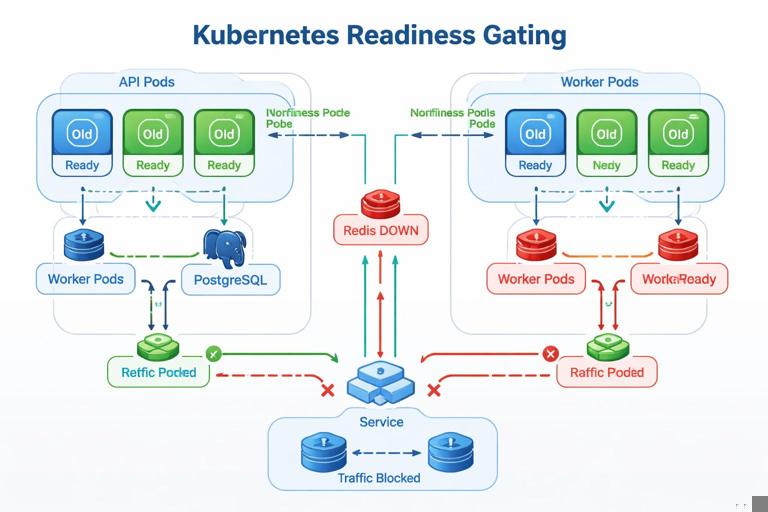
Once the system is running, validate that readiness gates are doing their job. A common failure mode is that pods report Ready even though they cannot reach dependencies, causing intermittent 5xx errors during rollouts or dependency restarts.
Simulate a dependency outage
Scale Redis to zero and observe that API and worker readiness should flip to not-ready (depending on how you implemented /ready), preventing traffic from being sent to broken pods.
kubectl -n mini-project scale deploy/redis --replicas=0
kubectl -n mini-project get pods -w
Scale Redis back up.
kubectl -n mini-project scale deploy/redis --replicas=1Roll out a new API version
Update the API image tag and watch the rollout. Ensure that new pods become Ready before old ones terminate, and that requests continue to succeed during the rollout.
kubectl -n mini-project set image deploy/api api=ghcr.io/your-org/mini-api:1.0.1
kubectl -n mini-project rollout status deploy/api --timeout=180s
If you see downtime, inspect events and probe failures. Often the fix is to adjust startupProbe and readiness behavior so the pod is not considered Ready too early.
Data Persistence and Stateful Behavior Validation
Because Postgres uses a PersistentVolumeClaim, deleting the Postgres pod should not delete data. Validate this explicitly: create a task, ensure it is stored, delete the Postgres pod, wait for it to come back, and confirm the task record still exists.
kubectl -n mini-project delete pod -l app.kubernetes.io/name=postgres
kubectl -n mini-project wait --for=condition=ready pod -l app.kubernetes.io/name=postgres --timeout=180s
Then query the API for an existing task id. If data is missing, check that the PVC is bound and that Postgres is using the mounted path correctly.
kubectl -n mini-project get pvc
kubectl -n mini-project describe pvc data-postgres-0
Handling Background Work Safely During Deployments
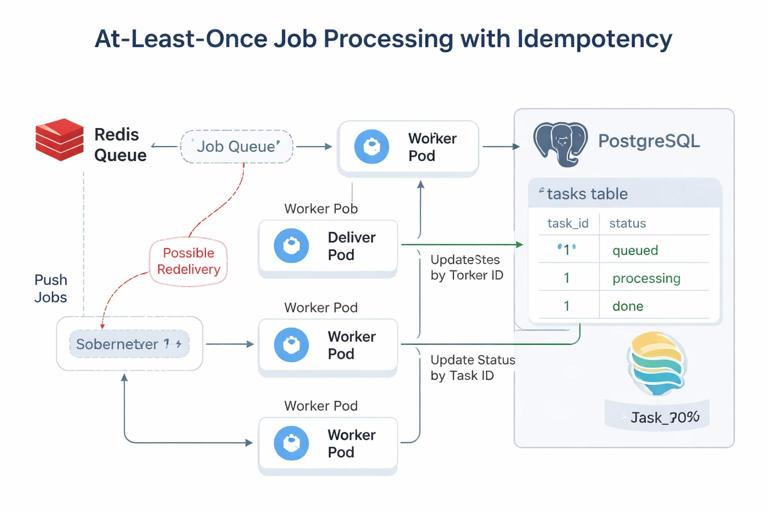
Workers introduce a subtle operational requirement: you must avoid losing jobs or processing them twice during restarts. Exactly-once processing is hard; most systems aim for at-least-once with idempotent handlers. In this mini-project, implement idempotency at the database layer by using the task id as the primary key and updating status transitions carefully.
Practical idempotency pattern
- When the worker starts processing a task, update status from
queuedtoprocessingonly if current status isqueued. - If the update affects 0 rows, another worker already took it (or it is done), so skip.
- When finished, update to
donewith the result payload.
This pattern ensures that if Redis redelivers a job (or a worker restarts mid-task), the database acts as the source of truth for whether work should proceed.
Graceful shutdown expectations
During a rollout, Kubernetes sends SIGTERM and waits up to terminationGracePeriodSeconds. Your worker should stop fetching new jobs, finish in-flight work, update the database, and exit. If it exits immediately, you may see tasks stuck in processing. A simple mitigation is a watchdog that marks tasks as queued again if they have been processing for too long, but that requires careful design to avoid duplicate side effects.
Day-2: Inspecting System Health with Kubernetes Primitives
Even without diving into full monitoring dashboards, you can get a lot of signal from Kubernetes status and events. Use these commands as a quick operational checklist.
Workload status
kubectl -n mini-project get deploy,statefulset,pods,svc
kubectl -n mini-project describe deploy/api
kubectl -n mini-project describe deploy/worker
kubectl -n mini-project describe statefulset/postgres
Events and probe failures
kubectl -n mini-project get events --sort-by=.lastTimestamp | tail -n 30Dependency connectivity from inside the cluster
If you suspect DNS or network issues, run a temporary pod and test connectivity to Services.
kubectl -n mini-project run netcheck --rm -it --image=busybox:1.36 -- sh
# inside the pod:
nslookup postgres
nslookup redis
nc -zv postgres 5432
nc -zv redis 6379
This isolates whether the problem is inside your application code or in cluster-level connectivity and naming.
Optional Enhancements to Make the Mini-Project More Realistic
If you want to extend the project, add one or more of these enhancements. Each one exercises a common production concern without requiring a huge codebase.
- Add a second worker type (e.g.,
email-worker) consuming a different queue, to practice multiple consumers and separate scaling. - Add a periodic CronJob that cleans up old tasks or compacts results, and verify it runs and logs as expected.
- Add a canary worker rollout by temporarily running both versions and ensuring idempotency prevents double-processing side effects.
- Add a database migration Job per release and make the API/worker tolerate mixed schema during rollout (backward-compatible changes first).
- Add a simple load test (e.g., a Job that posts 1000 tasks) and observe worker throughput and queue depth via logs.







