


Project Goal and Architecture
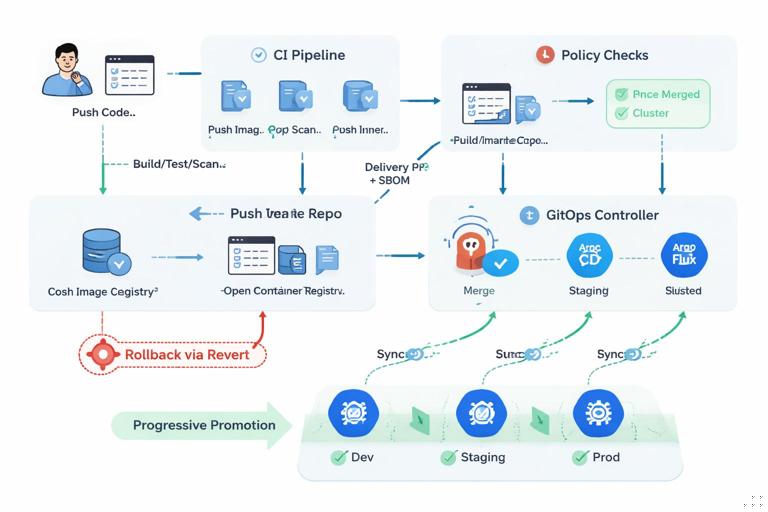
This mini-project connects a traditional CI pipeline (build, test, scan, publish) to a GitOps-driven delivery flow (promotion via pull requests, policy checks, and automated sync). The key idea is to separate responsibilities: CI produces immutable artifacts (container images and optional SBOM/attestations), while GitOps promotes those artifacts by changing declarative configuration in a separate repository. This reduces “who can deploy” to “who can merge,” and makes every deployment reproducible from Git history.
You will implement an end-to-end workflow with these properties:
- Single source of truth for runtime state: a Git repository that contains the desired Kubernetes manifests/Helm values for each environment.
- Immutable artifact promotion: environments reference image digests (not mutable tags) so the exact artifact is deployed.
- Automated safety gates: CI blocks promotion if tests, policy checks, or security scans fail.
- Progressive promotion: changes flow dev → staging → production via pull requests and approvals.
- Fast rollback: revert a Git commit to restore the previous desired state.
Assumed components (you can swap equivalents): a CI system (GitHub Actions/GitLab CI/Jenkins), a container registry, a GitOps controller (Argo CD or Flux), and a policy engine (OPA Gatekeeper or Kyverno). The chapter focuses on wiring them together rather than re-explaining Kubernetes packaging, Helm authoring, or GitOps basics.
Repository Layout: App Repo vs Delivery Repo
Use two repositories to keep concerns clean:
- Application repository (“app repo”): source code, unit/integration tests, Dockerfile, build scripts.
- Delivery repository (“delivery repo”): environment configuration (Helm values or Kustomize overlays), image references, and any deployment-time policy configuration.
A practical delivery repo structure for three environments:
- Listen to the audio with the screen off.
- Earn a certificate upon completion.
- Over 5000 courses for you to explore!

Download the app
delivery-repo/ env/ dev/ values.yaml kustomization.yaml (optional) staging/ values.yaml prod/ values.yaml apps/ myapp/ chart/ (optional, if vendored) app.yaml (Argo CD Application or Flux Kustomization)Even if you deploy with Helm, keep environment-specific overrides in the delivery repo. The app repo should not contain “prod values.” This makes promotions explicit and reviewable.
Artifact Strategy: Tags for Humans, Digests for Deployments
CI typically publishes images with tags like myapp:1.4.2 or myapp:sha-abc123. For safe continuous delivery, the delivery repo should reference the image by digest:
image: repository: registry.example.com/myorg/myapp digest: sha256:3b1f... tag: 1.4.2 # optional metadata for humansWhy digests matter: tags can be overwritten or moved; digests cannot. If staging passed with a digest, production should deploy that same digest.
Step-by-Step: CI Pipeline That Produces a “Promotable” Release
Step 1: Build and Test
Your CI pipeline should run on every pull request and on merges to the main branch. A typical sequence:
- Install dependencies
- Run unit tests
- Run integration tests (optionally using ephemeral services)
- Build the container image
Keep the pipeline deterministic. Pin tool versions (language runtime, build tooling) to reduce “works on CI but not later” drift.
Step 2: Security and Quality Gates
Add gates that must pass before publishing an image intended for promotion:
- Static analysis (linters, type checks)
- Dependency vulnerability scan (SCA)
- Container image scan (OS packages and known CVEs)
- Policy checks on manifests (if you generate them in CI)
Decide which findings are blocking. A common approach is: fail on critical/high vulnerabilities with a fix available; warn on low/medium; allow exceptions only via explicit, reviewed allowlists.
Step 3: Publish Image and Capture Digest
After gates pass on merge to main, push the image to the registry and capture the digest. Many registries return the digest after push; otherwise you can query it. Store it as a CI output for later steps.
Also generate and publish metadata that helps auditing:
- SBOM (software bill of materials)
- Provenance/attestation (who built it, from which commit, with which workflow)
Even if you don’t enforce attestations immediately, producing them early makes later hardening easier.
Step 4: Create a Promotion Pull Request to the Delivery Repo
Instead of letting CI directly change the cluster, CI should propose a change to the delivery repo. This is the “handoff” from CI to GitOps. The promotion PR updates the environment’s image digest (and optionally chart version or app version).
Example: update env/dev/values.yaml:
image: repository: registry.example.com/myorg/myapp digest: sha256:3b1f... tag: 1.4.2CI can open a PR automatically using a bot identity. The PR description should include:
- Source commit SHA from the app repo
- Image digest
- Links to CI run, test results, scan summaries
- Change log excerpt (optional)
This PR becomes the auditable artifact for “what is being deployed and why.”
Delivery Repo Checks: Policy, Drift, and Render Validation
When the promotion PR is opened in the delivery repo, run checks that validate deployability and compliance before merge. These checks are different from app tests; they focus on runtime configuration correctness.
Step 5: Render and Validate Manifests
In the delivery repo CI, render the final manifests exactly as the GitOps controller would. For Helm-based delivery, run:
helm dependency build ./apps/myapp/chart helm template myapp ./apps/myapp/chart -f env/dev/values.yaml > rendered.yamlThen validate:
- Schema validation (Kubernetes API schema via kubeconform/kubeval)
- Policy validation (OPA Conftest or Kyverno CLI)
- Best-practice checks (e.g., no privileged pods, required labels present)
These checks catch issues like invalid API versions, missing required fields, or policy violations before anything reaches the cluster.
Step 6: Enforce “Digest-Only” and Other Guardrails
Add a simple policy that rejects deployments using mutable tags like :latest or any tag without a digest. This can be enforced in two places:
- Pre-merge in delivery repo CI (fast feedback)
- In-cluster via admission control (non-bypassable)
Example policy intent (expressed in plain language): “All containers must specify image with a digest; tags are allowed only as metadata and must not be used for pulling.”
Step 7: Optional Preview Environments per PR
For higher confidence, create ephemeral preview environments for delivery repo PRs. The idea: every promotion PR can be deployed to a temporary namespace (or temporary cluster) and tested end-to-end before merge.
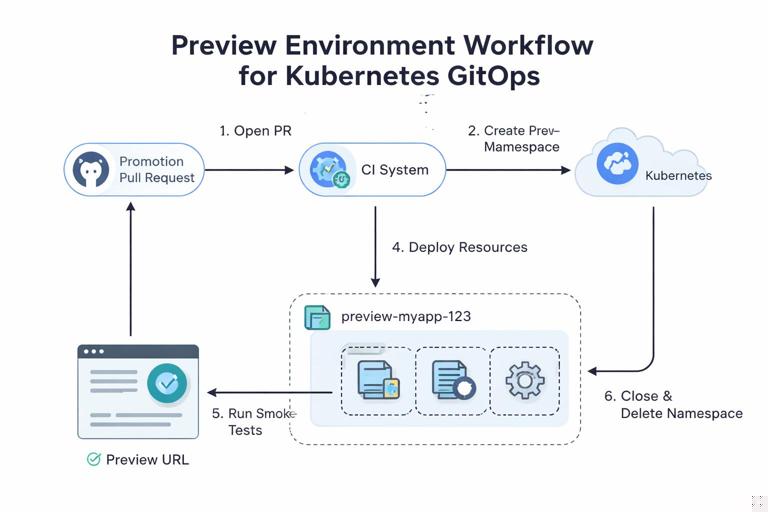
Implementation pattern:
- Delivery repo CI creates a namespace like
preview-myapp-123 - Applies rendered manifests or creates a GitOps Application pointing to the PR branch
- Runs smoke tests against the preview endpoint
- Deletes the namespace on PR close
This is especially useful when configuration changes (resource limits, env vars, feature flags) can break runtime behavior even if the app build is fine.
GitOps Sync: From Merge to Cluster
Once the promotion PR is merged, the GitOps controller detects the change and reconciles the cluster to match. The important operational detail is that the controller should be configured with:
- Auto-sync enabled for lower environments (dev)
- Auto-sync with additional protections or manual sync for production, depending on your risk tolerance
- Self-heal to correct drift
- Prune with care (ensure you understand what gets deleted)
Even with auto-sync, production can still be “continuous delivery” without being “continuous deployment” if you require an approval step before merging the production PR.
Promotion Flow: Dev → Staging → Prod
Step 8: Promote the Same Digest Forward
After dev is updated and validated (automated tests, monitoring checks), promote the exact same digest to staging by opening a PR that changes only env/staging/values.yaml. Do not rebuild the image for staging; rebuilding introduces a new artifact and breaks the “same bits” guarantee.
Repeat for production. This creates a clean chain of custody:
- App repo commit produces image digest
- Dev PR references digest
- Staging PR references same digest
- Prod PR references same digest
Step 9: Add Environment-Specific Approvals and Protections
Use repository protections to require approvals for staging and production promotions:
- Require at least N reviewers for
env/prodchanges - Require passing checks (render validation, policy checks)
- Restrict who can approve (CODEOWNERS for platform team or SRE)
- Require signed commits or verified bot signatures (optional)
This keeps the workflow consistent: everything is a PR, but higher environments demand more scrutiny.
Operational Safety: What Happens When Things Go Wrong
Step 10: Fast Rollback via Git Revert
If production shows regressions, rollback should be a Git operation in the delivery repo:
- Revert the commit that updated the production digest
- Merge the revert PR
- GitOps controller syncs back to the previous digest
This rollback is auditable and repeatable. It also avoids “kubectl hotfixes” that create drift and confusion.
Step 11: Freeze Promotions Without Stopping CI
Sometimes you want CI to keep building (for developer velocity) while preventing deployments (incident response, change freeze). Implement a “promotion freeze” mechanism in the delivery repo:
- A protected file or flag (e.g.,
env/prod/freeze.yaml) that delivery CI checks - If freeze is enabled, promotion PRs to prod fail or are blocked from merge
This is more reliable than asking people not to click merge, and it keeps the process explicit.
Hands-On Implementation Example (Tool-Agnostic)
The following pseudo-workflow shows the key automation steps. Adapt to your CI system.
App Repo Pipeline (on merge to main)
# 1) Build and test run unit-tests run integration-tests # 2) Build image build-image --tag registry.example.com/myorg/myapp:sha-${GIT_SHA} # 3) Scan scan-image registry.example.com/myorg/myapp:sha-${GIT_SHA} # 4) Push and capture digest push-image registry.example.com/myorg/myapp:sha-${GIT_SHA} DIGEST=$(get-image-digest registry.example.com/myorg/myapp:sha-${GIT_SHA}) # 5) Create promotion PR to delivery repo update-file delivery-repo/env/dev/values.yaml
  set image.digest=${DIGEST}
  set image.tag=sha-${GIT_SHA} create-pull-request
  --repo delivery-repo
  --branch promote-dev-${GIT_SHA}
  --title "Promote myapp ${GIT_SHA} to dev"
  --body "Digest: ${DIGEST}\nCI: ${CI_RUN_URL}"
Delivery Repo Pipeline (on PR)
# 1) Render manifests helm template myapp ./apps/myapp/chart -f env/dev/values.yaml > rendered.yaml # 2) Validate schema kubeconform -strict rendered.yaml # 3) Policy checks conftest test rendered.yaml # 4) Optional: deploy preview and run smoke tests deploy-preview rendered.yaml run-smoke-tests --endpoint ${PREVIEW_URL}After merge, GitOps syncs dev automatically. The same pattern repeats for staging and prod, either triggered manually (button/dispatch) or by an automated “promote if green” workflow that opens the next PR when health checks pass.
Integrating Health Signals Before Auto-Promotion
To avoid promoting a broken release, gate promotions on runtime signals. Instead of immediately opening a staging PR after dev merge, require evidence that dev is healthy for a period of time.
Common gating signals:
- Smoke tests against dev endpoint (HTTP 200, basic flows)
- Error budget / SLO burn rate below threshold for X minutes
- No increase in crash loops or restarts beyond baseline
- Key business metric sanity (optional)
Implementation approach:
- A scheduled CI job queries monitoring APIs and decides whether to open the next promotion PR.
- Alternatively, a ChatOps command triggers promotion after an on-call verifies dashboards.
The important part is that the decision results in a Git change (a PR), not a direct imperative deployment.
Hardening the Workflow Against Supply-Chain and Access Risks
Least Privilege for CI and GitOps
Keep CI credentials scoped:
- CI needs permission to push images to the registry.
- CI needs permission to open PRs in the delivery repo (Git token with minimal scopes).
- CI does not need cluster-admin access if GitOps is the only deployer.
GitOps controller needs read access to the delivery repo and the ability to apply resources in target namespaces. Avoid giving it broad permissions beyond what it reconciles.
Provenance Verification (Optional but Recommended)
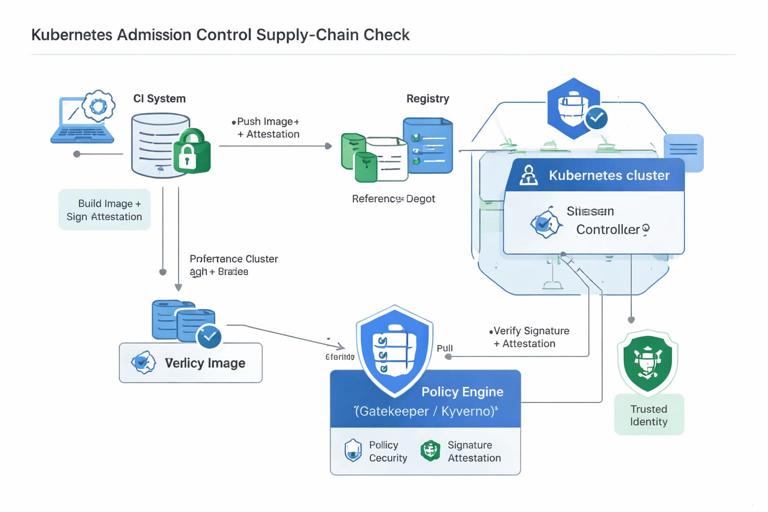
If you generate attestations, you can enforce that only images built by your trusted CI workflow can be deployed. This is typically done with an admission policy that verifies:
- Image digest has a valid signature
- Signature matches your organization’s identity
- Attestation claims match expected repo and workflow
This prevents a scenario where someone pushes a malicious image to the registry and updates the delivery repo to reference it.
Practical Checklist: What to Implement First
If you are implementing this workflow from scratch, prioritize in this order:
- CI builds and pushes images; delivery repo references digests
- CI opens promotion PRs to dev; GitOps auto-syncs dev
- Delivery repo PR checks render and validate manifests
- Promotion PRs for staging/prod with approvals
- Runtime health gating before auto-promotion
- Admission policies for digest-only and provenance verification
- Preview environments for delivery PRs
This sequence delivers value early (repeatable deployments and auditability) while leaving room for stronger controls as your team matures.







