Why schedule communication is a separate skill
A schedule can be technically correct and still fail in the field if it is not communicated in a way that different audiences can understand and act on. Crews need clear near-term direction and constraints removal. Owners need confidence, transparency, and early warning. Stakeholders (designers, inspectors, neighbors, lenders, tenants, utilities, internal leadership) need the right level of detail to coordinate decisions without being buried in activity IDs.
Communicating schedules is the practice of translating the same underlying plan into multiple “views” that answer different questions: What do I do next? What decisions are needed? What is at risk? What is the commitment date? What changed since last week? The goal is not to show more data; it is to reduce friction, prevent surprises, and speed up decisions.
Principles for effective schedule communication
1) One source of truth, multiple views
Maintain one master schedule file (the source of truth). From it, generate audience-specific outputs: a two-week crew plan, a monthly owner dashboard, a permitting/inspection calendar, a procurement status list, and a milestone trend chart. Avoid maintaining separate “shadow schedules” in spreadsheets that drift out of sync.
2) Communicate decisions, not just dates
Dates alone do not drive action. Every schedule communication should make clear: (a) what is planned, (b) what is required to keep it, (c) what is blocking it, and (d) who owns the next step. A schedule that does not assign responsibility for removing constraints becomes a passive report instead of a management tool.
3) Use consistent time horizons
Different audiences operate on different time horizons. A practical set is: daily/weekly for crews, 2–6 weeks for foremen and superintendents, monthly for owners and lenders, and milestone-based for executives. Keep these horizons consistent so people learn what to expect.
- Listen to the audio with the screen off.
- Earn a certificate upon completion.
- Over 5000 courses for you to explore!

Download the app
4) Show change clearly
Most conflict comes from “I didn’t know it moved.” Always highlight changes since the last communication: moved milestones, added scope, resequenced work, new constraints, and revised durations. Use a simple “What changed?” section and visual cues (color, arrows, delta days) rather than forcing readers to compare two Gantt charts manually.
5) Match detail level to the audience
Crews need task-level clarity (where, what, when, access, handoffs). Owners need milestone-level clarity and risk. Stakeholders need interface points (when they must act, what they must deliver). Too much detail causes people to ignore the schedule; too little detail causes rework and missed handoffs.
Core schedule communication deliverables (what you actually send)
A) Crew-facing: the “Do-This-Next” plan
This is typically a one-page or two-page output used in field huddles. It should be organized by area and trade, not by activity ID. It should include: planned work, prerequisites, access notes, and inspections/hold points that affect the crew.
- Format: 1–2 week horizon, broken down by day or by work blocks.
- Content: location/zone, task description in plain language, planned start/finish, predecessor handoff, and constraints (materials, approvals, equipment, access).
- Rule: if a crew cannot act on it tomorrow morning, it does not belong on this sheet.
B) Owner-facing: milestone and risk dashboard
Owners generally want to know whether key commitments are holding, what is driving risk, and what decisions they must make. A good owner update is short, consistent, and decision-oriented.
- Format: 1–3 pages plus an appendix Gantt if requested.
- Content: milestone table (baseline vs current vs forecast), near-term critical interfaces (e.g., inspections, owner-furnished items), top risks with mitigation, and a “decisions needed by” list.
- Rule: do not hide uncertainty; communicate ranges and triggers (e.g., “If permit is not issued by X, then Y milestone moves”).
C) Stakeholder-facing: interface schedule
Stakeholders often touch the project at specific moments: design clarifications, utility tie-ins, inspections, commissioning, tenant coordination, deliveries, road closures. They need a schedule that emphasizes their touchpoints and lead times.
- Format: calendar view or milestone list by stakeholder.
- Content: required submittals/approvals, inspection windows, access dates, outage windows, and contact/owner for each interface.
- Rule: include “latest acceptable date” and “requested date” to drive urgency and allow negotiation.
Step-by-step process: build a communication package from the master schedule
Step 1: Identify audiences and their decisions
Create a simple matrix of audiences and what they decide or execute. Example:
- Crews/foremen: daily sequencing, manpower shifts, equipment needs, access coordination.
- Superintendent/PM: constraint removal, trade coordination, inspection readiness, change coordination.
- Owner/rep: approvals, owner-furnished items, operational constraints, milestone acceptance.
- Design team: RFIs, ASIs, design clarifications, submittal turnaround.
- Authorities/inspectors: inspection booking windows, required documentation readiness.
This prevents the common mistake of sending everyone the same Gantt chart and hoping they find what matters.
Step 2: Define the “communication rhythm” (cadence)
Set recurring meetings and outputs so stakeholders know when updates happen and how to request changes.
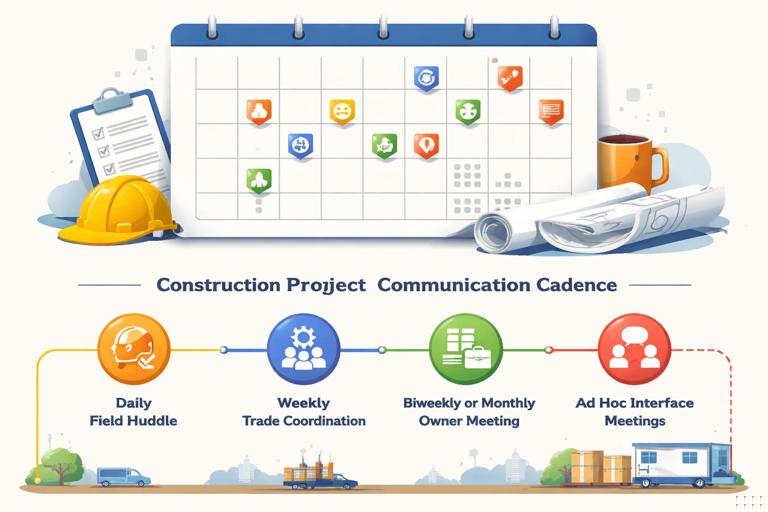
- Daily: short field huddle (10–15 minutes) using the crew-facing plan.
- Weekly: coordination meeting with trade partners using a 2–6 week view and constraint log.
- Biweekly or monthly: owner progress meeting using milestone dashboard and risk register.
- Ad hoc: interface meetings for utilities, shutdowns, commissioning, or tenant moves.
Publish the cadence and stick to it. Consistency builds trust and reduces “surprise” escalations.
Step 3: Choose the right schedule views
From the master schedule, generate views that match the audience:
- Filtered Gantt: show only relevant trades/areas and a limited time window.
- Milestone list: a table of key dates with baseline/current/forecast and delta.
- Calendar view: inspections, shutdowns, deliveries, and access restrictions.
- Phase map: a simple graphic of zones/areas with planned start/finish windows.
- Trend chart: milestone movement over time (useful for owner confidence and internal management).
Keep formatting consistent: same date format, same naming conventions, and clear legends.
Step 4: Translate schedule language into field language
Activity names that make sense to schedulers may not make sense to crews. Rewrite or alias activities into plain language and include location. Compare:
- Too abstract: “Rough-in MEP Level 2”
- Actionable: “Level 2: run branch conduit in corridor A–D; set boxes in Rooms 201–220”
When possible, tie tasks to drawings/areas (“Gridlines 1–5,” “Unit types A/B,” “North wing”) so crews can visualize the work.
Step 5: Add constraint and handoff information
Schedules often fail in communication because they omit the “ready conditions.” For each near-term task, add a short constraint checklist:
- Materials on site (or confirmed delivery date)
- Access available (scaffold, lift, keys, security)
- Predecessor complete and accepted (quality/inspection sign-off)
- Design information complete (RFI answered, sketch issued)
- Safety plan impacts (hot work permits, shutdown approvals)
Also make handoffs explicit: “Drywall cannot start until inspection passed and above-ceiling photos taken.” This reduces trade-to-trade conflict.
Step 6: Highlight changes and decisions needed
Every update package should include two short sections near the top:
- What changed since last update: 3–7 bullets with dates and reasons.
- Decisions needed by: who must decide, what they must decide, and the latest date to avoid impact.
This is where schedule communication becomes management communication.
Step 7: Confirm understanding (closed-loop communication)
Do not assume that sending a PDF means alignment. Use closed-loop techniques:
- Ask each trade to restate their next two weeks: “What are you starting Monday? What do you need by Wednesday?”
- Capture commitments in meeting notes: “Electrical commits to complete corridor rough-in by Friday 3 PM.”
- Assign owners to constraints with due dates and follow up next meeting.
Closed-loop communication turns the schedule from a document into a set of commitments.
How to communicate schedules to crews (field execution)
Field huddles: structure that works
A practical huddle structure is:
- Safety and access changes (1–2 minutes): shutdowns, restricted areas, lift plans.
- Today’s priorities (3–5 minutes): top 3–5 tasks by area.
- Handoffs and inspections (2–3 minutes): what must be ready for the next trade.
- Constraints (2–3 minutes): what is missing and who is getting it.
- Confirm (1 minute): each foreman confirms their start point and manpower.
Use a printed plan posted in the trailer and a marked-up plan on a board. If you use a digital tool, still ensure the crew can see it quickly without hunting through menus.

Example: a two-week crew plan snippet
Area: Level 1 - East Wing (Grids A-D / 1-6) | Week of: Mar 4 - Mar 15 | Superintendent: J. Lee | Updated: Mar 1 3:00 PM | Changes: +2 days (RFI-17 response pending until Mar 5) | Decisions needed: Owner to approve finish mockup by Mar 6 EOD | Constraints owner: PM (S. Patel) Due: Mar 5 10:00 AM | Notes: No access to Room 112 until abatement clearance posted Mar 4-5: Framing crew - Frame corridor soffits A/1 to D/6 (needs layout complete, lift reserved) Mar 4-6: Electrical - Set boxes Rooms 101-120 (needs walls framed in Rooms 105-110) Mar 6: Inspection - Above-ceiling rough inspection (target 9 AM; request submitted) Mar 7-8: Mechanical - Hang duct mains corridor (needs inspection pass + delivered duct sections) Mar 11-15: Drywall - Hang board corridor + tape start (requires MEP sign-off + photos complete)This format makes dependencies and constraints visible without requiring anyone to interpret network logic.
How to communicate schedules to owners (trust and decision speed)
Owner updates: what to include and what to avoid
Owners typically respond well to consistent, repeatable reporting. Include:
- Milestone table: baseline vs current vs forecast, with delta days.
- Near-term focus: what will be completed before the next meeting.
- Top risks: 3–5 items with probability/impact and mitigation actions.
- Owner actions: approvals, selections, access, operational constraints, or funding-related decisions.
Avoid sending a 40-page schedule printout as the primary update. If the owner wants it, include it as an appendix and reference specific pages/filters.
Example: milestone table (owner-facing)
Milestone Baseline Current Plan Forecast Delta Notes Permit Issued Apr 10 Apr 10 Apr 12 +2 City review extended; resubmitted Mar 28 Dry-in Complete May 20 May 22 May 22 +2 Weather days used; recovery plan in progress Substantial Completion Aug 30 Aug 30 Sep 6 +7 Driven by dry-in slip + long-lead equipment startup window Owner Decision: Finish Mockup Mar 6 Mar 6 Mar 6 0 Approval needed to release production orderNotice that “notes” are written in plain language and tie directly to actions and impacts.
How to communicate schedules to stakeholders (interfaces and commitments)
Interface mapping: make touchpoints explicit
Stakeholders often miss their required actions because they are buried among hundreds of activities. Create an interface list grouped by stakeholder:
- Design team: RFI response deadlines tied to upcoming work windows.
- Utility company: outage request dates, site readiness dates, and restoration windows.
- Inspector/AHJ: target inspection dates, booking lead time, required documentation list.
- Neighbors/tenants: noisy work windows, access restrictions, parking impacts.
Send this list separately from the main schedule and keep it short.
Example: stakeholder interface calendar items
Stakeholder: Utility Provider (Gas) - Apr 2: Submit outage request package (latest acceptable Apr 3) - Apr 15: Site ready for tie-in (trench inspected, bedding complete) - Apr 18 (6 AM - 12 PM): Planned outage window (requires owner operations sign-off by Apr 10) Stakeholder: Fire Marshal - May 6: Above-ceiling inspection request (submit by Apr 29) - May 10: Fire alarm rough inspection (drawings stamped + device list finalized)Visual communication techniques that reduce confusion
Use “zones” and color consistently
Many projects are easier to understand by location than by trade. If you use zones (North/South, floors, wings, units), keep the same zone names everywhere: schedule filters, drawings, meeting notes, and photos. Use consistent colors for zones or phases across all outputs.
Use simple status codes
For near-term tasks, use a small set of status codes that everyone understands:
- Green: ready and on track
- Yellow: at risk (constraint not cleared yet)
- Red: blocked (cannot start/continue)
Pair the color with a short reason and an owner. Color without explanation becomes noise.
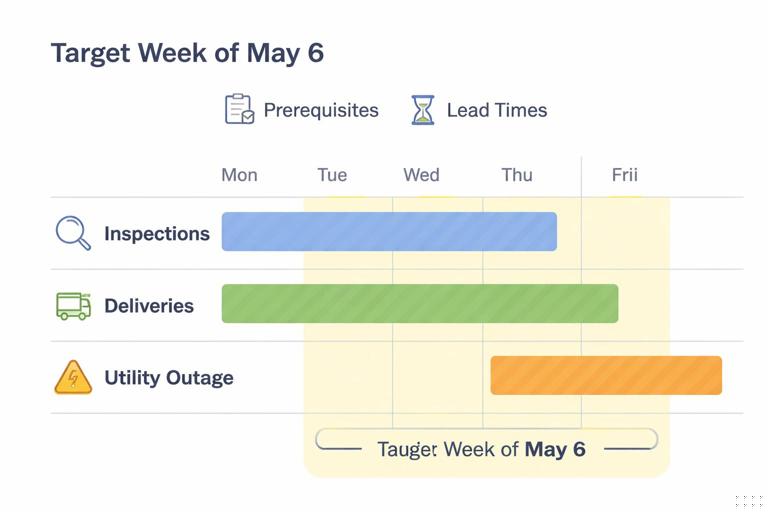
Show “windows” instead of false precision when appropriate
Some activities (inspections, deliveries, utility outages) have uncertainty. Instead of presenting a single date that will likely move, communicate a window: “target week of May 6” with prerequisites and booking lead time. This is especially useful for external stakeholders who schedule weeks in advance.
Common communication failures and how to prevent them
Failure: sending the full schedule to everyone
Prevention: send filtered views and a short narrative summary. Keep the full schedule available on request, but do not make it the primary communication tool.
Failure: not stating assumptions behind dates
Prevention: for key near-term tasks, state the readiness assumptions: “Assumes inspection passes first time,” “Assumes access to Room 112,” “Assumes owner approval by Friday.” This is not repeating how the schedule was built; it is making the current plan executable.
Failure: unclear ownership of constraints
Prevention: every constraint gets an owner and due date, and it is reviewed at the next meeting. If ownership is unclear, the superintendent or PM assigns it immediately.
Failure: stakeholders learn about changes too late
Prevention: implement an “early warning” rule: if a milestone is trending late or a key interface is at risk, notify affected parties immediately, not at the next monthly meeting. Use a short email with: what changed, why, impact, and requested action.
Practical templates you can reuse
Template 1: Weekly schedule email (owner/stakeholders)
Subject: Weekly Schedule Update - Project X - Week Ending [Date] 1) Key Milestones (Baseline / Current / Forecast): - [Milestone A]: [dates] (Delta: +X days) - [Milestone B]: [dates] (Delta: 0) 2) What Changed Since Last Week: - [Change #1] (Reason) - [Change #2] (Reason) 3) Top Risks (Next 2-6 Weeks): - [Risk]: Mitigation / Owner / Due date 4) Decisions Needed By: - [Decision]: Needed by [date] to protect [milestone] 5) Upcoming Interfaces: - [Inspection/Outage/Delivery] planned [date/window]; prerequisites [list]Template 2: Trade coordination agenda (2–6 week view)
1) Review last week's commitments (met / missed / why) 2) Review next 2-6 weeks by area (handoffs highlighted) 3) Constraints log review (new + aging items) 4) Access/equipment conflicts (lifts, scaffolds, shutdowns) 5) Confirm next week's commitments by trade (record in notes)Template 3: One-page crew board (posted in trailer)
THIS WEEK BY AREA: - Area A: [tasks + handoffs] - Area B: [tasks + handoffs] INSPECTIONS / HOLD POINTS: - [date]: [inspection] (responsible: [name]) CONSTRAINTS TO CLEAR: - [constraint] owner [name] due [date] CHANGES SINCE LAST WEEK: - [bullet list]