Why “Good” Schedules Fail in Practice
Many schedules look reasonable on paper yet still fail to control the job. The root cause is often not the scheduling software or the CPM method itself, but small, repeated mistakes in how the schedule is structured, maintained, and used for decisions. These mistakes create blind spots: the schedule stops predicting reality, teams stop trusting it, and management starts reacting instead of steering.
This chapter focuses on common scheduling mistakes that show up in residential and small-to-mid commercial construction and provides practical ways to prevent them. The emphasis is on behaviors and schedule “hygiene” rather than re-teaching foundational topics already covered earlier.
Mistake 1: Building a Schedule That Is Too Detailed (or Not Detailed Enough)

Over-detailing creates a schedule that is expensive to update and impossible to read. Under-detailing hides the true drivers of time and makes it hard to coordinate trades. The right level of detail is the level that supports decisions: what must happen next, who is responsible, and what information is needed to release work.
Symptoms
- Hundreds of micro-activities (e.g., “install 3 outlets in bedroom 2”) that never get updated accurately.
- Activities so broad (e.g., “MEP rough-in”) that multiple trades collide and the schedule cannot show sequencing or handoffs.
- Field teams ignore the schedule because it does not match how they plan work.
How to prevent it (step-by-step)
- Step 1: Define the schedule’s decision horizon. Ask: “What decisions will this schedule support in the next 2–6 weeks?” If the schedule cannot answer those questions, detail is misplaced.
- Step 2: Use consistent activity sizing. Aim for activities that are typically 2–10 working days for most trades (adjust to project size). Very short activities belong in weekly planning tools; very long activities should be broken into meaningful phases or areas.
- Step 3: Break only where handoffs or inspections occur. Add detail where one crew’s completion enables another crew, where an inspection gates progress, or where access/area constraints matter.
- Step 4: Standardize naming and structure. Use a repeatable pattern (Area + System + Action) so updates are fast and reports are readable.
Practical example
Instead of one activity “Drywall,” use “Drywall hang – Level 1,” “Drywall tape/finish – Level 1,” and “Prime – Level 1” if those are separate crews and separate readiness conditions. Avoid splitting into “Hang north wall,” “Hang south wall,” etc., unless the project is large enough that those are truly independent work fronts.
Mistake 2: Treating the Schedule as a Static Document Instead of a Control System
A schedule is not a one-time deliverable. It is a control system that must be maintained with disciplined inputs and outputs. When updates become irregular or subjective, the schedule stops being predictive and becomes a historical record.
- Listen to the audio with the screen off.
- Earn a certificate upon completion.
- Over 5000 courses for you to explore!

Download the app
Symptoms
- Updates happen only when the owner asks for a report.
- Percent complete is guessed rather than based on observable progress.
- Finish dates move without clear reasons tied to specific activities.
How to prevent it (step-by-step)
- Step 1: Set a fixed update cadence. Weekly is common; the key is consistency. Put it on the project calendar as a recurring event.
- Step 2: Define “update inputs” and “update outputs.” Inputs: actual starts/finishes, remaining durations, key constraints, and confirmed upcoming commitments. Outputs: revised forecast dates, near-term risk list, and a focused set of actions.
- Step 3: Separate “status” from “plan changes.” First record what actually happened. Only then decide whether logic, durations, or sequencing must change.
- Step 4: Keep a change log. Track why a major activity moved (weather, design clarification, rework, crew shortage). This improves accountability and supports later analysis.
Mistake 3: Using “Hard” Constraints as a Shortcut
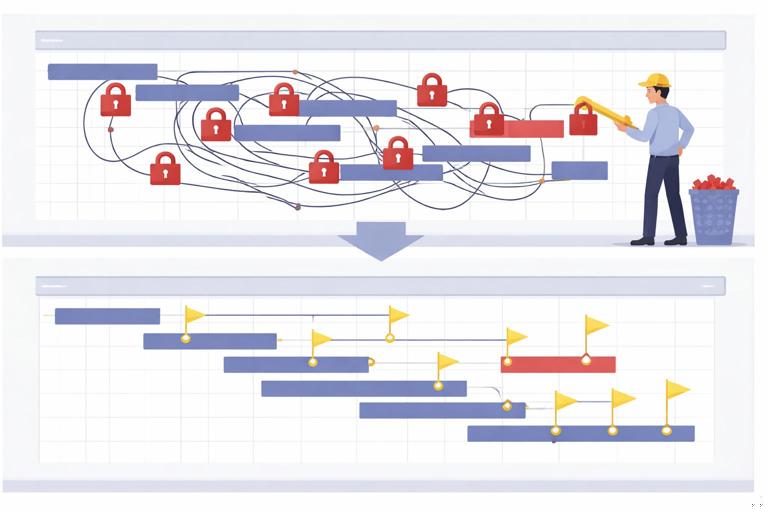
Constraints can be useful, but overuse (especially hard constraints like “Must Finish On” or “Start On”) can hide logic problems and create misleading float. Constraints can also prevent the schedule from showing the true impact of delays.
Symptoms
- Many activities have fixed dates without a clear external reason.
- The critical path appears to jump unpredictably after updates.
- Activities show negative float or unrealistic early/late dates.
How to prevent it
- Use constraints only when there is a real external restriction. Examples: a mandated inspection date, a utility shutdown window, or owner-provided access limitations.
- Prefer “soft” controls. Use milestones and logic ties to represent targets rather than forcing dates.
- Audit constraints monthly. Review a list of constrained activities and confirm each constraint is still valid and documented.
Practical example
If “Cabinet install” is constrained to start on a date because “that’s when we want it,” remove the constraint and instead tie it logically to prerequisites and a milestone target. If the date is driven by a confirmed delivery appointment that cannot move, document it and keep a constraint, but verify it after each procurement update.
Mistake 4: Ignoring Calendars and Work Rules (and Then Being Surprised)
Schedules often fail because the calendar assumptions do not match reality: weekends, holidays, weather days, night work, owner access hours, or trade-specific work rules. If the schedule uses a generic calendar, it can systematically overpromise.
Symptoms
- Planned dates fall on weekends or holidays when no work occurs.
- Activities appear feasible only if crews work overtime that was never approved.
- Night work or restricted hours are not represented, compressing durations unrealistically.
How to prevent it (step-by-step)
- Step 1: Create a project calendar that matches the contract and site rules. Include holidays and known site closures.
- Step 2: Use trade-specific calendars when needed. Example: a concrete crew may work Saturdays; an inspection calendar may exclude Fridays; a school project may restrict daytime work.
- Step 3: Re-check calendars after major changes. If overtime is authorized or restrictions change, update calendars and document the change.
Mistake 5: Failing to Model Rework, Reviews, and Iterations
Construction is not purely linear. Submittals get revised, inspections fail, punch items reappear, and owner decisions trigger rework. When the schedule assumes a perfect first-pass process, it becomes optimistic by default.
Symptoms
- Inspection activities are shown as one-day events with no allowance for corrections.
- Submittal and shop drawing cycles are shown as single tasks without revision loops.
- Commissioning and closeout are squeezed into the final days with no buffer for retesting.
How to prevent it
- Include explicit “correction windows” where history shows they occur. This is not padding everywhere; it is modeling known iteration points.
- Use “review/return/revise/resubmit” patterns for key submittals. Even if simplified, represent at least one revision cycle for high-risk items.
- Track first-pass yield. If inspections are failing frequently, adjust the plan: add prep checks, increase quality control time, or re-sequence to reduce rushed work.
Practical example
For a fire alarm acceptance test, add a preceding “pre-test and corrections” activity and a following “retest window” milestone allowance. This makes the schedule more honest and forces earlier readiness checks.
Mistake 6: Not Defining “Done” for Activities (Ambiguous Completion)
If “done” is unclear, updates become subjective and disputes increase. Ambiguous completion also causes downstream crews to mobilize too early or too late.
Symptoms
- Activities are marked complete while punch items remain that block the next trade.
- Different stakeholders disagree on whether an area is “ready.”
- Progress claims do not match field conditions.
How to prevent it (step-by-step)
- Step 1: Add completion criteria in the activity notes. Keep it short and observable (e.g., “All devices installed, labeled, tested; panel schedule updated”).
- Step 2: Use “handoff” checklists for key transitions. Examples: “drywall ready,” “ceiling close,” “paint ready,” “substantial completion ready.”
- Step 3: Align criteria with inspections and downstream needs. “Done” should mean the next crew can work without rework or waiting.
Mistake 7: Overlapping Work Without Explicit Access/Area Rules
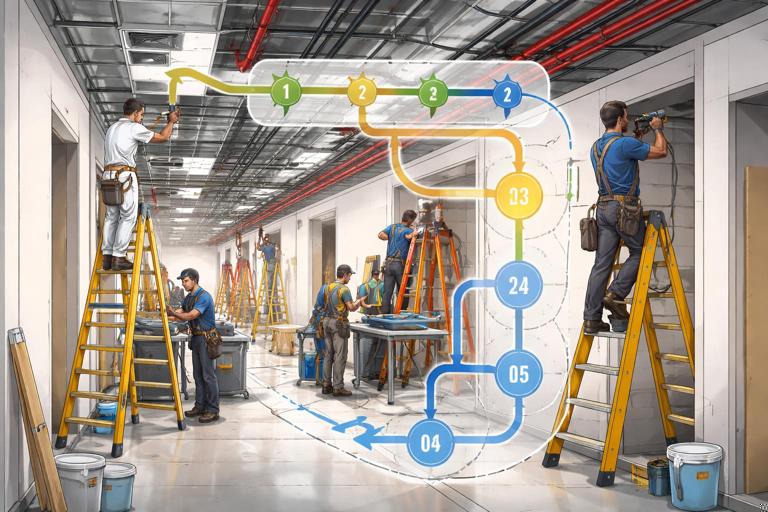
Schedules often show parallel activities that are technically possible but practically impossible due to access conflicts, safety rules, or limited work fronts. The result is trade stacking, productivity loss, and constant resequencing.
Symptoms
- Multiple trades scheduled in the same rooms at the same time.
- Crews repeatedly demobilize/remobilize due to congestion.
- Safety incidents or quality issues increase during compressed periods.
How to prevent it
- Define work-front capacity. For each area, decide how many crews can work effectively at once.
- Use “area release” milestones. Example: “Level 2 released for finishes” represents a real handoff, not just a date.
- Model access constraints explicitly. If only one lift can operate in an atrium, reflect that in sequencing and not just in assumptions.
Practical example
If the schedule shows “ceiling grid,” “sprinkler trim,” “lighting trim,” and “paint touch-up” all starting the same day in the same corridor, decide the intended flow (e.g., grid first, then sprinkler/lighting, then touch-up) and represent that flow so the schedule predicts congestion before it happens.
Mistake 8: Allowing “Open Ends” and Broken Logic to Accumulate
Even with good initial planning, schedules degrade over time. Activities get added quickly, logic ties are missed, and the network develops open ends (activities with no predecessors or successors). This can create unrealistic float and misleading critical paths.
Symptoms
- Activities appear to start “out of nowhere” with no prerequisites.
- Activities finish without driving anything, creating false float.
- Forecast completion dates change dramatically after minor updates.
How to prevent it (step-by-step)
- Step 1: Run a monthly schedule quality check. Review open ends, excessive lags, constraints, and out-of-sequence progress.
- Step 2: Use a “new activity checklist.” Every added activity must have: a responsible party, at least one predecessor, at least one successor, and a clear completion definition.
- Step 3: Fix logic before adjusting dates. If the network is broken, date changes are cosmetic and will not hold.
Mistake 9: Hiding Risk in Single-Point Dates (No Range Thinking)
Schedules often communicate one finish date as if it is certain. In reality, many activities have uncertainty. When teams plan as if the single date is guaranteed, they fail to prepare contingencies and are surprised by predictable variability.
Symptoms
- Teams treat the forecast date as a promise rather than a projection.
- Small issues cause major date swings because no contingency actions were prepared.
- Management focuses on “the date” instead of the conditions required to achieve it.
How to prevent it
- Communicate confidence levels. For key milestones, discuss best-case, most-likely, and risk-case outcomes in internal reviews.
- Maintain a top risk register tied to schedule activities. Each risk should have an owner and a trigger date for action.
- Use “conditions-based” milestones. Define what must be true by certain dates (e.g., “all long-lead releases complete,” “area ready for inspection”) rather than only stating end dates.
Mistake 10: Not Separating Production Work from Administrative/Decision Work
Schedules can become biased toward field production tasks while underrepresenting administrative and decision tasks that control readiness: approvals, owner selections, design clarifications, utility coordination, and closeout documentation. When these are not visible, they do not get managed.
Symptoms
- Field work is “ready” but cannot proceed due to missing decisions.
- Closeout drags because O&M manuals, as-builts, and training were not planned early.
- Owner selections arrive late and force resequencing.
How to prevent it (step-by-step)
- Step 1: Create an “information and decisions” lane. In the schedule, group decision/approval tasks so they are visible and reportable.
- Step 2: Tie decisions to the work they enable. If a finish selection enables ordering and installation, connect it so late decisions show their impact.
- Step 3: Start closeout activities earlier. Plan document collection, training planning, and commissioning documentation as progressive tasks, not a last-week scramble.
Mistake 11: Measuring Progress in a Way That Encourages Gaming
When progress measures reward starting many tasks rather than finishing them, teams unintentionally create too much work-in-process. The schedule may show high percent complete while the project is not actually closer to turnover.
Symptoms
- Many activities are “90% complete” for weeks.
- Crews start work in many areas but finish few.
- Punch lists explode because incomplete work is left behind.
How to prevent it
- Favor finish-based tracking. Internally, emphasize completed handoffs and closed inspections rather than partial starts.
- Limit work-in-process. Set a rule for how many areas can be open per trade at once, aligned with supervision capacity.
- Use “definition of done” to validate progress. Only claim completion when criteria are met and the next trade can proceed.
Mistake 12: Letting the Schedule Drift Away from the Contract Requirements
Schedules can become internally focused and forget contractual obligations: interim milestones, owner access dates, liquidated damages triggers, or required sequence constraints. When the schedule drifts, the team may optimize locally but violate contract commitments.
Symptoms
- Internal plans conflict with contractual milestones.
- Key dates are tracked in emails/spreadsheets but not reflected in the schedule.
- Change events are not evaluated against contractual time requirements.
How to prevent it (step-by-step)
- Step 1: Maintain a contract milestone map. List all contractual time requirements and verify they appear as milestones or constraints with documentation.
- Step 2: Review the schedule against the contract monthly. Confirm that forecast dates still comply and that any risk to compliance is escalated early.
- Step 3: Tie change management to schedule impacts. When scope changes occur, ensure the schedule reflects added work and any time implications are evaluated promptly.
Practical “Schedule Hygiene” Checklist (Use Weekly)
Use the following checklist as a quick routine to prevent the most common failures. It is designed to be completed in 20–40 minutes during the update cycle.
- Network health: Any new open ends? Any activities that now have no successor because something was deleted?
- Constraints: Any new hard constraints added? Are they documented and still valid?
- Calendars: Do upcoming holidays, access restrictions, or planned shutdowns match the schedule calendar?
- Completion clarity: Are any “almost done” activities missing clear acceptance criteria?
- Congestion check: Are too many trades stacked in the same area next week?
- Iteration points: Are inspections, tests, and reviews showing realistic correction windows?
- Decision lane: Are owner/architect/utility decisions visible with dates and owners?
- Reality check: Does the near-term plan match what the superintendent and key subs believe will happen?
Mini Case Study: Turning a “Pretty” Schedule into a Reliable One

Consider a small commercial interior build-out where the schedule looked clean but the job repeatedly slipped. The schedule had many hard constraints (“Start On” dates), broad activities (“MEP rough-in”), and no explicit allowance for inspection corrections. Updates were irregular, and activities were marked complete when crews left the area, not when the next trade could start.
To stabilize the schedule, the team implemented a simple reset:
- Removed non-essential hard constraints and rebuilt the forecast based on logic and real calendars.
- Split broad activities at true handoffs (rough-in complete by area, drywall ready, ceiling close).
- Added short correction windows after key inspections and tests.
- Defined “done” for the handoff activities and required sign-off before marking complete.
- Ran a weekly hygiene checklist and logged reasons for major date moves.
The result was not a magically shorter project, but a schedule that predicted problems earlier. That earlier visibility allowed the team to make timely decisions (re-sequence areas, adjust crew focus, and accelerate specific gating items) instead of discovering conflicts in the field.
Common Anti-Patterns to Watch for in Scheduling Meetings
Scheduling mistakes often persist because meeting habits reinforce them. Watch for these anti-patterns and replace them with more disciplined behaviors.
- Anti-pattern: “Let’s just change the date.” Replacement: Identify the activity causing the shift, update status first, then adjust logic/durations only with a stated reason.
- Anti-pattern: “We’ll make it up later.” Replacement: Assign a near-term action with an owner and a check date; reflect the action in the schedule if it changes work.
- Anti-pattern: “It’s 90% done.” Replacement: Ask what remains, what is blocking completion, and when the handoff criteria will be met.
- Anti-pattern: “The schedule is wrong.” Replacement: Determine whether the issue is missing logic, wrong calendar, unclear completion criteria, or unmodeled iteration/rework.
Templates You Can Add to Your Schedule Notes
Use short, repeatable note formats to reduce ambiguity and speed up updates.
Activity completion criteria template
DONE means: [observable condition(s)] + [inspection/sign-off if applicable] + [area clean/ready for next trade]Constraint justification template
Constraint reason: [external driver] | Source: [email/meeting/date] | Next review: [date]Iteration/rework allowance template
Expected iteration: [inspection/test/review] | Typical corrections: [list] | Planned window: [duration]