Why Checklists Matter for Reliable Prompt Results
When educators say an AI tool is “inconsistent,” the root cause is often not the model but the prompt: missing details, unclear boundaries, or an output format that leaves too much room for interpretation. A checklist turns prompting into a repeatable routine. Instead of relying on memory or “good instincts,” you run the same quality gates every time, which reduces rework and makes outputs more predictable across different topics, grade levels, and tasks.
Checklists are especially useful when you are moving fast—planning a week, generating multiple versions, or producing materials for several groups. They also help teams: if multiple teachers share prompts, a checklist creates a common standard so outputs feel consistent in tone, rigor, and structure.

The Reliability Checklist: A Pre-Flight Scan Before You Send
1) Task clarity: What exactly should the model do?
Reliable prompts name the task in a single, unambiguous verb phrase (generate, revise, classify, summarize, critique, convert, extract). If your prompt includes multiple tasks, either sequence them (“First… then…”) or split into separate prompts. A quick test: if you can’t restate the task in one sentence, the model can’t either.
- Good: “Generate 12 multiple-choice questions that assess inference in a short story.”
- Risky: “Help me with assessment and teaching ideas for inference.”
2) Inputs: Did you provide the material the model must use?
Many “bad outputs” happen because the model is forced to guess. If you want questions about a text, include the text (or a passage). If you want feedback on student work, paste the work. If you want alignment to your unit, include the unit focus and key terms. If you cannot share the full input, provide a representative excerpt and clearly state what is missing.
- Include: passage, prompt, student response, vocabulary list, data table, lab scenario, or any required constraints.
- If input is long: specify what to prioritize (e.g., “Use only paragraphs 2–4”).
3) Audience and level: Who is this for?
Reliability improves when you specify the learner profile in practical terms: grade band, reading level range, language proficiency, and prior knowledge assumptions. Avoid vague labels like “simple” or “advanced” without a reference point. If you need multiple versions, ask for them explicitly and label them.
- Listen to the audio with the screen off.
- Earn a certificate upon completion.
- Over 5000 courses for you to explore!

Download the app
- Example: “Grade 7, reading level approx. 900–1000L, mixed proficiency, assume students know basic plot elements.”
4) Boundaries: What should the model avoid?
Strong prompts include “do not” constraints that prevent common failure modes: adding extra content, changing meaning, inventing sources, or using prohibited formats. Boundaries are most effective when they are specific and testable.
- “Do not introduce new characters.”
- “Do not mention standards codes.”
- “Do not include answer explanations.”
- “Do not use bullet points; use a table.”
5) Output format: Can you copy-paste the result into your workflow?
Formatting is a reliability lever. If you don’t specify structure, you get variability. Decide what you need: a table, numbered list, JSON, or a fixed template with headings. Also specify length ranges and counts (e.g., “exactly 10 items,” “120–150 words each”).
- Include required fields: “Question, A–D options, correct answer letter, skill tag.”
- Specify ordering: “Sort from easiest to hardest.”
6) Quality criteria: What does “good” look like?
Instead of saying “high quality,” define observable criteria: cognitive demand, evidence use, clarity, and alignment to your goal. Add a quick self-check instruction so the model verifies its own output before finalizing.
- Example criteria: “Each distractor must be plausible and match common misconceptions.”
- Self-check: “Before finalizing, confirm each question can be answered using only the provided passage.”
7) Edge cases: What could go wrong?
Predictable problems include: ambiguous wording, multiple correct answers, off-level vocabulary, or tasks that require external facts. Add guardrails: define terms, restrict to provided information, and request a “flag list” of any items that might be questionable.
- Example: “If any item could have two correct answers, flag it and revise.”
8) Reusability: Can you run this prompt again next week?
A reliable prompt is modular. Use placeholders (e.g., [PASTE PASSAGE], [GRADE], [SKILL]) and keep the instruction set stable. This reduces prompt drift and makes results more consistent over time.
Reusable skeleton: Task + Inputs + Audience + Constraints + Output format + Quality checkThe Post-Output Checklist: A Fast Review Before You Use It
1) Fidelity check: Did it follow the instructions?
Scan for instruction misses first: wrong number of items, wrong format, missing fields, or extra sections. If the model missed a requirement, don’t “fix it yourself” immediately—ask for a corrected version using a short repair prompt.
2) Accuracy check: Is everything answerable from the given material?
For classroom materials, reliability means students can succeed using what you provided. Verify that questions, feedback, or explanations do not rely on outside facts unless you intentionally allowed that. If you see invented details, revise the prompt to tighten the “use only the provided input” boundary.
3) Level check: Is the language and demand appropriate?
Look for hidden complexity: multi-step directions, dense sentences, idioms, or advanced vocabulary. If needed, request a “language pass” that simplifies wording without changing rigor (for example, shorter sentences, clearer verbs, fewer embedded clauses).
4) Bias and tone check: Is it classroom-appropriate?
Even when content is technically correct, tone can be off: overly harsh feedback, stereotypes, or culturally narrow examples. If you see issues, add a tone constraint (neutral, supportive, specific) and request alternative contexts.

5) Usability check: Can you deploy it immediately?
Check whether the output fits your delivery method: printable, LMS-ready, slide-ready, or copy-paste into a document. If not, ask for a conversion prompt: “Convert this into a two-column handout” or “Reformat as a table with headings.”
Step-by-Step: Turning a “Bad Prompt” into a Reliable One
Step 1: Identify the failure mode
Common failure modes include: too broad, missing input, unclear audience, no format, or conflicting instructions. Name the failure mode in your notes so you can fix the cause, not the symptom.
Step 2: Add the missing ingredient (input, constraints, or format)
Most improvements come from adding one of three things: the source material, a strict output template, or a boundary like “use only the provided text.” Add only what you need; overly long prompts can introduce contradictions.
Step 3: Add a self-check line
A short self-check instruction often prevents obvious errors: “Verify there is exactly one correct answer,” “Verify each item cites a line from the passage,” or “Verify the reading level range.”
Step 4: Run a repair prompt instead of rewriting everything
If the output is close, don’t start over. Use a targeted repair: “Revise item 4 so the distractors are plausible and only one answer is correct.” This keeps the model anchored to your existing structure.
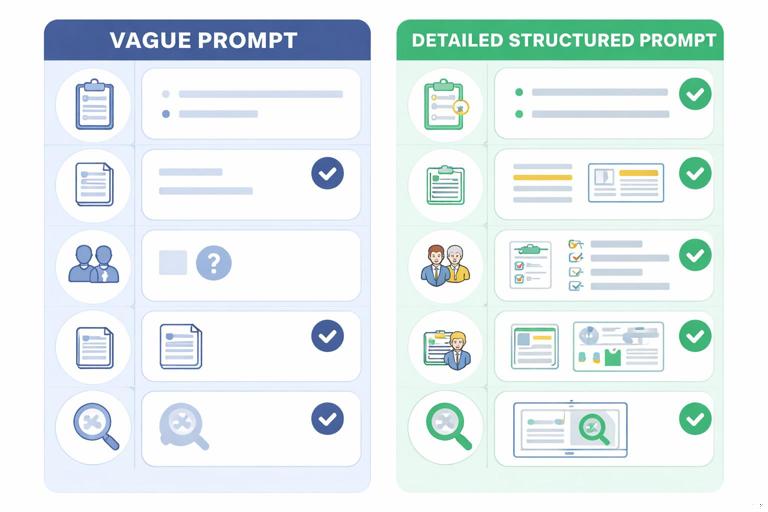
Good vs. Bad Prompt Examples (With What Changes and Why)
Example Set 1: Generating Comprehension Questions from a Passage
Bad prompt: “Make some questions about this story for my class.”
Why it fails: “Some” is undefined, the skill focus is unclear, the grade level is missing, and the output format is unspecified. The model may produce a random mix of literal and inferential questions, inconsistent difficulty, and no answer key.
Good prompt: “Using only the passage below, generate exactly 10 multiple-choice questions for Grade 6 that assess inference and theme (6 inference, 4 theme). Provide four options (A–D), exactly one correct answer, and a one-sentence rationale that quotes or paraphrases the relevant part of the passage. Output as a table with columns: #, Skill, Question, A, B, C, D, Correct, Rationale. Before finalizing, verify that every question is answerable using only the passage and that no two options could both be correct. Passage: [PASTE PASSAGE].”
What changed: the task is specific, the input is required, the counts and skills are defined, the format is copy-ready, and the self-check targets the most common assessment errors.
Example Set 2: Creating Short-Answer Prompts and an Answer Guide
Bad prompt: “Write short answer questions and answers for this topic.”
Why it fails: “Topic” can be interpreted broadly, answers may be too long, and the model may drift into facts not taught in your materials.
Good prompt: “Create 6 short-answer questions based only on the notes below. Each question must be answerable in 2–3 sentences by a Grade 8 student. Provide an answer guide with: key points (bullets), one common misconception, and a 0–2 point scoring note (2=complete, 1=partial, 0=incorrect). Output in a numbered list. Notes: [PASTE NOTES].”
What changed: the response length is controlled, the source is constrained, and the answer guide is structured for quick grading.
Example Set 3: Revising Directions for Clarity
Bad prompt: “Make these directions clearer.”
Why it fails: “Clearer” is subjective; the model may change requirements, add steps, or remove important constraints.
Good prompt: “Rewrite the directions below for clarity without changing any requirements. Keep all steps, deadlines, and point values exactly the same. Use short sentences, numbered steps, and bold the action verbs. Output only the revised directions. Directions: [PASTE DIRECTIONS].”
What changed: the model is prevented from altering meaning, and the requested style is explicit and testable.
Example Set 4: Generating Practice Items with Controlled Variation
Bad prompt: “Give me more practice problems like these.”
Why it fails: “Like these” is vague; difficulty may drift, and the model may introduce new problem types.
Good prompt: “Generate 12 new practice items that match the structure of the 4 examples below. Keep the same skill focus and difficulty. Do not introduce new formats. For each item, provide the problem and the correct answer only (no solution steps). Output as a two-column table: Problem | Answer. Examples: [PASTE 4 EXAMPLES].”
What changed: the model is anchored to examples, variation is controlled, and extra explanations are prohibited.
Example Set 5: Producing Feedback Comments with Consistent Tone
Bad prompt: “Write feedback for these students.”
Why it fails: the model may be inconsistent in tone, length, and specificity; it may also give advice that doesn’t match your criteria.
Good prompt: “Write feedback for each student response below using this structure: (1) One sentence naming what the student did well, (2) One sentence identifying the highest-impact next step, (3) One sentence giving a concrete revision suggestion. Keep tone neutral-supportive, avoid idioms, and keep each feedback set 45–60 words. Output as a table: Student, Feedback. Responses: [PASTE RESPONSES].”
What changed: feedback becomes uniform, easy to scan, and actionable, with length and tone controlled.
Micro-Checklists You Can Paste into Prompts
Instruction-following micro-checklist
Use this when the model often misses requirements.
Before finalizing, confirm: (a) you followed every constraint, (b) counts match exactly, (c) format matches exactly, (d) no extra sections were added. If any check fails, fix it and re-check.Single-correct-answer micro-checklist (for multiple choice)
Use this when you see ambiguous items.
Quality check: Ensure exactly one option is clearly correct. Revise any item where two options could be defended. Distractors must be plausible but wrong for a specific reason.“Use only provided material” micro-checklist
Use this when the model invents details.
Use only the text/data provided. Do not add facts, names, dates, or definitions not present. If information is missing, write: “Insufficient information in the provided material.”Readability micro-checklist
Use this when language level varies.
Language constraints: short sentences, concrete verbs, minimal jargon. Replace idioms with literal phrasing. Keep average sentence length under 15–18 words.Repair Prompts: Quick Fixes When Output Is Close
Repair pattern 1: Fix format only
If the content is fine but the structure is wrong, repair the formatting without regenerating ideas.
Reformat the content you just produced into a table with columns: ____. Do not change wording except where needed to fit the table.Repair pattern 2: Fix instruction misses
If counts or required elements are missing, request a targeted correction.
You produced __ items; I need exactly __. Add the missing items in the same style and difficulty. Keep everything else unchanged.Repair pattern 3: Fix ambiguity or multiple correct answers
If an item is flawed, revise only that item and keep numbering stable.
Revise item #__ so there is exactly one correct answer. Keep the same skill target. Provide the revised question, options A–D, and the correct answer letter.Repair pattern 4: Tighten alignment to the provided input
If the model drifted beyond your material, pull it back explicitly.
Remove any details not supported by the provided text. Replace them with text-supported details or delete the sentence. Output the corrected version only.Building Your Own Prompt Checklist for Your Team
Choose 8–12 “non-negotiables”
To make a checklist usable, keep it short. Pick the items that most often cause rework in your context: missing input, unclear audience, no output template, or inconsistent tone. Write each as a yes/no question so it is easy to scan.
- Is the task stated in one sentence with a clear verb?
- Are required inputs pasted or referenced with placeholders?
- Is the audience/level specified?
- Are “do not” boundaries included for common failure modes?
- Is the output format copy-ready (table/template) with exact counts?
- Is there a self-check line for the most likely error?
Standardize a few reusable templates
Instead of inventing new prompts each time, create a small set of stable templates (question generation, directions rewrite, feedback comments, practice item creation). Keep the checklist at the top of each template so it is visible at the moment you prompt.
Keep a “known issues” note and update the checklist
If you repeatedly see the same problem—like vocabulary drifting upward or the model adding explanations—turn that into a checklist item and a constraint line. Over time, your checklist becomes a local reliability system tailored to your students and materials.