Why turnaround workflows and templates matter
Once a recovery direction is chosen and governance is in place, the fastest way to regain control is to standardize how work is requested, executed, reviewed, and reported. Turnaround workflows and templates are the repeatable “operating system” of a rescue effort: lightweight, auditable, and designed to reduce ambiguity. They convert recovery intent into daily behaviors, and they create artifacts that make progress visible and decisions defensible.
In troubled projects, teams often suffer from inconsistent definitions (what “done” means), fragmented information (status spread across chats and spreadsheets), and untracked decisions (leading to re-litigation). Templates solve these by forcing a minimum set of fields, timestamps, owners, and acceptance criteria. Workflows solve them by defining when and how each artifact is created, reviewed, and updated.

Good rescue templates share three properties: (1) minimal but sufficient fields, (2) clear ownership and update cadence, and (3) traceability between artifacts (e.g., a change request links to a decision log entry and a plan update). The goal is not bureaucracy; it is to reduce cognitive load and prevent rework while the project is under pressure.
Turnaround workflow map: the core loop
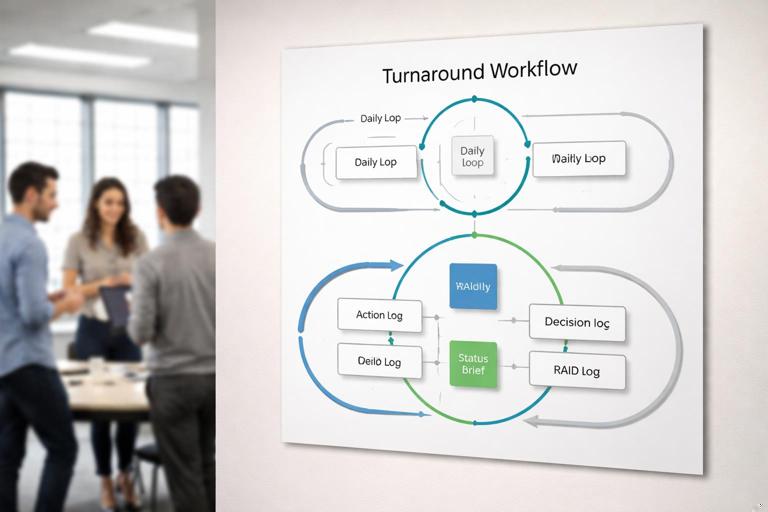
A practical turnaround workflow can be expressed as a short loop that runs daily and weekly. The loop is supported by a small set of artifacts that interlock.
Daily loop (execution control)
- Intake and clarify new work or issues (use an Intake Triage Card).
- Assign an owner and next action (update Action Log).
- Execute work in short slices with explicit acceptance criteria (use Work Packet Template).
- Record decisions immediately when made (update Decision Log).
- Update blockers, risks, and dependencies (update RAID Log and Dependency Board).
- Publish a short, consistent status snapshot (use Turnaround Status Brief).
Weekly loop (governance and re-plan)
- Review progress against the recovery plan and milestones (Recovery Plan Tracker).
- Review open decisions and escalations (Decision Log + Escalation Path).
- Review changes and their impact (Change Request Form + Impact Assessment).
- Review quality signals and rework trends (Quality Gate Checklist + Defect Trend Log).
- Confirm next-week priorities and capacity (Capacity & Allocation Sheet).
Keep the workflow visible: a one-page “How we run the turnaround” poster (digital or printed) listing the daily and weekly loop, the artifacts, and where they live (single source of truth).
- Listen to the audio with the screen off.
- Earn a certificate upon completion.
- Over 5000 courses for you to explore!

Download the app
Artifact set: the minimum viable rescue toolkit
Below is a practical set of checklists, logs, and recovery artifacts that cover most turnaround needs. You can start with the minimum set and add only when a recurring failure mode appears.
1) Intake Triage Card (standardize incoming work)
Purpose: prevent randomization and context switching by forcing clarity before work enters the recovery stream.
Use when: a stakeholder requests a change, a defect is reported, a dependency shifts, or a new risk emerges.
Recommended fields:
- ID, date, requester, channel received
- Type: defect / change / risk / dependency / question
- Problem statement (one sentence)
- Business impact (who/what is affected)
- Urgency (time-bound reason)
- Proposed outcome (what “fixed” looks like)
- Evidence links (screenshots, logs, tickets)
- Initial triage: accept / reject / defer / needs info
- Owner for next step and due date
Step-by-step workflow:
- Capture request in the card within the same day.
- Run a 10-minute triage (PM + tech lead + QA lead as needed).
- If “needs info,” assign a single person to obtain it; do not let the whole team chase it.
- If accepted, convert into a Work Packet and add to the plan tracker.
Practical example: A sales leader asks for “one more report” for a demo. The triage card forces the requester to define the demo date, which customers, what fields are required, and what is acceptable as a temporary workaround. This often reveals that a manual export is sufficient for the demo, avoiding a risky build.
2) Work Packet Template (make execution measurable)
Purpose: ensure every piece of recovery work has a clear definition of done, test approach, and rollback plan where applicable.
Use when: any task larger than a few hours, any change touching production, or any work with cross-team dependencies.
Recommended fields:
- Work Packet ID, title, owner, reviewers
- Objective (one sentence)
- Scope boundaries (in / out)
- Acceptance criteria (observable, testable)
- Implementation notes (high level)
- Test plan (who tests, what tests, environments)
- Release plan (steps, timing, approvals)
- Rollback plan (if applicable)
- Dependencies (links to dependency items)
- Risks introduced and mitigations
- Effort estimate and target date
Step-by-step workflow:
- Create the work packet before coding/config changes begin.
- Review acceptance criteria with QA and the requester (or proxy) to avoid late disputes.
- During execution, update only two things: status and blockers; avoid rewriting the packet.
- Close the packet only when acceptance criteria are met and evidence is attached (test results, screenshots, logs).
Practical example: A performance fix is requested. The work packet forces a measurable target (e.g., “p95 API latency under 400ms for endpoint X with dataset Y”) and defines the test harness. Without this, “performance improved” becomes subjective and rework-prone.
3) Action Log (the single list of commitments)
Purpose: maintain a trusted list of who is doing what by when, especially for cross-functional follow-ups that fall between systems.
Recommended fields:
- Action ID, description
- Owner
- Due date
- Status (open / in progress / done / blocked)
- Blocker reason and unblock owner
- Linked artifacts (work packet, decision, risk)
- Last updated timestamp
Operating rule: if it is a commitment discussed in a meeting, it must appear in the action log before the meeting ends.
Practical example: A vendor must deliver an updated API schema. That is not a “task” in your sprint board, but it is a critical commitment. The action log tracks it with an owner and due date, and it becomes visible in status.
4) RAID Log (Risks, Assumptions, Issues, Dependencies)
Purpose: keep the recovery effort from being surprised. In turnarounds, the RAID log should be short, current, and actively used, not a compliance document.
Recommended fields:
- Item ID, type (R/A/I/D)
- Description
- Impact (what breaks if it happens)
- Likelihood (for risks)
- Owner
- Mitigation / response plan
- Trigger (how you’ll know it’s happening)
- Target resolution date
- Status and last update
Step-by-step workflow:
- Review top 5–10 items daily in the turnaround standup.
- Escalate items that are both high impact and time-sensitive.
- Close items aggressively when no longer relevant to avoid noise.
Practical example: An assumption that “UAT users will be available next week” is recorded with an owner and a trigger (“UAT roster confirmed by Wednesday”). If the trigger fails, it becomes an issue immediately, not a surprise at the end of the week.
5) Decision Log (stop re-litigating)
Purpose: preserve alignment by recording what was decided, why, and what it affects. In a rescue, decisions are frequent and often made under time pressure; without a log, teams lose time revisiting settled topics.
Recommended fields:
- Decision ID, date
- Decision statement (clear and specific)
- Context and options considered
- Decision owner / approver
- Rationale (why this option)
- Impacts (scope, schedule, cost, quality, risk)
- Follow-up actions (linked to action log)
- Revisit date/condition (if reversible)
Operating rule: if a decision changes scope, dates, acceptance criteria, or ownership, it must be logged the same day.
Practical example: “We will ship with feature flag off for segment B and enable after monitoring for 48 hours.” This prevents later confusion when someone asks why segment B is not seeing the feature.
6) Change Request + Impact Assessment (control scope drift during recovery)
Purpose: ensure changes are evaluated consistently and do not silently destabilize the recovery plan.
Recommended fields:
- Change ID, requester, date
- Description of change
- Reason (regulatory, customer, defect, enhancement)
- Impact assessment: effort, schedule, risk, quality, dependencies
- Alternatives (including “do nothing” or workaround)
- Recommendation (approve / reject / defer)
- Approver and decision date
- Links to updated plan items and decision log
Step-by-step workflow:
- Capture the change request via Intake Triage Card.
- Complete impact assessment with the smallest group that can estimate credibly (often tech lead + PM + QA).
- Route to the correct approver based on thresholds (e.g., any change affecting a milestone requires sponsor approval).
- If approved, update the plan tracker and create/adjust work packets.
Practical example: A compliance tweak arrives mid-recovery. The impact assessment may show it is small in effort but high in regression risk, requiring an extra test cycle. That becomes explicit rather than discovered after a failed release.
7) Recovery Plan Tracker (turn milestones into executable slices)
Purpose: provide a single view of recovery milestones, work packets, owners, and forecast dates. This is not a full project plan rewrite; it is a control board for the turnaround window.
Recommended fields:
- Milestone / outcome
- Work packet IDs under it
- Owner(s)
- Planned date, forecast date
- Status (green/amber/red)
- Top blocker
- Dependencies
- Notes and links to evidence
Operating rule: forecast dates must be updated at a fixed cadence (e.g., twice weekly) using the same method, so stakeholders can trust trend direction.
8) Turnaround Status Brief (one-page, consistent, evidence-linked)
Purpose: reduce stakeholder anxiety and meeting load by providing a predictable snapshot. A rescue status update should be short, factual, and linked to artifacts for drill-down.
Suggested structure:
- What changed since last update (3–5 bullets)
- Current milestone forecast (table or bullets)
- Top risks/issues and what is being done
- Decisions needed (with due dates)
- Help needed / escalations
- Metrics (few, stable): throughput, defect trend, environment stability, etc.
Practical example: Instead of “testing is going well,” the brief states “UAT: 18/25 scenarios passed; 3 blocked by data issue D-14; fix in progress, retest Thursday.”
9) Quality Gate Checklists (prevent rework and release churn)
Purpose: enforce a small set of non-negotiable checks before moving work across stages (dev complete, test complete, ready to release). In turnarounds, quality gates should be pragmatic: fewer items, strictly followed.
Example gates and checklist items:
- Dev Complete Gate: acceptance criteria met; unit tests updated; feature flag behavior documented; logging/monitoring added where needed.
- Test Complete Gate: test evidence attached; critical defects triaged; regression scope executed; known issues documented with workarounds.
- Release Ready Gate: rollback plan validated; runbook updated; support notified; change window confirmed; monitoring dashboard prepared.
Step-by-step workflow:
- Define gate owners (often tech lead for Dev Complete, QA lead for Test Complete, release manager for Release Ready).
- Require checklist completion as a prerequisite for moving the work packet status.
- When a gate fails, record the failure reason in a Defect/Quality log to identify recurring breakdowns.
10) Defect Trend Log (focus on patterns, not anecdotes)
Purpose: track whether the turnaround is reducing rework or merely shifting it. The log is less about individual bugs (your tracker already has those) and more about categories and flow.
Recommended fields:
- Week/date range
- New defects opened, defects closed
- Escaped defects (found after a gate)
- Defect categories (requirements gap, environment, integration, performance, data, etc.)
- Top 3 recurring causes and countermeasures
Practical example: If “environment/data” defects dominate, the recovery should prioritize test data stability and environment runbooks rather than adding more feature work.
11) Meeting-to-Artifact workflow (make meetings produce outputs)
Purpose: prevent meetings from becoming repetitive discussions with no durable outcomes. Every turnaround meeting should have a defined artifact it updates.
- Daily standup updates: Action Log + RAID Log (top items only).
- Twice-weekly planning sync updates: Recovery Plan Tracker + Work Packet priorities.
- Governance review updates: Decision Log + Change Requests + Escalations list.
- Release readiness review updates: Quality Gate Checklists + Release Runbook.
Operating rule: if a meeting does not update an artifact, question why the meeting exists.
Templates you can copy: concise formats
Decision Log entry template
Decision ID: DEC-___   Date: ___   Approver: ___  Owner: ___  Status: Proposed/Approved/Reversed  Revisit: ___
Decision: ______________________________________________
Context: _______________________________________________
Options considered:
1) __________________  Pros/Cons: ______________________
2) __________________  Pros/Cons: ______________________
Rationale: _____________________________________________
Impacts:
- Scope: __________  Schedule: __________  Cost: ________
- Quality: ________  Risk: __________  Ops/Support: _____
Follow-up actions (Action IDs): _________________________
Links: (Change request / Work packets / Evidence) _______
Work Packet template
Work Packet ID: WP-___  Title: __________________  Owner: ___  Reviewers: ___
Objective (1 sentence): _________________________________
In scope: _______________________________________________
Out of scope: ___________________________________________
Acceptance criteria:
- AC1: _________________________________________________
- AC2: _________________________________________________
Test plan:
- Tests: ________________________________________________
- Environment/data: _____________________________________
Release plan:
- Steps: ________________________________________________
- Approvals: ____________________________________________
Rollback plan: __________________________________________
Dependencies (IDs/links): _______________________________
Risks introduced + mitigations: __________________________
Target date: ___  Status: Not started/In progress/Blocked/Done
Evidence links (tests, screenshots, logs): _______________
Turnaround Status Brief template
Date: ___   Reporting period: ___   Prepared by: ___
1) Changes since last update (3–5 bullets)
- _________________________________________________

2) Milestone forecast
- Milestone A: Planned ___  Forecast ___  Status G/A/R  Blocker: ___
- Milestone B: Planned ___  Forecast ___  Status G/A/R  Blocker: ___

3) Top risks/issues (max 5)
- [R/I] ___  Impact: ___  Owner: ___  Next step by: ___

4) Decisions needed (max 3)
- DEC needed: ___  By: ___  Options: ___

5) Help needed / escalations
- _________________________________________________

6) Metrics (stable set)
- Throughput: ___  Defects opened/closed: ___  Escapes: ___
How to implement the toolkit without slowing the team
Start with “minimum viable artifacts” for the first week
If you introduce too many templates at once, teams will resist and quality will drop. A practical rollout sequence:
- Day 1–2: Action Log + Decision Log + Turnaround Status Brief (immediate control and alignment).
- Day 3–4: Work Packet Template + Quality Gate Checklists (execution consistency).
- Day 5+: RAID Log + Change Request + Defect Trend Log (stability and learning).
Define ownership and update cadence explicitly
Every artifact needs a named owner and a cadence. Without this, logs become stale and lose trust.
- Action Log owner: turnaround PM or delivery lead; updated daily.
- Decision Log owner: PM; updated same day as decisions.
- RAID Log owner: PM with functional owners per item; reviewed daily.
- Quality gates owner: tech lead/QA/release manager; enforced per work packet.
- Status brief owner: PM; published on a fixed schedule.
Make artifacts link to each other (traceability)
Traceability is what turns documents into a system. Use IDs and links consistently:
- Every change request links to a decision entry and the affected work packets.
- Every work packet links to risks/dependencies it touches.
- Every status brief links to the plan tracker and highlights the decision IDs needed.
This prevents “shadow work” and ensures that when a stakeholder asks “why,” the answer is one click away.
Use “definition of ready” and “definition of done” for rescue work
In turnarounds, teams often start work with missing information. Add two small checklists:
- Definition of Ready (for a work packet): objective clear, acceptance criteria drafted, owner assigned, dependencies identified, test approach agreed.
- Definition of Done (for a work packet): acceptance criteria met, test evidence attached, docs/runbook updated if needed, release notes drafted, monitoring considered.
These are not new concepts; they are practical guardrails to keep recovery work from bouncing back and forth.
Common failure modes and how templates prevent them
Failure mode: “We agreed, but people remember it differently”
Countermeasure: Decision Log with a clear decision statement, approver, and impacts. Require that any scope/date change is invalid unless logged.
Failure mode: “Work is ‘almost done’ for days”
Countermeasure: Work Packet acceptance criteria and evidence links. If evidence is missing, the work is not done. This reduces hidden testing and integration surprises.
Failure mode: “Everything is urgent, so nothing is prioritized”
Countermeasure: Intake Triage Card plus a visible plan tracker. Urgency must be justified with impact and time constraint; otherwise it is deferred.
Failure mode: “Status meetings consume the week”
Countermeasure: Turnaround Status Brief. Stakeholders get a predictable snapshot and can drill down via links, reducing ad hoc calls.
Failure mode: “Risks are known but not acted on”
Countermeasure: RAID log with owners, triggers, and dates; review top items daily and escalate when triggers hit.