Why scripts, templates, checklists, and exercises matter in non-sales negotiations
In non-sales roles, negotiation often happens in short, messy moments: a Slack thread about timelines, a meeting where scope quietly expands, a vendor email asking for “one small change,” or a manager requesting an urgent deliverable. In these situations, you rarely have time to craft perfect language from scratch. Scripts, templates, checklists, and practice exercises turn negotiation from an improvised performance into a repeatable operating system.

Think of these tools as “cognitive scaffolding.” They reduce decision fatigue, prevent you from forgetting critical steps, and give you confident wording under pressure. They also help teams negotiate consistently: the same standards, the same documentation, the same escalation triggers, and the same way of presenting trade-offs.
This chapter provides ready-to-use assets you can copy into your notes, team wiki, or email templates. Each tool is designed to be lightweight enough for real work, but structured enough to protect you from common pitfalls like vague commitments, untracked concessions, and accidental yeses.
How to use this chapter
Pick one negotiation context you face frequently (for example: timeline changes, scope requests, resource constraints, vendor terms, cross-functional dependencies). Then:
- Choose 2–3 scripts you can use immediately.
- Adopt one template for documenting agreements and decisions.
- Use one checklist before and after important conversations.
- Run one practice exercise weekly for 10–15 minutes (solo or with a peer).
The goal is not to sound robotic. The goal is to have a reliable starting point that you can personalize while staying clear, calm, and consistent.
- Listen to the audio with the screen off.
- Earn a certificate upon completion.
- Over 5000 courses for you to explore!

Download the app
Scripts: reusable language for common negotiation moments
A script is a short, repeatable phrase that accomplishes a negotiation task: clarifying, slowing down, proposing options, requesting time, documenting, or escalating. Good scripts are neutral, specific, and easy to say out loud.
Script design principles
- Lead with shared intent: “I want to make sure we deliver what you need.”
- Name the constraint without drama: “Given current capacity…”
- Offer a choice instead of a block: “We can do A by Friday or B by Tuesday.”
- Ask for confirmation: “Does that work for you?”
- Close the loop in writing: “I’ll summarize the decision and next steps.”
Scripts for clarifying the request
Use these when someone asks for something vague or when you suspect hidden requirements.
- “To make sure I’m solving the right problem, what does success look like for you?”
- “What’s the decision this supports, and when is that decision being made?”
- “Which part is mandatory vs. nice-to-have?”
- “What happens if we don’t do this now?”
- “Can you share an example of what ‘good’ looks like?”
Scripts for slowing down and buying time
Use these when you need to check feasibility, align internally, or avoid committing in the moment.
- “I want to give you a reliable answer. Let me confirm capacity and get back to you by [time].”
- “I can’t commit on the spot, but I can commit to a decision by [time].”
- “Before we lock this in, I need to validate dependencies with [team/person].”
- “Let’s pause for 24 hours so we don’t create rework.”
Scripts for proposing trade-offs (without sounding defensive)
Use these when you need to protect quality, timeline, or workload while still being helpful.
- “If we keep the deadline, we’ll need to reduce scope. Here are two options.”
- “We can optimize for speed or completeness. Which matters more here?”
- “Given current priorities, I can take this on if we deprioritize [X]. What should move?”
- “I can do version 1 now and version 2 later. What’s the minimum viable outcome?”
Scripts for handling scope creep in real time
Use these when new requirements appear midstream.
- “That’s a new requirement. Should we treat it as an add-on or replace something already in scope?”
- “I can include that, but it changes the timeline by about [X]. Do you want to proceed?”
- “Let’s capture this as a separate item so we can estimate it properly.”
- “To keep us aligned: are we agreeing to expand scope, or are we just exploring?”
Scripts for pushing back respectfully
Use these when you need to say no, not now, or not in that way.
- “I can’t commit to that as stated, but I can offer an alternative.”
- “That won’t work on our side because [constraint]. Here’s what would work.”
- “I’m concerned we’d be trading speed for errors. Can we adjust the plan?”
- “I’m not the right owner for this. The right next step is [handoff].”
Scripts for aligning on decision-making and ownership
Use these to prevent endless loops and unclear accountability.
- “Who is the final decision-maker on this?”
- “What are the criteria we’ll use to choose between options?”
- “What’s the approval path, and how long does each step take?”
- “Who owns the next action, and by when?”
Scripts for documenting agreements (and preventing misunderstandings)
Use these immediately after meetings or when a thread gets complicated.
- “To confirm, we agreed on: [A], [B], [C]. If I missed anything, please reply by [time].”
- “Here’s the decision, the rationale, and the next steps. I’ll proceed unless I hear otherwise by [time].”
- “Just to be explicit: this includes [in scope] and excludes [out of scope].”
Scripts for escalating without blame
Use these when you need leadership input or a priority call.
- “We have a priority conflict: [A] and [B] can’t both happen with current capacity. Can you choose which to prioritize?”
- “We’re blocked by [dependency]. Can you help remove the blocker or approve an alternative?”
- “I want to avoid surprises. Here are the risks if we proceed as-is.”
Templates: repeatable structures for emails, meeting notes, and decision records
Templates reduce ambiguity and make it easier for others to say yes because the decision is clearly framed. Use them as “fill-in-the-blank” formats, not as long documents.
Template 1: Negotiation one-pager (internal or external)
Use this before any meaningful negotiation. Keep it to one screen.
Title: [Topic / Request / Project] Date: [ ] Owner: [ ] Participants: [ ] Context (1–2 sentences): [Why this is happening now] Desired outcome (specific): [What we want to be true] Non-negotiables: [Must-haves] Flexible variables: [Where we can adjust] Constraints: [Time, budget, policy, capacity, dependencies] Options to propose (2–3): 1) [Option A] 2) [Option B] 3) [Option C] Questions to ask: - [Clarifying question 1] - [Clarifying question 2] Decision needed by: [Date/time] Next step after agreement: [Implementation action]Template 2: Options email (presenting choices and trade-offs)
Use this when someone asks for “can you do it by Friday?” and the real answer is “it depends.”
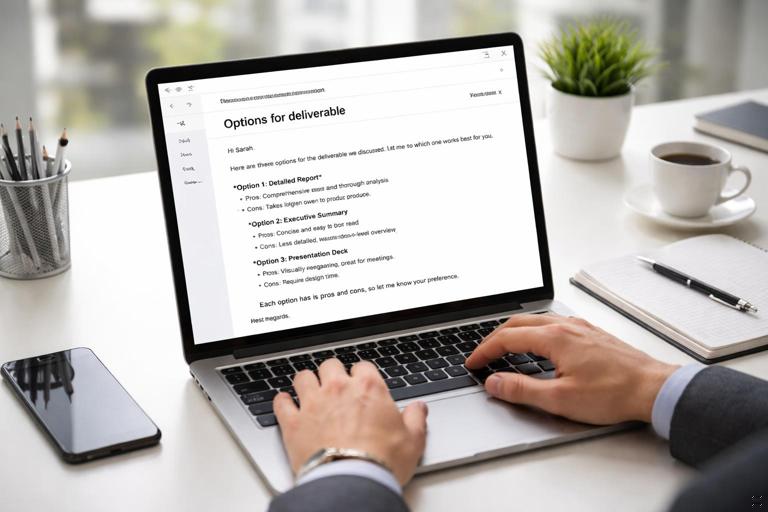
Subject: Options for [deliverable] by [date] Hi [Name], To meet your goal of [desired outcome], here are a few options with trade-offs: Option A (fastest): - Scope: [ ] - Delivery: [date] - Trade-off: [risk/limitation] Option B (balanced): - Scope: [ ] - Delivery: [date] - Trade-off: [risk/limitation] Option C (highest quality): - Scope: [ ] - Delivery: [date] - Trade-off: [risk/limitation] Which option should we proceed with? If you choose A or B, please confirm that [explicit trade-off] is acceptable. Thanks, [Your name]Template 3: Meeting decision record (MDR)
Use this after any meeting where commitments were made. It prevents “I thought you meant…” later.
Meeting: [Name] Date: [ ] Attendees: [ ] Decision(s): 1) [Decision] Owner: [ ] Due: [ ] 2) [Decision] Owner: [ ] Due: [ ] In scope: - [ ] Out of scope: - [ ] Assumptions: - [ ] Risks / open questions: - [ ] Next check-in: [date/time]Template 4: Change request intake (scope/timeline/budget changes)
Use this when new work appears. It forces clarity before commitment.
Change request: [short name] Requested by: [ ] Date: [ ] What is changing? - Add/modify/remove: [ ] Why now? - Driver: [deadline, stakeholder need, compliance, incident, etc.] Impact estimate: - Effort: [ ] - Timeline impact: [+X days / new date] - Cost impact: [ ] - Risk impact: [ ] Trade-off required (choose one): - Reduce scope elsewhere: [what] - Extend timeline: [new date] - Add resources: [what/who] - Accept risk: [which risk] Decision needed from: [name/role] by [date]Template 5: “No, but” response (decline with an alternative)
Use this to avoid over-explaining while still being constructive.
Hi [Name], I can’t commit to [request] by [date] given [constraint]. What I can do is: - [Alternative 1] by [date] OR - [Alternative 2] by [date] If neither works, the decision needed is whether to [trade-off]. Let me know which path you prefer. Thanks, [Your name]Checklists: prevent errors and protect your time
Checklists are not bureaucracy; they are guardrails. Use them for high-stakes or high-frequency negotiations. Keep them short enough that you’ll actually use them.
Checklist 1: Pre-conversation “10-minute readiness”
- What decision do we need by the end of this interaction?
- What are the 2–3 acceptable options I can propose?
- What information is missing that could change the answer?
- What constraints must be stated out loud (capacity, policy, dependency)?
- What is my “if they ask for more” response?
- What will I write down during the conversation (numbers, dates, owners)?
- What is my plan to confirm in writing afterward?
Checklist 2: During-conversation “stay on track”
- Did we define the request in specific terms (deliverable, date, quality level)?
- Did we separate facts from assumptions?
- Did we explicitly discuss at least one trade-off?
- Did we name who decides and who executes?
- Did we confirm next steps and timing?
Checklist 3: Post-conversation “agreement hygiene”
- Did I send a written summary with decisions, owners, and dates?
- Did I list in-scope and out-of-scope items?
- Did I capture open questions and who will answer them?
- Did I update the relevant tracker (project board, ticket, contract notes, CRM equivalent)?
- Did I schedule the next check-in if the work spans more than a week?
Checklist 4: Red-flag detector (when to pause or escalate)
- Ambiguous language: “ASAP,” “quick,” “should be easy,” “just.”
- Unowned work: no clear owner, or “we” without names.
- Hidden dependencies: “someone else will handle it” without confirmation.
- Repeated re-trading: terms keep changing after agreement.
- Deadline without rationale: urgency is asserted but not explained.
- One-sided risk: you carry the downside, others get the upside.
Practice exercises: build negotiation fluency without real-world risk
Practice exercises turn scripts and templates into instinct. The key is repetition with feedback. You don’t need a formal training session; you need short, frequent reps.
Exercise 1: Script substitution drill (5 minutes)
Goal: Replace reactive phrases with intentional scripts.
Step-by-step:
- Write down 5 phrases you often say under pressure (examples: “Sure,” “I’ll try,” “No problem,” “I guess,” “Let me see what I can do”).
- For each phrase, write a better substitute that adds clarity or creates options.
- Read each substitute out loud twice.
Example substitutions:
- Replace “I’ll try” with “I can confirm feasibility by 3pm and then commit to a date.”
- Replace “Sure” with “Yes, if we agree on which item we’re deprioritizing.”
- Replace “No problem” with “I can do that; it will shift [other work] to next week.”
Exercise 2: Two-option habit (10 minutes)
Goal: Train yourself to propose choices instead of yes/no.
Step-by-step:
- Pick a real request you received recently.
- Write two viable options with different trade-offs (speed vs. completeness, cost vs. flexibility, scope vs. timeline).
- Write a 4-sentence message using the Options email template.
- Optional: ask a peer, “Which option would you choose and why?”
Example: A stakeholder wants a dashboard “by Monday.” Option A: basic metrics by Monday, manual refresh. Option B: automated version by Thursday. Your message should force a choice and confirm acceptance of the trade-off.
Exercise 3: Role-play the “scope creep interruption” (10–15 minutes)
Goal: Practice interrupting politely when new requirements appear.
Step-by-step:
- With a partner, choose roles: requester and owner.
- The requester introduces a new requirement mid-discussion.
- The owner must use one of the scope creep scripts and present two paths: add-on vs. replace.
- Switch roles and repeat with a different scenario.
Scenarios:
- A meeting agenda adds “and can you also…” at minute 25.
- A vendor says, “This feature is included,” then later adds a fee.
- A manager asks for a “quick review” that is actually a full rewrite.
Exercise 4: The “written summary” speed run (7 minutes)
Goal: Get fast at documenting decisions while details are fresh.
Step-by-step:
- Take notes from a recent meeting (or invent a short scenario).
- Set a timer for 7 minutes.
- Write a Meeting Decision Record using the MDR template.
- Check for: owners, dates, in/out of scope, open questions.
Benchmark: You should be able to produce a clear summary in under 7 minutes without over-explaining.
Exercise 5: Objection-to-question conversion (10 minutes)
Goal: Stay curious and constructive when you hear pushback.
Step-by-step:
- List 6 objections you commonly hear (examples: “Too expensive,” “We need it sooner,” “That’s not acceptable,” “Other teams do it,” “Just make it happen,” “We don’t have time for that”).
- For each objection, write one clarifying question and one options statement.
- Practice saying both out loud.
Example:
- Objection: “We need it sooner.”
- Question: “What happens if it lands on Wednesday instead of Monday?”
- Options: “We can deliver a basic version Monday or the full version Wednesday. Which do you prefer?”
Exercise 6: The “constraint statement” drill (5 minutes)
Goal: State constraints calmly without apology or defensiveness.
Step-by-step:
- Write three constraints you often face (capacity, policy, technical dependency).
- For each, write a one-sentence constraint statement and a one-sentence next step.
- Read them out loud until they sound natural.
Example:
- Constraint: “We can’t access that data without approval.”
- Statement: “We’ll need security approval before we can pull that dataset.”
- Next step: “If you can introduce us to the approver today, we can start the request immediately.”
Build your personal negotiation toolkit (a practical setup)
To make these tools usable, store them where you work. A toolkit that lives in a PDF you never open won’t help you in a live meeting.
Step-by-step setup (30 minutes)
- Create a single note titled “Negotiation Toolkit.”
- Paste in: 8–10 scripts you like most, the Options email template, and the MDR template.
- Add three “common scenarios” you face and pre-write a draft message for each.
- Create a checklist section with the Pre-conversation and Post-conversation lists.
- Schedule a weekly 15-minute calendar block labeled “Negotiation reps” to run one exercise.
Example: three scenario drafts to pre-write
- Timeline request: a ready-to-send Options email with two delivery dates and explicit trade-offs.
- Scope expansion: a message that asks whether the new item is an add-on or a replacement, plus a change request intake snippet.
- Priority conflict: an escalation note that asks a leader to choose between two priorities with clear consequences.
Team-level adoption: make negotiation consistency scalable
When a team negotiates inconsistently, stakeholders learn to “shop” for the easiest yes. Shared scripts and templates create predictable standards and reduce interpersonal friction.
Lightweight team norms (copy/paste)
- We confirm decisions in writing within 24 hours using the MDR format.
- We treat new requirements as change requests and document impact before committing.
- We present at least two options when a request conflicts with capacity or deadlines.
- We do not accept “ASAP” as a deadline; we ask for a date and rationale.
- We escalate priority conflicts as choices, not complaints.
Micro-practice in team meetings (5 minutes)
Once per week, pick one real scenario and do a quick round:
- One person plays the requester and states the ask in one sentence.
- Two people respond with different scripts (clarify, propose options, document).
- The group votes on which response is clearest and why.
This keeps skills fresh and normalizes clear negotiation language across the team.