What Product Integrations and Platform Partnerships Actually Are
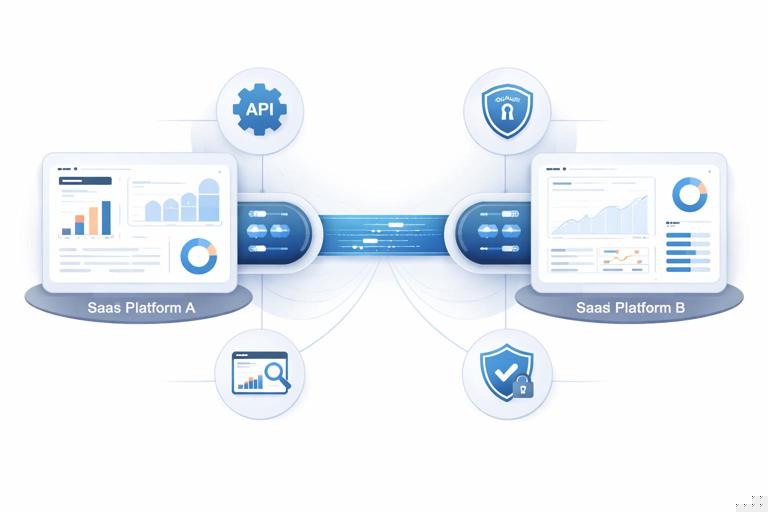
Definition and scope: A product integration is a technical connection that lets two products exchange data or trigger actions so users can complete a workflow across both tools. A platform partnership is the business and technical relationship that makes integrations discoverable, supported, and scalable—often through an app marketplace, developer program, or shared ecosystem roadmap. Technical alignment is the set of architectural, security, operational, and roadmap agreements that keep the integration reliable as both products evolve.
Why this matters operationally: Integrations are not “one-and-done” features. They create a long-lived dependency between two engineering organizations, two release cycles, and two support teams. The partnership succeeds when the integration is stable, easy to adopt, observable in production, and resilient to change (API versions, auth updates, schema changes, and new compliance requirements).
Integration Archetypes and When to Use Each
1) Data sync (one-way or two-way)
What it is: Periodic or near-real-time synchronization of objects (contacts, tickets, invoices, events) between systems. Use it when: Users need consistent records across tools and can tolerate eventual consistency. Example: Sync “Customer” and “Subscription status” from billing into CRM so sales sees renewal risk.
2) Event-driven automation (triggers and actions)
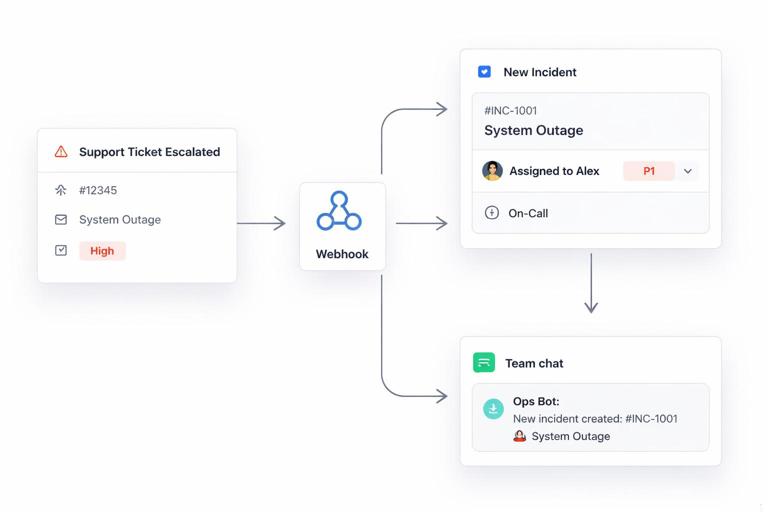
What it is: One system emits events (e.g., “deal won”), the other performs actions (e.g., “create project”). Use it when: Users want workflow automation and immediate outcomes. Example: When a support ticket is escalated, create an incident in an on-call tool and notify a Slack channel.
3) Embedded experiences (UI integration)
What it is: Surfacing partner functionality inside your UI (embedded widgets, iframes, deep links, embedded reports) or your functionality inside theirs. Use it when: The workflow needs to feel native and reduce context switching. Example: Display a payment status widget inside an order management screen.
- Listen to the audio with the screen off.
- Earn a certificate upon completion.
- Over 5000 courses for you to explore!

Download the app
4) Identity and access integration (SSO, SCIM, role mapping)
What it is: Shared authentication and user provisioning. Use it when: Enterprise adoption requires centralized identity, least privilege, and automated onboarding/offboarding. Example: Support SAML SSO plus SCIM provisioning so IT can manage users and roles.
5) Marketplace listing + standardized connectors
What it is: Distribution through a platform marketplace with standardized install flows, review requirements, and analytics. Use it when: The platform has strong demand capture and customers expect “one-click” installs. Example: Publishing an app in a CRM marketplace with OAuth install and admin consent.
Choosing the Right Technical Shape: A Decision Checklist
Workflow criticality: Is the integration “nice-to-have” or does it sit on a revenue-critical path (billing, identity, compliance)? Critical paths require stronger guarantees: retries, idempotency, monitoring, and formal change management.
Data sensitivity: If you will handle PII, payment data, or regulated data, prioritize minimal data transfer, field-level scoping, encryption, and auditable access. If you can achieve the workflow with metadata or references, avoid copying sensitive fields.
Latency tolerance: If users need immediate updates, use webhooks or streaming events. If daily sync is fine, scheduled jobs reduce complexity. Document expected latency so support can triage “missing data” reports.
Ownership and source of truth: Decide which system is authoritative per object and per field. Many integration failures come from ambiguous ownership (e.g., both systems overwriting “status”). Define conflict rules explicitly.
Step-by-Step: Designing an Integration That Survives Real Usage
Step 1: Write the “integration contract” before writing code
Capture a short spec that both teams can agree on. Keep it concrete and testable.
- User story: “As a support manager, when a ticket is marked ‘Escalated’, an incident is created with the ticket link and severity.”
- Objects and fields: Ticket ID, title, priority, customer ID, link, timestamps.
- Direction: System A triggers; System B creates/updates.
- Source of truth: Priority comes from System A; incident status comes from System B.
- Latency: < 60 seconds from escalation to incident creation.
- Failure behavior: Retry for 24 hours; if still failing, alert admin and log error details.
Step 2: Choose the integration pattern and boundaries
Decide whether you will build a direct integration (your service calls their API), use an integration platform (iPaaS), or support both. Direct integrations give control and better UX; iPaaS can accelerate long-tail connectors but may limit advanced features. Define boundaries: what the integration will not do (e.g., “no historical backfill beyond 30 days” or “no attachment sync”).
Step 3: Define authentication and authorization
Most modern platform partnerships rely on OAuth 2.0 with scoped permissions. Specify scopes in plain language for admins: “Read tickets,” “Write incidents,” “Read users.” If enterprise customers require it, plan for admin consent, token rotation, and revocation handling. For server-to-server use cases, consider OAuth client credentials or signed JWT flows, but ensure you can map actions to an accountable tenant and user.
Step 4: Design data mapping and schema evolution
Create a mapping table: partner field → your field, including types, allowed values, and default behavior. Plan for schema changes by using versioned payloads, optional fields, and backward-compatible parsing. Avoid hard-failing on unknown fields; log and ignore when safe.
// Example mapping snippet (conceptual) partner.ticket.priority (string: low|med|high) -> incident.severity (int: 1|2|3) low -> 3, med -> 2, high -> 1 default: 2 if missingStep 5: Build for reliability: idempotency, retries, and rate limits
Idempotency: Ensure repeated requests don’t create duplicates. Use an idempotency key like “ticket_id + event_timestamp” or store a mapping table (ticket_id → incident_id). Retries: Implement exponential backoff and respect “Retry-After” headers. Rate limits: Detect 429 responses and throttle. If the partner has strict limits, batch updates or use incremental sync.
Step 6: Implement observability from day one
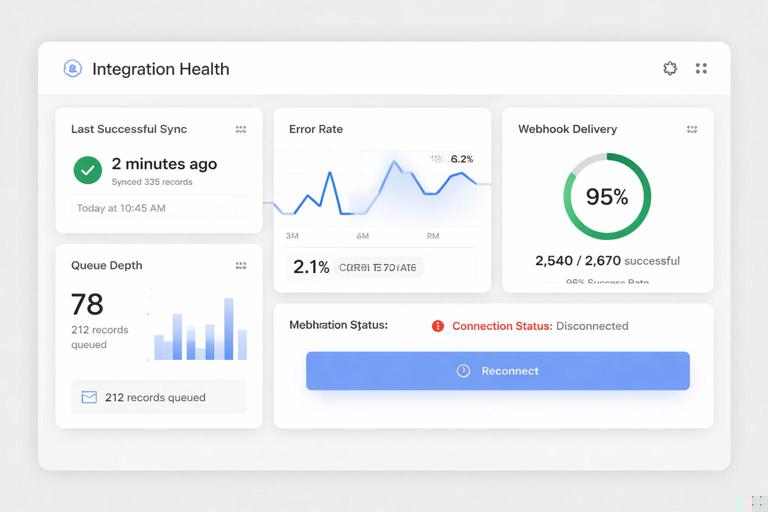
Integrations fail in production for reasons users can’t see. Add structured logs, correlation IDs, and metrics per tenant: success rate, latency, error codes, webhook delivery failures, and queue depth. Provide an admin-facing “Integration Health” page showing last successful sync, last error, and a “reconnect” action.
Step 7: Create a safe rollout plan
Release behind feature flags, start with internal tenants, then a small beta cohort. Use canary releases for webhook handlers and background workers. If the integration touches billing or identity, require explicit customer opt-in and provide a rollback path (disable integration without data loss).
Technical Alignment: The Hidden Work That Prevents Breakage
API versioning and deprecation policy
Agree on how breaking changes are handled. If the partner uses versioned endpoints, pin to a version and monitor deprecation notices. If they do not, build defensive parsing and contract tests. Establish a shared expectation: minimum notice period, sandbox availability, and migration support.
Release coordination and change notifications
Set up a lightweight change channel: a shared email list or webhook for platform change events, plus a quarterly technical roadmap sync. The goal is not bureaucracy; it is early warning for auth changes, new required headers, or object model updates.
Security alignment
Align on encryption in transit (TLS), secrets storage, token rotation, and least-privilege scopes. If you store partner tokens, define where and how (KMS-backed vault, rotation schedule, access controls). If you process regulated data, align on audit logs and incident response contacts.
Compliance and data processing boundaries
Clarify whether you are a data processor or controller for shared data and what data is necessary. Minimize retention: store only what you need for the workflow, and define deletion behavior (e.g., when a customer disconnects the integration, revoke tokens and delete cached data within X days).
Marketplace and Platform Requirements You Must Engineer For
Install and uninstall flows
Marketplaces often require a standardized install experience: OAuth consent, tenant selection, and confirmation screens. Engineer uninstall handling: revoke tokens, stop webhooks, and clean up scheduled jobs. Many platforms test uninstall behavior during app review.
App review checklists
Platforms may require: privacy policy links, scope justification, security questionnaires, penetration testing summaries, and proof of least privilege. Treat app review as a product requirement: build a “permissions rationale” page and keep documentation current.
Multi-tenant architecture expectations
Platforms assume your app can handle many tenants with isolation. Ensure tenant-aware rate limiting, per-tenant encryption keys if needed, and strict separation in logs and storage. A common failure mode is leaking data through mis-scoped caching or shared queues.
Integration UX: Adoption Depends on Setup, Not Just Features
Make configuration self-serve
Users abandon integrations that require support tickets. Provide guided setup: connect account, choose objects, map fields, test connection, and confirm. Include sensible defaults and a “recommended configuration” for common use cases.
Explain what will happen in plain language
During setup, show examples: “When a ticket is escalated, we will create an incident with these fields.” Display scope requests with human-readable descriptions. Provide a preview of data mapping and a test event button.
Design for partial failure
Some records will fail due to validation rules or permissions. Provide per-record error visibility and remediation steps: “Field X is required in the partner system; update your mapping or add a default.” Avoid silent drops.
Testing Strategy for Integrations: Beyond Unit Tests
Contract tests and sandbox environments
Use contract tests to validate request/response shapes against partner expectations. Run tests against a sandbox tenant with seeded data. If the partner lacks a stable sandbox, create a mock server that replays recorded responses and add periodic live checks to detect drift.
End-to-end test cases you should always include
- Auth lifecycle: initial connect, token refresh, token revocation, reconnect.
- Duplicate events: webhook delivered twice; ensure idempotency.
- Out-of-order delivery: event B arrives before event A; ensure ordering logic or safe handling.
- Rate limiting: simulate 429 and verify backoff.
- Permission changes: admin removes a scope; verify clear error messaging.
- Large payloads: long text fields, many line items, attachments (even if not supported, ensure graceful failure).
Operational Ownership: Support, Escalations, and Runbooks
Define who owns what in production
Even with strong engineering, users will experience issues: expired tokens, changed permissions, partner outages, or schema changes. Create a runbook that maps symptoms to actions: “401 errors → token refresh or reconnect,” “429 spikes → throttle and queue,” “webhook signature failures → verify secret rotation.”
Escalation paths and incident collaboration
Set up a shared escalation path with the partner’s technical contact. Include what evidence to provide: request IDs, timestamps, tenant IDs, and sample payloads (redacted). Agree on severity definitions for integration outages and expected response times for platform incidents.
Customer-facing status and transparency
If the integration is widely used, publish an integration status page or at least surface status inside the product. When the partner platform is degraded, show a banner: “Partner API is experiencing delays; your data may sync late.” This reduces support load and builds trust.
Roadmap Alignment: Keeping the Integration Relevant
Plan for iterative expansion
Start with a narrow workflow, then expand based on usage telemetry: which triggers are used, which mappings are edited, where failures occur. Roadmap alignment means agreeing on the next objects, deeper embedded UI, or enterprise features like SCIM and audit logs.
Avoid integration sprawl
As you add features, keep the integration coherent. Too many toggles and object options create configuration debt. Prefer opinionated presets (“Support Escalation Pack,” “Renewal Risk Pack”) that bundle settings and reduce setup time.
Practical Example: Building a Two-Way CRM ↔ Billing Integration
Use case and boundaries
Goal: Sales and finance share a consistent view of customer status. Sync: Billing → CRM for subscription status and MRR; CRM → Billing for account owner and customer segment. Boundaries: No invoice PDF sync; no historical backfill beyond 90 days.
Step-by-step implementation outline
- Objects: Customer, Subscription, Account, Owner.
- Auth: OAuth with scopes: read subscriptions, read customers, write customer metadata.
- Source of truth: Billing owns MRR and renewal date; CRM owns owner and segment.
- Mechanism: Webhooks for subscription changes; nightly reconciliation job for drift detection.
- Idempotency: Store mapping table (billing_customer_id ↔ crm_account_id) and last processed event ID.
- Observability: Metrics per tenant: webhook success rate, reconciliation diffs, and time-to-sync.
- UX: Setup wizard with field mapping and a “Test sync” button that updates a sample account.
Common edge cases and how to handle them
- Account merges in CRM: Detect merge events; update mapping table and prevent orphaned billing links.
- Subscription cancellations and reactivations: Treat as state transitions; ensure CRM reflects the latest state without duplicating records.
- Multiple subscriptions per customer: Decide whether CRM shows aggregate MRR or line-item subscriptions; document the rule.
- Permission drift: If an admin changes scopes, show a clear reconnect prompt and pause writes to avoid partial updates.