What a Partner Discovery System Is (and Why It’s Different from “Finding Partners”)
Definition: A partner discovery system is a repeatable, documented workflow that continuously produces qualified partner candidates, keeps them organized, and refreshes priorities as the market changes. It’s not a one-time “research sprint.” It’s an operating system that turns scattered signals (customers, competitors, integrations, communities, events, content, hiring patterns) into a living target list.

What it outputs: (1) a structured target list (accounts + contacts), (2) evidence attached to each target (why now, why them), (3) an outreach-ready “next action,” and (4) a cadence for refreshing and expanding the list.
What it is not: It is not partner fit scoring, not value proposition design, and not a mindset chapter. Those are separate. This chapter focuses on the machinery that reliably surfaces candidates and turns them into an actionable pipeline.
System Architecture: Inputs → Signals → Candidates → Target List
Inputs: Data sources you can access repeatedly (CRM, product telemetry, support tickets, app marketplaces, LinkedIn, job boards, review sites, newsletters, conference agendas, GitHub, partner directories).
Signals: Observable indicators that a company is a plausible partner candidate (e.g., they launched an integration category, they are hiring a partnerships manager, they co-market frequently, they serve the same buyer, they appear in your customers’ tech stacks).
- Listen to the audio with the screen off.
- Earn a certificate upon completion.
- Over 5000 courses for you to explore!

Download the app
Candidates: A raw pool of companies that match your discovery criteria. Candidates are not yet “targets.” They become targets when you attach evidence, identify the right contact(s), and define a concrete next step.
Target list: A prioritized, segmented list with fields that support execution: segment, source, signal(s), contact(s), last touched date, next action, and status.
Choose Your Discovery Lanes (So You Don’t Drown in Leads)
Most teams fail at partner discovery because they try to search everywhere at once. A better approach is to define 3–5 “discovery lanes” that match your business model and can be run weekly. Each lane should have: a source, a repeatable query, a capture method, and a review cadence.
Lane 1: Customer-Stack Mining
Why it works: Your customers already reveal which tools, agencies, platforms, and ecosystems they trust. Those are often the fastest path to warm introductions and co-selling.
- Sources: CRM fields, onboarding forms (“What do you use today?”), support tickets, implementation notes, customer success QBR decks, product telemetry (connected apps), invoices (agency names).
- Repeatable query: “Top 50 accounts by ARR or growth” → list all third-party tools mentioned → count frequency.
- Capture: Create a “Tech/Service Mention” table: company mentioned, type (tool/agency/platform), customer account, context, date.
Lane 2: Integration & Marketplace Adjacency
Why it works: Ecosystems create natural distribution. If you can integrate or align with a platform’s marketplace, you inherit discovery and credibility.
- Sources: App marketplaces (Salesforce AppExchange, HubSpot Marketplace, Shopify App Store, Atlassian Marketplace), integration directories, Zapier/Make listings, API partner pages.
- Repeatable query: Search by category keywords and filter by “new,” “trending,” or “most installed.”
- Capture: Record listing URL, category, install count (if visible), reviews, and whether they already list competitors.
Lane 3: Competitor & “Co-Sell With” Mapping
Why it works: Partners often cluster. If a company partners with your competitor, they may also partner with you—especially if they want optionality or broader coverage.
- Sources: Competitor partner pages, press releases, webinar archives, case studies, “technology partners” footers.
- Repeatable query: For each competitor: scrape partner logos → identify overlaps → add to candidate pool.
- Capture: Note the evidence link (e.g., “Partner page screenshot”), partnership type if stated, and recency.
Lane 4: Content & Event Co-Marketing Signals
Why it works: Companies that co-market frequently have internal processes for webinars, newsletters, and joint announcements—meaning lower friction to run campaigns together.
- Sources: Webinar platforms, YouTube channels, podcast guest lists, conference sponsor lists, virtual summit agendas, newsletter swaps.
- Repeatable query: “webinar” + category keyword; “partner webinar” on LinkedIn; conference agenda export.
- Capture: Track how often they co-market, with whom, and the topics (to infer audience alignment).
Lane 5: Hiring & Org Signals
Why it works: Hiring indicates intent. If a company is hiring for partnerships, alliances, channel, or ecosystem roles, they are likely building or expanding a partner program.
- Sources: LinkedIn Jobs, company career pages, Wellfound, Greenhouse/Lever boards.
- Repeatable query: Alerts for “partnerships,” “alliances,” “channel,” “BD,” “ecosystem,” “strategic partnerships,” plus your category keywords.
- Capture: Save job link, role seniority, location, and whether it mentions specific partner types (ISVs, agencies, resellers).
Define Discovery Criteria That Are Operational (Not Theoretical)
Discovery criteria are the minimum filters that decide whether a company enters your candidate pool. Keep them simple enough that a coordinator or analyst can apply them consistently. Avoid criteria that require deep judgment (that’s for later stages). Examples of operational criteria:
- Customer overlap proxy: They serve the same industry or buyer persona (as stated on their website).
- Distribution surface: They have a marketplace listing, partner page, or integration directory entry.
- Reach indicator: Minimum follower count, newsletter size, or event sponsorship tier (use as a rough proxy only).
- Geography: Operates in your target regions.
- Compliance constraints: Exclude categories you cannot work with (e.g., regulated areas you can’t support).
Target List Building: From Raw Candidates to Outreach-Ready Accounts
A target list is not a spreadsheet of logos. It’s a working queue. The goal is to move each candidate to a state where someone can take a next action without doing new research from scratch.
Step 1: Create a Single Source of Truth (SSOT)
Pick one system where every candidate lives. This can be a CRM, Airtable, Notion database, or a dedicated partner platform. The tool matters less than consistency and field design.
Minimum fields for the company record:
- Company name, website, HQ region
- Segment (platform, ISV, agency, community, data provider, etc.)
- Discovery lane (customer-stack, marketplace, competitor map, content/event, hiring)
- Signal(s) observed (short tags)
- Evidence links (URLs)
- Status (candidate, research, targeted, contacted, engaged, paused)
- Owner
- Next action + due date
- Last updated date
Step 2: Normalize and De-duplicate
Discovery systems generate duplicates fast (the same company appears in multiple lanes). De-duplication is not busywork; it preserves trust in the list.
- Standardize naming (legal name vs brand name).
- Use website domain as a unique identifier.
- Merge records and keep multiple “source lanes” as tags rather than separate rows.
Step 3: Add “Why Now” Notes
“Why now” is a short, factual reason the company is timely. It is not a value proposition. It’s the trigger that makes outreach relevant.
- “Launched marketplace category page last month.”
- “Hiring Head of Partnerships (posted 2 weeks ago).”
- “Co-hosted 3 webinars in the last quarter.”
- “Appears in 18% of our top accounts’ tech stacks.”
Step 4: Identify the Right Contact(s) and Map the Buying Committee
Partner deals often stall because teams contact only one person. Build a small contact map per target. You are not designing the pitch here; you are ensuring you can reach the right stakeholders.
- Primary: Partnerships/Ecosystem/BD leader (title varies).
- Secondary: Product or Integrations lead (if technical alignment is required).
- Go-to-market: Marketing partnerships or demand gen (if co-marketing is likely).
- Sales/channel: Channel sales leader (if referrals/co-sell are involved).
Contact fields to store: name, title, LinkedIn URL, email pattern (if known), location/time zone, and a personalization note tied to a signal.
Step 5: Assign a Target Tier and a Motion Type
To keep execution realistic, tier targets by effort and expected complexity, then assign a motion type. This prevents your team from treating every logo like a bespoke strategic alliance.
- Tier A: High coordination, multi-stakeholder, longer cycle (requires deeper research before outreach).
- Tier B: Standard partner motion (clear owner, moderate cycle).
- Tier C: Lightweight tests (newsletter swap, small integration, referral experiment).
Motion type examples: integration-first, co-marketing-first, referral-first, agency enablement-first, platform listing-first. The motion type is a planning label that dictates what “next action” looks like.
Practical Step-by-Step: Weekly Partner Discovery Sprint (90 Minutes)
This sprint is designed to be run every week by one person, producing a steady flow of targets without overwhelming the team.
Step 1 (10 minutes): Pull last week’s metrics
Track: new candidates added, candidates promoted to targeted, contacts found, outreach-ready targets created, duplicates merged. The goal is to keep the system honest and prevent list rot.
Step 2 (25 minutes): Run two discovery lanes
Pick two lanes per week (rotate). Example rotation: Week 1 customer-stack + hiring; Week 2 marketplace + content/events; Week 3 competitor map + customer-stack.
- Collect 10–20 raw candidates total.
- For each, capture at least one evidence link and one signal tag.
Step 3 (20 minutes): Normalize, de-duplicate, and tag
Merge duplicates, standardize domains, and tag each candidate with lane + segment + signal tags. If you can’t tag it quickly, it’s probably not a good candidate yet.
Step 4 (25 minutes): Promote 5 candidates into “targeted” status
Promotion criteria for this step should be operational: you have at least one strong signal, at least one evidence link, and you can identify at least one plausible contact.
- Add “why now” note.
- Add 1–3 contacts (at minimum LinkedIn URLs).
- Assign tier and motion type.
- Set a next action with a due date (e.g., “Find email + draft intro,” “Request intro from mutual customer,” “Comment on post then connect”).
Step 5 (10 minutes): Queue handoff
If someone else does outreach, your sprint ends by handing off an outreach-ready queue. If you do outreach, your sprint ends by scheduling the first touches. The key is that discovery produces action, not just data.
Practical Step-by-Step: Building a 100-Account Target List in 10 Working Days
This is a structured approach for teams that need a target list quickly (e.g., launching a partner program, entering a new segment, or preparing for a quarter’s pipeline).
Day 1: Set up the database and field schema
Create the SSOT with the minimum fields. Add controlled vocabularies for segment, lane, status, tier, and motion type to avoid messy free-text.
Days 2–4: Fill the top of funnel (150–200 candidates)
Run 3–5 lanes aggressively. Expect duplicates. The goal is volume with basic evidence.
- Customer-stack mining: export top accounts and extract tools/agencies.
- Marketplace adjacency: capture top apps in your category and adjacent categories.
- Competitor mapping: capture every partner logo and cross-check overlap.
- Hiring signals: add companies hiring partnerships roles.
- Content/events: add frequent co-marketers.
Days 5–6: Clean and segment
De-duplicate by domain, standardize names, and assign segments. Remove obvious non-starters (wrong geography, incompatible category, outdated companies). You should end with ~120–160 clean candidates.
Days 7–9: Enrich and promote to 100 targets
For each target, add: one “why now” note, at least one contact, and a next action. If you can’t find a contact quickly, keep it as a candidate and move on—speed matters.
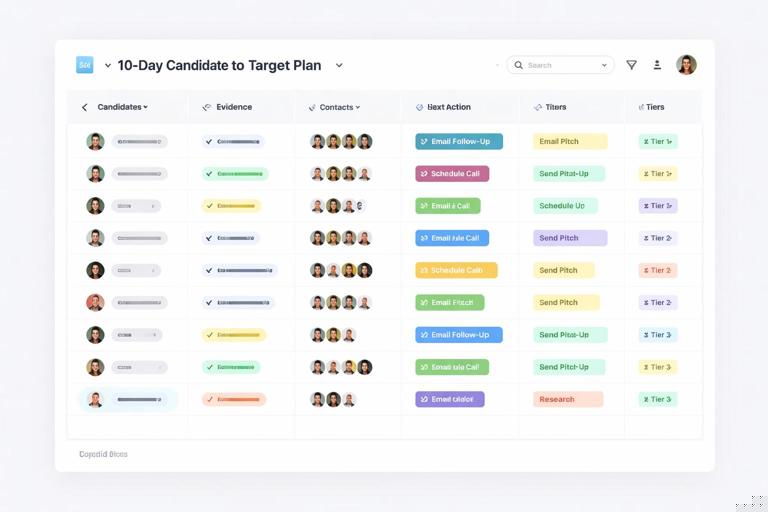
Day 10: Create execution views
Build filtered views that match how work happens:
- Outreach-ready this week: Tier B/C, contact identified, next action due within 7 days.
- Needs intro: targets where a mutual customer or investor connection is likely.
- Integration-first queue: targets with API docs and existing marketplace presence.
- Co-marketing-first queue: targets with frequent webinars/newsletters.
Signal Library: What to Look For and How to Capture It
A signal library is a shared list of “things we consider meaningful,” with examples and how to document them. It reduces subjective debates and speeds up tagging.
Category A: Ecosystem readiness signals
- Has a partner page with clear program structure
- Has a marketplace listing or integration directory
- Publishes API docs and SDKs
- Mentions “partners” in navigation or footer
Category B: Go-to-market collaboration signals
- Runs webinars with other brands
- Publishes joint case studies
- Has a “partners@” email or partner intake form
- Has co-branded landing pages
Category C: Timing signals
- New partnerships hire
- New product launch in adjacent category
- New region expansion
- Recent funding round (may expand GTM)
How to capture signals consistently
Use short tags (e.g., HIRING_PARTNERSHIPS, MARKETPLACE_LISTING, CO_MARKETING_FREQUENT) and always attach at least one evidence URL. If the evidence is a transient page (like a job post), store a screenshot link or archived URL when possible.
List Hygiene: Preventing Target List Rot
Target lists decay quickly: people change jobs, priorities shift, and companies pivot. Hygiene is the set of small routines that keep the list usable.
Cadences to implement
- Weekly: de-duplicate, promote a handful of candidates, and close the loop on next actions.
- Monthly: refresh contacts for “targeted” accounts; check if key stakeholders moved roles.
- Quarterly: re-run your top discovery lanes and re-balance segments (your list should reflect current strategy).
Staleness rules
Define what “stale” means so it’s not emotional:
- No update in 60 days → status becomes “needs refresh.”
- Contact bounced or left company → “contact refresh required.”
- Signal older than 6 months with no new evidence → downgrade priority.
Operational Templates You Can Copy
Target record template (company)
Company: [Name] Domain: [example.com] Segment: [ISV/Agency/Platform/etc.] Discovery lanes: [customer-stack, marketplace, hiring] Signals: [MARKETPLACE_LISTING, HIRING_PARTNERSHIPS] Evidence: - [URL 1] - [URL 2] Why now: [1–2 factual lines] Tier: [A/B/C] Motion type: [integration-first/co-marketing-first/etc.] Status: [candidate/research/targeted/contacted/engaged/paused] Owner: [Name] Next action: [Specific task] Due date: [YYYY-MM-DD]Contact record template
Name: [Full name] Title: [Title] Company: [Name] LinkedIn: [URL] Email: [if known] Time zone: [TZ] Role in partner process: [primary/secondary/marketing/product/sales] Personalization note: [Tie to a signal: hiring post, webinar, marketplace listing]Weekly sprint checklist
[ ] Add 10–20 candidates from 2 lanes [ ] Attach evidence links + signal tags [ ] De-duplicate by domain [ ] Promote 5 to targeted [ ] Add contacts + why now + tier + motion type [ ] Set next action + due date [ ] Handoff outreach-ready queue