What “Re-Baselining” Really Means in a Rescue Context
Re-baselining is the act of replacing the project’s approved plan baseline (scope, schedule, and cost performance targets) with a new, explicitly agreed reference point that reflects what will actually be delivered, by when, and at what cost. In a troubled project, re-baselining is not a paperwork exercise or a way to “make the metrics look green.” It is a controlled reset that makes execution measurable again and prevents the team from being judged against an obsolete plan.
A rescue re-baseline has three non-negotiable properties:
- It is evidence-based: the new plan is grounded in validated scope, realistic productivity assumptions, and current constraints (capacity, vendor lead times, environments, dependencies).
- It is decision-based: the baseline changes because stakeholders accept explicit tradeoffs (scope, time, cost, quality, risk exposure), not because the team “hopes harder.”
- It is governance-backed: the baseline is approved through the project’s decision authority, and future changes follow a defined change-control path.
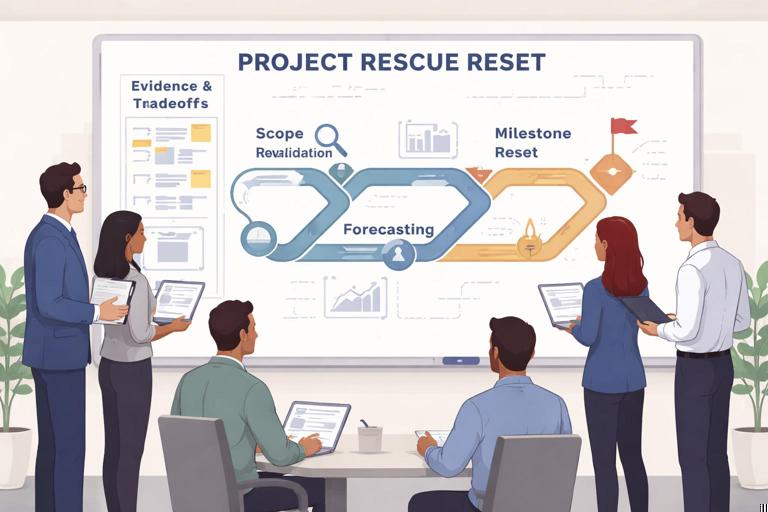
Re-baselining typically includes three tightly linked activities: scope revalidation (what is in/out and what “done” means), forecasting (what the remaining work will take given current reality), and milestone reset (a new sequence of commitments and decision points that stakeholders can rely on).
When to Re-Baseline (and When Not To)
Signals that a re-baseline is warranted
- The original baseline is no longer credible due to major requirement shifts, missed critical milestones, or invalid assumptions (e.g., vendor delivery dates, staffing levels, regulatory interpretations).
- Progress reporting has become meaningless because variance is permanently large and cannot be recovered without major changes.
- Stakeholders are making decisions using conflicting versions of “the plan” (multiple roadmaps, unofficial dates, or parallel backlogs).
- The team is stuck in a cycle of rework, partial completion, and unstable releases, making remaining effort unpredictable without a reset.
Situations where re-baselining is premature
- Scope is still disputed or not decomposed enough to estimate reliably.
- Critical unknowns remain unresolved (e.g., architecture choice, contract renegotiation, environment access) and would dominate the forecast.
- Leadership is seeking a re-baseline solely to “reset the clock” without committing to tradeoffs or removing constraints.
In those cases, you may need a short stabilization window (e.g., to resolve a blocking dependency or complete a thin-slice prototype) before a baseline can be responsibly reset.
Scope Revalidation: Reconfirm What You Are Actually Delivering
Scope revalidation is the disciplined process of turning a messy, drifting set of expectations into a clear, testable delivery definition. In a rescue, scope is often polluted by “silent additions” (unapproved features), ambiguous acceptance criteria, and outdated assumptions about what is mandatory versus optional.
- Listen to the audio with the screen off.
- Earn a certificate upon completion.
- Over 5000 courses for you to explore!

Download the app
Step-by-step: Scope revalidation workflow
1) Establish a single scope source of truth
Choose one artifact as the authoritative scope container for the re-baseline period (e.g., a product backlog, a requirements catalog, or a deliverables list). The key is not the tool but the rule: if it’s not in the source of truth, it’s not in scope.
- Normalize naming (consistent feature names, IDs, and ownership).
- Remove duplicates and merge overlapping items.
- Tag each item with a business owner and a delivery owner.
2) Reconfirm the “definition of done” for each deliverable
In troubled projects, “done” often means “dev complete,” while stakeholders expect “ready for production with training and support.” Revalidation requires explicit acceptance criteria.
- For each deliverable, define acceptance tests or measurable criteria (functional, performance, security, compliance, documentation).
- Clarify non-functional requirements that drive effort (availability targets, audit logging, data retention).
- Confirm deployment and operational readiness expectations (monitoring, runbooks, support handoff).
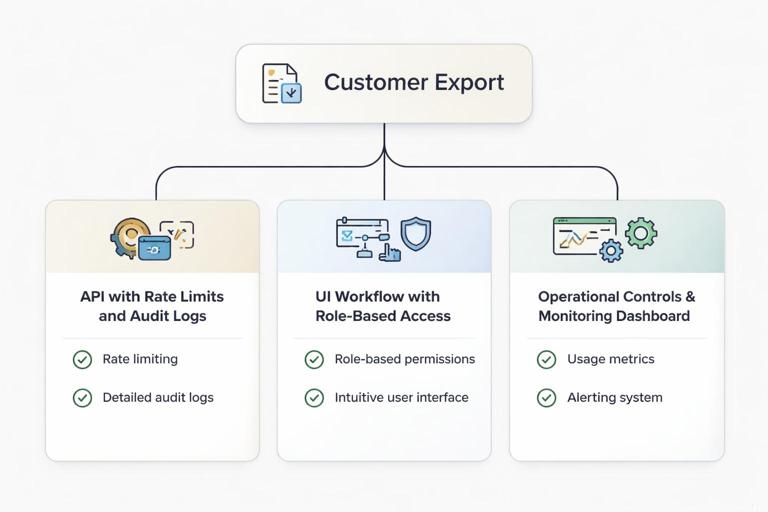
Practical example: A “Customer Export” feature becomes three deliverables: (1) export API with rate limits and audit logs, (2) UI workflow with role-based access, (3) operational controls and monitoring dashboard. Each has acceptance criteria and can be estimated and scheduled.
3) Classify scope into commitment tiers
To enable milestone reset and credible forecasting, classify items into tiers such as:
- Must-have (Committed): required for the release to be viable (regulatory, contractual, core value).
- Should-have (Target): high value but can be deferred without breaking viability.
- Could-have (Optional): nice-to-have, only if capacity remains.
- Won’t-have (Out): explicitly excluded from the re-baseline.
This tiering is not theoretical; it is the mechanism that prevents the new baseline from collapsing under “everything is priority one.”
4) Validate dependencies and external constraints
Scope items often hide dependencies that invalidate schedules: data migrations, vendor APIs, security reviews, legal approvals, hardware procurement, or shared platform changes.
- For each must-have item, list upstream dependencies and required inputs.
- Confirm lead times and availability windows (e.g., change freezes, audit periods).
- Identify “dependency owners” and required decision dates.
5) Freeze scope for the re-baseline window (with controlled change)
Re-baselining requires a stable target. Establish a scope freeze for the committed tier until the new baseline is approved. Changes can still happen, but only through explicit tradeoffs (e.g., add X only if Y is removed or schedule/cost changes are accepted).
Forecasting: Build a Credible View of Remaining Work
Forecasting converts validated scope into time and cost expectations. In a rescue, the biggest forecasting mistake is using theoretical velocity or optimistic estimates from before the project encountered reality. Your forecast must reflect current throughput, rework rates, and constraint-driven delays.
Forecasting inputs you must refresh
- Remaining work inventory: the revalidated scope, decomposed enough to estimate.
- Team capacity: real availability after meetings, support load, vacations, onboarding, and attrition risk.
- Productivity/throughput: recent delivery rate of “done” items under current conditions.
- Quality drag: defect backlog, test automation gaps, environment instability, and rework percentage.
- Dependency lead times: vendor deliveries, approvals, and shared services.
Step-by-step: A practical forecasting approach
1) Decompose must-have scope into forecastable units
Break down each must-have deliverable into units small enough to estimate and sequence (e.g., user stories, work packages, backlog items). If items remain too large, estimates will be dominated by uncertainty and will be politically contested.
- Target: items that can be completed within 1–2 weeks of focused work by a small subset of the team.
- Include integration, testing, documentation, and deployment tasks explicitly.
2) Choose an estimation method appropriate for the team
Use a method the team can apply consistently:
- Bottom-up effort (hours/days): useful for infrastructure, migration, and compliance tasks with clear steps.
- Relative sizing (points): useful for product backlogs where throughput history exists.
- Three-point estimates (optimistic/most likely/pessimistic): useful when uncertainty is high and you need ranges.
In a rescue, ranges are often more honest than single numbers, but stakeholders still need a commitment date. A common pattern is to forecast a range and then set a commitment based on a chosen confidence level (e.g., 80–90%) after tradeoffs are agreed.
3) Calibrate using recent throughput, not aspiration
Use the last several iterations or delivery cycles to measure how much “done” work the team actually completes. If the team has been thrashing, you may need to exclude abnormal weeks (e.g., major outages) but be careful not to cherry-pick.
Practical example: The team planned 40 points per sprint but delivered 18–22 points of fully accepted work for the last 4 sprints. Use 20 points as the baseline throughput unless you have concrete constraint removals that will change it (e.g., adding two senior engineers, stabilizing CI, reducing support load).

4) Apply capacity reality checks
Convert headcount into usable capacity:
- Account for part-time allocation, planned leave, and onboarding time for new members.
- Subtract recurring overhead (ceremonies, stakeholder reviews, compliance gates, incident support).
- Model key-person constraints (e.g., one database specialist becomes a bottleneck).
A simple capacity model is often sufficient: total available person-days per iteration, adjusted by focus factor (e.g., 60–70% productive time in complex environments).
5) Model rework and quality stabilization explicitly
Troubled projects frequently underestimate the “tax” of defects, refactoring, and incomplete requirements. Add explicit work items for:
- Defect burn-down required to reach release quality.
- Test automation or regression suite improvements needed to sustain cadence.
- Hardening activities: performance tuning, security remediation, data reconciliation.
If you do not include these, they will still happen—just invisibly—destroying the schedule later.
6) Produce a forecast with scenarios
Create at least two scenarios:
- Baseline scenario: committed scope with current capacity and known constraints.
- Accelerated scenario: what changes (and what it costs) to pull the date in (e.g., add staff, reduce scope, parallelize testing).
Scenarios make tradeoffs concrete and reduce the temptation to demand an impossible single plan.
7) Convert forecast into a time-phased plan
Translate the forecast into a schedule that includes:
- Sequencing based on dependencies and integration order.
- Buffers for high-risk items (explicit, not hidden).
- Decision points for scope adjustments if throughput deviates.
Keep the plan at the right level: detailed enough to manage, not so detailed it becomes fragile. Often, a rolling-wave plan works best: detailed for the next 4–8 weeks, higher-level beyond that.
Milestone Reset: Rebuild Commitments Stakeholders Can Trust
Milestones in a rescue are not ceremonial dates; they are control points that enable governance, funding decisions, and operational readiness. Resetting milestones means redefining what will be demonstrated, validated, or decided at each point—based on the revalidated scope and forecast.
Principles for effective milestone reset
- Milestones must be evidence-producing: each milestone should produce artifacts or outcomes that reduce uncertainty (working software, test results, migration rehearsal, security sign-off).
- Milestones must be decision-enabling: stakeholders should be able to decide continue/adjust based on milestone outputs.
- Milestones must reflect integration reality: avoid milestones that celebrate isolated component completion without end-to-end validation.
Step-by-step: Resetting milestones
1) Define the milestone types you will use
Common milestone types in recovery plans include:
- Scope lock milestone: committed scope approved and frozen for the release window.
- Architecture/integration milestone: end-to-end “thin slice” working across critical systems.
- Quality gate milestone: measurable quality thresholds met (defect counts, test coverage, performance benchmarks).
- Operational readiness milestone: monitoring, runbooks, support model, and training ready.
- Release readiness milestone: go/no-go criteria met, rollback plan tested, approvals complete.
2) Attach objective entry/exit criteria to each milestone
Replace vague definitions (“UAT complete”) with measurable criteria:
- Entry criteria: what must be true to start the milestone phase (environments stable, test data ready).
- Exit criteria: what must be demonstrated to claim completion (e.g., 95% of critical test cases passed, zero open severity-1 defects, migration rehearsal completed within SLA).
Practical example: “Integration Milestone” exit criteria: (1) user can create an order through UI, (2) order persists in database, (3) downstream billing receives event, (4) audit log entry created, (5) automated regression test added and passing in CI.

3) Re-sequence milestones to reduce risk early
In distressed projects, the original plan often postponed hard integration or compliance work until late. Reset milestones to surface the hardest risks earlier:
- Move end-to-end integration earlier via a thin slice.
- Schedule security/compliance reviews as iterative checkpoints, not a final hurdle.
- Plan data migration rehearsals early enough to iterate.
4) Align milestones with stakeholder communication and funding cycles
Milestones should map to how decisions are made in your organization:
- Steering committee cadence (e.g., monthly).
- Release windows and change freezes.
- Contractual reporting dates or regulatory checkpoints.
This alignment reduces “surprise governance,” where the team is asked to justify progress on dates that do not match delivery reality.
5) Build a milestone-based reporting model
After reset, report progress against milestone outcomes rather than activity. A simple model includes:
- Milestone status (not started/in progress/at risk/complete).
- Evidence produced (demo links, test reports, sign-offs).
- Forecast to next milestone with confidence level.
- Top blockers and decisions needed by date.
Integrating Scope, Forecast, and Milestones into a New Baseline
The re-baseline is complete only when scope, schedule, and cost are internally consistent and approved. Integration means ensuring that what you committed to deliver (scope tiers) fits within the forecasted capacity and is reflected in milestone commitments.
Step-by-step: Baseline integration checklist
1) Reconcile scope tiers with forecast capacity
- If must-have scope does not fit the forecast window, reduce must-have scope or change capacity/time—do not “assume efficiency gains.”
- Ensure should-have items are clearly non-committed and placed after committed milestones.
2) Validate critical path and dependency dates
- Confirm that dependency lead times are represented as schedule constraints.
- Identify the true critical path (often integration, data migration, approvals).
3) Confirm cost implications
Even if your project does not track formal earned value, you still need a cost view:
- Labor cost based on staffing plan and duration.
- Vendor/contractor costs and change orders.
- Tooling, environments, and licensing changes required for recovery.
Make cost tradeoffs explicit: accelerating schedule may increase cost; reducing scope may reduce cost or simply reduce risk.
4) Establish baseline artifacts and versioning
Define what constitutes the baseline package, for example:
- Committed scope list with acceptance criteria.
- Release plan/schedule with milestones and dates.
- Resourcing plan and capacity assumptions.
- Risk register updates tied to milestone mitigations.
- Change-control rules for baseline modifications.
Version the baseline (e.g., Baseline 2.0) and store it in a location accessible to all stakeholders.
Change Control After Re-Baselining: Protect the Reset
A re-baseline without disciplined change control will degrade quickly. The goal is not bureaucracy; it is preventing silent scope growth and unmanaged schedule erosion.
Practical change-control rules that work in rescues
- Tradeoff rule: any new committed scope must remove equivalent effort from committed scope or adjust time/cost.
- Decision SLA: stakeholders must decide on change requests within a defined time window (e.g., 5 business days) or the request is deferred.
- Impact statement template: every change request includes impact on milestones, cost, risks, and acceptance criteria.
- Batching: review changes at a regular cadence (weekly) rather than ad hoc, unless urgent.
Practical example: A stakeholder requests an additional audit report. The team provides an impact statement: +8 days effort, introduces dependency on security logging changes, pushes “Operational Readiness” milestone by 1 week unless a lower-priority report is removed. Stakeholders choose which report is in the committed tier.
Common Failure Modes (and How to Avoid Them)
Failure mode: Re-baselining becomes a negotiation of dates, not scope
Symptom: stakeholders demand the original date while refusing scope changes. Countermeasure: present a scope-to-date mapping: show exactly which must-have items fit by the demanded date and what is excluded. Make the tradeoff visible and documented.
Failure mode: Forecast ignores quality and integration work
Symptom: plan looks feasible until late-stage testing collapses it. Countermeasure: include explicit hardening, regression, and operational tasks in the scope source of truth and milestone exit criteria.
Failure mode: Milestones are calendar events without evidence
Symptom: milestones are “met” but nothing is demonstrably ready. Countermeasure: require objective exit criteria and attach artifacts (test reports, demos, sign-offs) to each milestone.
Failure mode: Baseline assumptions are undocumented
Symptom: later disputes about what was agreed (capacity, vendor dates, environments). Countermeasure: publish baseline assumptions as a first-class artifact and review them at each milestone.
Templates You Can Reuse
Scope revalidation table (example structure)
ID | Deliverable | Tier | Acceptance Criteria | Dependencies | Owner | NotesMilestone definition template
Milestone Name: -------------- Date: -------------- Owner: -------------- Purpose: (what uncertainty is reduced / what decision is enabled) Entry Criteria: - ... Exit Criteria (evidence-based): - ... Evidence/Artifacts: - ... Risks Addressed: - ... Decisions Needed By: - ...Change request impact statement
Change Request: -------------- Requested By: -------------- Description: -------------- Scope Impact: (add/remove/modify) Schedule Impact: (milestones affected, days/weeks) Cost Impact: (labor/vendor) Risk/Quality Impact: (new risks, mitigations) Recommendation: (approve/defer/replace scope) Decision Needed By: --------------